Turn on suggestions
Auto-suggest helps you quickly narrow down your search results by suggesting possible matches as you type.
- JMP Statement Regarding Critical PHP Remote Code Execution Vulnerabilities (CVE-2026-109618, CVE-2026-109619)
- Don’t miss your chance to experience Discovery Summit Europe at our best available rate! Early bird registration through 31 Oct.
- Graph Builder Toolbar streamlines interactive graphing. Creates shortcuts on Report and GraphBuilder Helpers toolbars. Download and install the extension.
Options
- Subscribe to RSS Feed
- Mark Topic as New
- Mark Topic as Read
- Float this Topic for Current User
- Bookmark
- Subscribe
- Mute
- Printer Friendly Page
Discussions
Solve problems, and share tips and tricks with other JMP users.- User Community
- :
- Discussions
- :
- Re: Copy-Paste error with JSL [Column "???" requires numeric vlaues]

Level V
- Mark as New
- Bookmark
- Subscribe
- Mute
- Subscribe to RSS Feed
- Get Direct Link
- Report Inappropriate Content
Copy-Paste error with JSL [Column "???" requires numeric vlaues]
Created:
Mar 4, 2022 02:54 AM
| Last Modified: Jun 9, 2023 11:12 AM
(2468 views)
I don't know why this isn't working. I select rows who are empty, select a seccond column and try to copy them into the empty ones.
Both columns are numeric and it worked sometimes with other tables.
Sample table ans script is attached.
dt_2= data table("Untitled 20");
dt_2 << Select Where(Is Missing( :target1));
rs = dt_2 << Get Selected Rows();
if(nitems(rs)>0,
	dt_2:target1[rs] = dt_2:temp1[rs];
	dt_2:target2[rs] = dt_2:temp2[rs];
	//dt_2 << Delete Columns( :temp , :temp2 );
);
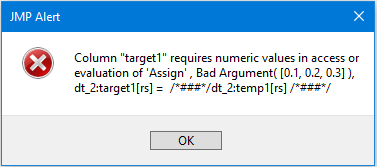
Alert:
THX
Mauro
"I thought about our dilemma, and I came up with a solution that I honestly think works out best for one of both of us"
- GLaDOS
- GLaDOS
2 ACCEPTED SOLUTIONS
Accepted Solutions


Super User
Solution
- Mark as New
- Bookmark
- Subscribe
- Mute
- Subscribe to RSS Feed
- Get Direct Link
- Report Inappropriate Content
Re: Copy-Paste error with JSL [Column "???" requires numeric vlaues]
- In your provided data table, your "temp" columns are "temp" and "temp2", not "temp1" and "temp2"
- You need to loop through the assignments. A JMP data table can not handle assignments where the right hand argument has multiple values. See my changes below
Names Default To Here( 1 );
dt_2 = Data Table( "Untitled 20" );
// dt_2 << Select Where( Is Missing( :target1 ) );
// rs = dt_2 << Get Selected Rows();
// Simplier code
rs = dt_2 << Get Rows Where( Is Missing( :target1 ) );
If( N Items( rs ) > 0,
	For( i = 1, i <= N Items( rs ), i++,
		dt_2:target1[rs[i]] = dt_2:temp[rs[i]];
		dt_2:target2[rs[i]] = dt_2:temp2[rs[i]];
	//dt_2 << Delete Columns( :temp , :temp2 );
	)
);
Jim
Level V
Solution
- Mark as New
- Bookmark
- Subscribe
- Mute
- Subscribe to RSS Feed
- Get Direct Link
- Report Inappropriate Content
Re: Copy-Paste error with JSL [Column "???" requires numeric vlaues]
THX @txnelson
This works, but I try to avoid for-loops.
It works with an array, but not with the table itself:
temp = dt_2:tartet2 << get values();  // copy row from target
temp[rs] = dt_2:temp2[rs]; // replace the values in the array
dt_2:target2 << set values(temp); // re-insert into target
"I thought about our dilemma, and I came up with a solution that I honestly think works out best for one of both of us"
- GLaDOS
- GLaDOS
2 REPLIES 2
Super User
Solution
- Mark as New
- Bookmark
- Subscribe
- Mute
- Subscribe to RSS Feed
- Get Direct Link
- Report Inappropriate Content
Re: Copy-Paste error with JSL [Column "???" requires numeric vlaues]
- In your provided data table, your "temp" columns are "temp" and "temp2", not "temp1" and "temp2"
- You need to loop through the assignments. A JMP data table can not handle assignments where the right hand argument has multiple values. See my changes below
Names Default To Here( 1 );
dt_2 = Data Table( "Untitled 20" );
// dt_2 << Select Where( Is Missing( :target1 ) );
// rs = dt_2 << Get Selected Rows();
// Simplier code
rs = dt_2 << Get Rows Where( Is Missing( :target1 ) );
If( N Items( rs ) > 0,
	For( i = 1, i <= N Items( rs ), i++,
		dt_2:target1[rs[i]] = dt_2:temp[rs[i]];
		dt_2:target2[rs[i]] = dt_2:temp2[rs[i]];
	//dt_2 << Delete Columns( :temp , :temp2 );
	)
);
Jim
Level V
Solution
- Mark as New
- Bookmark
- Subscribe
- Mute
- Subscribe to RSS Feed
- Get Direct Link
- Report Inappropriate Content
Re: Copy-Paste error with JSL [Column "???" requires numeric vlaues]
THX @txnelson
This works, but I try to avoid for-loops.
It works with an array, but not with the table itself:
temp = dt_2:tartet2 << get values();  // copy row from target
temp[rs] = dt_2:temp2[rs]; // replace the values in the array
dt_2:target2 << set values(temp); // re-insert into target
"I thought about our dilemma, and I came up with a solution that I honestly think works out best for one of both of us"
- GLaDOS
- GLaDOS
Recommended Articles
- © 2026 JMP Statistical Discovery LLC. All Rights Reserved.
- Terms of Use
- Privacy Statement
- Contact Us