- JMP will suspend normal business operations for our Winter Holiday beginning on Wednesday, Dec. 24, 2025, at 5:00 p.m. ET (2:00 p.m. ET for JMP Accounts Receivable).
Regular business hours will resume at 9:00 a.m. EST on Friday, Jan. 2, 2026. - We’re retiring the File Exchange at the end of this year. The JMP Marketplace is now your destination for add-ins and extensions.
- Subscribe to RSS Feed
- Mark Topic as New
- Mark Topic as Read
- Float this Topic for Current User
- Bookmark
- Subscribe
- Mute
- Printer Friendly Page
Discussions
Solve problems, and share tips and tricks with other JMP users.- JMP User Community
- :
- Discussions
- :
- Conditional formula

- Mark as New
- Bookmark
- Subscribe
- Mute
- Subscribe to RSS Feed
- Get Direct Link
- Report Inappropriate Content
Conditional formula
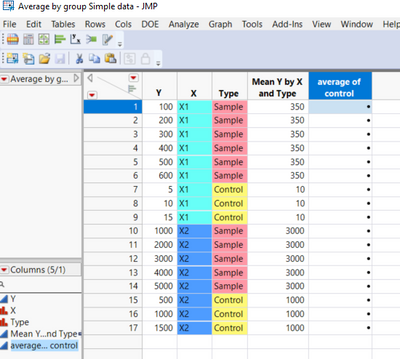
In the following table, I would like to create a column in which each "Sample" value is divided by the average of "Control" grouped by X.
For examples, each "Sample" in "X1" will be divided by average of "Control" from "X1", each "Sample" in "X2" will be divided by average of "Control" from "X2".
I can get the mean of "Control" by creating a formula that calculates Col Mean grouped by "X" and "Type".

How can I create a formula that spits out the averages of "Control" for all the rows within each "X" value? In this case 10 for all the rows contain X1, and 1000 for all the rows contain X2.
The data file is attached.
Thank you for your help!
Accepted Solutions


- Mark as New
- Bookmark
- Subscribe
- Mute
- Subscribe to RSS Feed
- Get Direct Link
- Report Inappropriate Content
Re: Conditional formula
Hi GroupSquareWolf-
I love working with these types of formula columns, they are like puzzles!
Here is a formula that works for your example. It essentially does the same thing that your multiple columns do, but in a single column. It only uses the Y, X, and Type columns without having to build any additional calculation or counter columns.
I am sure there are other solutions out there but here is the one I came up with:
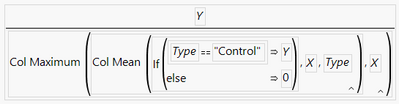
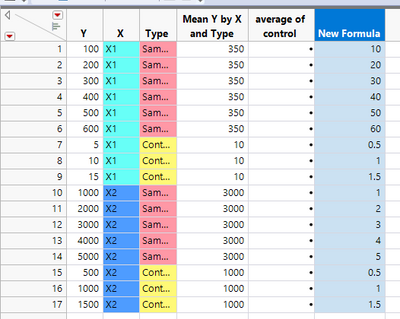
It is saved as "New Formula" in the data table.
Hope this helps!
-Scott
- Mark as New
- Bookmark
- Subscribe
- Mute
- Subscribe to RSS Feed
- Get Direct Link
- Report Inappropriate Content
Re: Conditional formula
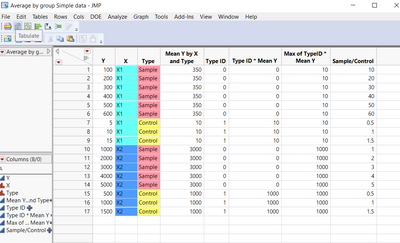
I got what I wanted indirectly, but would still appreciate to know a more direct way to do it.
This was what I did
1. I created a conditional formula in :"Type ID", assigning "Sample" as 0 and "Control" as 1
2 . Then multiplied "Type ID" with :"Mean Y by X and Type"
3. created a new column to fill every row with ColMax grouped by "X"
- Mark as New
- Bookmark
- Subscribe
- Mute
- Subscribe to RSS Feed
- Get Direct Link
- Report Inappropriate Content
Re: Conditional formula
Hi GroupSquareWolf-
I love working with these types of formula columns, they are like puzzles!
Here is a formula that works for your example. It essentially does the same thing that your multiple columns do, but in a single column. It only uses the Y, X, and Type columns without having to build any additional calculation or counter columns.
I am sure there are other solutions out there but here is the one I came up with:
It is saved as "New Formula" in the data table.
Hope this helps!
-Scott
- Mark as New
- Bookmark
- Subscribe
- Mute
- Subscribe to RSS Feed
- Get Direct Link
- Report Inappropriate Content
Re: Conditional formula
Thank you very much! It is very helpful.
Recommended Articles
- © 2025 JMP Statistical Discovery LLC. All Rights Reserved.
- Terms of Use
- Privacy Statement
- Contact Us