- JMP will suspend normal business operations for our Winter Holiday beginning on Wednesday, Dec. 24, 2025, at 5:00 p.m. ET (2:00 p.m. ET for JMP Accounts Receivable).
Regular business hours will resume at 9:00 a.m. EST on Friday, Jan. 2, 2026. - We’re retiring the File Exchange at the end of this year. The JMP Marketplace is now your destination for add-ins and extensions.
- Subscribe to RSS Feed
- Mark Topic as New
- Mark Topic as Read
- Float this Topic for Current User
- Bookmark
- Subscribe
- Mute
- Printer Friendly Page
Discussions
Solve problems, and share tips and tricks with other JMP users.- JMP User Community
- :
- Discussions
- :
- Conditional formatting in a data table

- Mark as New
- Bookmark
- Subscribe
- Mute
- Subscribe to RSS Feed
- Get Direct Link
- Report Inappropriate Content
Conditional formatting in a data table
Hi. Does anyone know how to do conditional formatting in a data table column? For example, I want to have the cells in a specific column to turn red when the value is greater than or equal to 0.20. I have found instructions on how to do this in a report but not a data table.
Accepted Solutions


 Community Manager
- Mark as New
- Bookmark
- Subscribe
- Mute
- Subscribe to RSS Feed
- Get Direct Link
- Report Inappropriate Content
Re: Conditional formatting in a data table
Hi @Michelle_Martin,
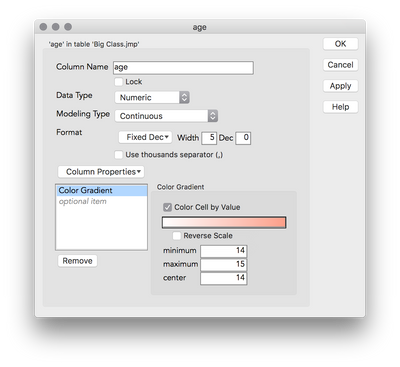
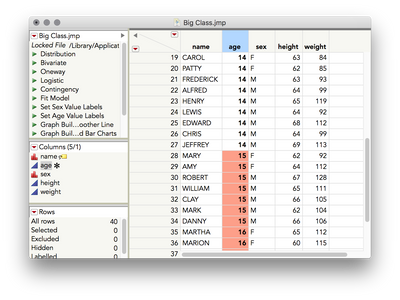
Have you tried the Color Gradient column property? Right-click the column you want to format > Column Info. Then, add the Color Gradient column property, check the box to "Color Cell by Value," and click the gradient to set the color theme (or define your own). To have a sharp cut-off, set the Minimum and Center to the same value, and the Max to one unit higher.
I hope this helps!


- Mark as New
- Bookmark
- Subscribe
- Mute
- Subscribe to RSS Feed
- Get Direct Link
- Report Inappropriate Content
Re: Conditional formatting in a data table
Here's an example with Big Class where I color cells red if the age is > 14:
dt = Open( "$SAMPLE_DATA/Big Class.jmp" );
dt << Select Where(:Age > 14);
:Age << Color Cells( "Red" );
dt << Clear Select;
- Mark as New
- Bookmark
- Subscribe
- Mute
- Subscribe to RSS Feed
- Get Direct Link
- Report Inappropriate Content
Re: Conditional formatting in a data table
Hi,
I kind of use your code, then I found if there's no cell fit the selection, the whole column will be red.
Community Manager
- Mark as New
- Bookmark
- Subscribe
- Mute
- Subscribe to RSS Feed
- Get Direct Link
- Report Inappropriate Content
Re: Conditional formatting in a data table
Hi @Michelle_Martin,
Have you tried the Color Gradient column property? Right-click the column you want to format > Column Info. Then, add the Color Gradient column property, check the box to "Color Cell by Value," and click the gradient to set the color theme (or define your own). To have a sharp cut-off, set the Minimum and Center to the same value, and the Max to one unit higher.
I hope this helps!

- Mark as New
- Bookmark
- Subscribe
- Mute
- Subscribe to RSS Feed
- Get Direct Link
- Report Inappropriate Content
Re: Conditional formatting in a data table
Is there anyway to automatically do this for all the columns in the data table? Through scripting or the column info tab
Solved: Standardize Attributes. Didn't see a delete button for replies so I can't delete this ...


- Mark as New
- Bookmark
- Subscribe
- Mute
- Subscribe to RSS Feed
- Get Direct Link
- Report Inappropriate Content
Re: Conditional formatting in a data table
Recommended Articles
- © 2025 JMP Statistical Discovery LLC. All Rights Reserved.
- Terms of Use
- Privacy Statement
- Contact Us