- JMP will suspend normal business operations for our Winter Holiday beginning on Wednesday, Dec. 24, 2025, at 5:00 p.m. ET (2:00 p.m. ET for JMP Accounts Receivable).
Regular business hours will resume at 9:00 a.m. EST on Friday, Jan. 2, 2026. - We’re retiring the File Exchange at the end of this year. The JMP Marketplace is now your destination for add-ins and extensions.
- Subscribe to RSS Feed
- Mark Topic as New
- Mark Topic as Read
- Float this Topic for Current User
- Bookmark
- Subscribe
- Mute
- Printer Friendly Page
Discussions
Solve problems, and share tips and tricks with other JMP users.- JMP User Community
- :
- Discussions
- :
- Concat multiple list items together

- Mark as New
- Bookmark
- Subscribe
- Mute
- Subscribe to RSS Feed
- Get Direct Link
- Report Inappropriate Content
Concat multiple list items together
Using JMP12.2 - I'm looking for a fast way to concat list items together from two different lists in a 1 to 1 fashion - assuming the lists have the same number of items. This will be used For Each Row in very large tables - so I prefer no iterative function if possible.
Here is an example of what I want to achieve:
list1 = {"a","b","c","d","e","f","g"};
list2 = {"1","2","3","4","5","6","7"};
Acceptable result can be a string or list. If string separated by delimiters.
List result: {"a,1","b,2","c,3","d,4","e,5","f,6","g,7"};
String result: "a:1,b:2,c:3,d:4,e:5,f:6,g:7";
Accepted Solutions


- Mark as New
- Bookmark
- Subscribe
- Mute
- Subscribe to RSS Feed
- Get Direct Link
- Report Inappropriate Content
Re: Concat multiple list items together
Hi @ts2 ,
Depending on what you want to do with the results, you might approach it a couple different ways. I know you don't want to do iterative functions, but in order to get the right output where the elements of one list are connected to the elements of another list, I think you have to do a For Loop. You could also consider doing an associative array.
Below is some JSL that might help you get started on a solution.
names default to here(1);

list1 = {"a","b","c","d","e","f","g"};

list2 = {"1","2","3","4","5","6","7"};


AA = Associative Array(List1, List2);

i=.;
result1={};
For(i=1, i<=nitems(list1), i++,
	result1[i]=list1[i]||":"||list2[i]
);

result 2 = EvalList({Concat Items(result1, ", ")});

Show(result1);
Show(result2);
Show (AA);
Hope this helps!,
DS
- Mark as New
- Bookmark
- Subscribe
- Mute
- Subscribe to RSS Feed
- Get Direct Link
- Report Inappropriate Content
Re: Concat multiple list items together
Hi @ts2 ,
Depending on what you want to do with the results, you might approach it a couple different ways. I know you don't want to do iterative functions, but in order to get the right output where the elements of one list are connected to the elements of another list, I think you have to do a For Loop. You could also consider doing an associative array.
Below is some JSL that might help you get started on a solution.
names default to here(1);

list1 = {"a","b","c","d","e","f","g"};

list2 = {"1","2","3","4","5","6","7"};


AA = Associative Array(List1, List2);

i=.;
result1={};
For(i=1, i<=nitems(list1), i++,
	result1[i]=list1[i]||":"||list2[i]
);

result 2 = EvalList({Concat Items(result1, ", ")});

Show(result1);
Show(result2);
Show (AA);
Hope this helps!,
DS

- Mark as New
- Bookmark
- Subscribe
- Mute
- Subscribe to RSS Feed
- Get Direct Link
- Report Inappropriate Content
Re: Concat multiple list items together
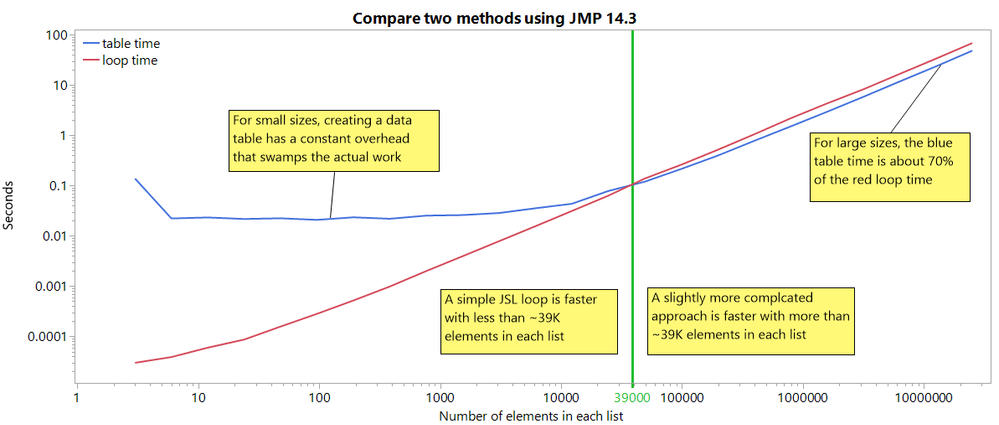
JSL loops have an undeservedly bad reputation. If the guts of the loop do much work, the loop's overhead will usually not matter much. And any solution without a JSL loop is going to involve a loop somewhere else, perhaps in C++ which will be a bit faster, but still. Anyway, here's a comparison of two methods, one involving a JSL loop and one using a loop hidden away in JMP's C++ code.
dtGraph = New Table( "stats",
	Add Rows( 0 ),
	New Column( "size", Numeric, "Continuous", Format( "Best", 12 ), Set Values( [] ) ),
	New Column( "table time", Numeric, "Continuous", Format( "Best", 12 ), Set Values( [] ) ),
	New Column( "loop time", Numeric, "Continuous", Format( "Best", 12 ), Set Values( [] ) )
);

For( n = 1, n < 1e7, n *= 2,
	dtGraph << addrows( 1 );
	dtGraph:size[N Rows( dtGraph )] = n * 3;// 3 items repeated...
	list1 = Repeat( {"a", "b", "c"}, n );
	list2 = Repeat( {"1", "2", "3"}, n );


	start = HP Time(); // data table method begins here
	dt = New Table( "temp",
		New Column( "a", Character, "Nominal", Set Values( list1 ) ),
		New Column( "b", Character, "Nominal", Set Values( list2 ) ),
		New Column( "c", Character, "Nominal", formula( a || ":" || b ) ),
		invisible
	);
	dt << runformulas;
	result = dt:c << getvalues;
	Close( dt, nosave );
	stop = HP Time(); // data table method ends here
	Show( stop - start );
	result = Concat Items( result, "," );
	Show( Length( result ), Left( result, 100 ) );
	dtGraph:table time[N Rows( dtGraph )] = (stop - start) / 1e6;


	result = {};
	start = HP Time(); // loop method begins here
	While(
		a = Remove From( list1, 1 );
		b = Remove From( list2, 1 );
		N Items( a ); // as long as something was removed...
	, // do this...
		Insert Into( result, a[1] || ":" || b[1] )
	);
	stop = HP Time(); // loop method ends here
	Show( stop - start );
	result = Concat Items( result, "," );
	Show( Length( result ), Left( result, 100 ) );
	dtGraph:loop time[N Rows( dtGraph )] = (stop - start) / 1e6;
	Wait( 1 );
);

dtGraph << Graph Builder(
	Size( 1200, 500 ),
	Show Control Panel( 0 ),
	Variables( X( :size ), Y( :table time ), Y( :loop time, Position( 1 ) ) ),
	Elements( Points( X, Y( 1 ), Y( 2 ), Legend( 5 ) ), Smoother( X, Y( 1 ), Y( 2 ), Legend( 6 ) ) ),
	SendToReport(
		Dispatch( {}, "size", ScaleBox, {Scale( "Log" ), Inc( 1 ), Minor Ticks( 1 )} ),
		Dispatch( {}, "table time", ScaleBox, {Scale( "Log" ), Format( "Best", 12 ), Inc( 1 ), Minor Ticks( 1 )} )
	)
);
JMP 14 is the oldest I have access to. I think the loop algorithm will have similar performance in JMP 12. It intentionally destroys the two lists as it processes them because older JMP versions did not have fast indexing in lists, but removing the first element is fast. The data table algorithm is first in the loop so it can use the lists before they are destroyed.
Looking back at the JSL, I shouldn't claim either algorithm is simpler or easier to follow.
- Mark as New
- Bookmark
- Subscribe
- Mute
- Subscribe to RSS Feed
- Get Direct Link
- Report Inappropriate Content
Re: Concat multiple list items together
Yes I may have been assuming the iterative(for) within iterative(for each row) would severely impact script performance but after building the example @SDF1 suggested the performance is surprisingly good.
Thanks for the comparison - I would have assumed the c++ would always be faster but it makes sense a table would always have more overhead. I wonder would "Begin Data Update" and/or "Private" table improve the table overhead?
- Mark as New
- Bookmark
- Subscribe
- Mute
- Subscribe to RSS Feed
- Get Direct Link
- Report Inappropriate Content
Re: Concat multiple list items together
My issue is solved - this is more a FYI for you and others who may find it useful.
I do have access to JMP14.3 but the script needs to run on JMP12.2 for compatibility within my organization.
I tried your analysis and for JMP14.3 got similar results as you - probably some differences in computing power.
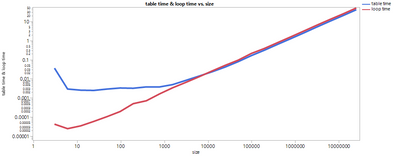
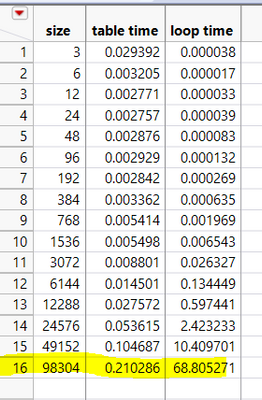
However, JMP12.2 the performance of the loop goes completely out of line. I have to kill JMP.exe process after 98304 as the time was increasing exponentially and never would've hit the 24th row:
- Mark as New
- Bookmark
- Subscribe
- Mute
- Subscribe to RSS Feed
- Get Direct Link
- Report Inappropriate Content
Re: Concat multiple list items together
I made a mess of that! Here's an updated version that will probably work correctly in older versions of JMP:
dtGraph = New Table( "stats",
	Add Rows( 0 ),
	New Column( "size", Numeric, "Continuous", Format( "Best", 12 ), Set Values( [] ) ),
	New Column( "table time", Numeric, "Continuous", Format( "Best", 12 ), Set Values( [] ) ),
	New Column( "loop time", Numeric, "Continuous", Format( "Best", 12 ), Set Values( [] ) )
);

For( n = 1, n < 1e7, n *= 2,
	dtGraph << addrows( 1 );
	dtGraph:size[N Rows( dtGraph )] = n * 3;// 3 items repeated...
	list1 = Repeat( {"a", "b", "c"}, n );
	list2 = Repeat( {"1", "2", "3"}, n );


	start = HP Time(); // data table method begins here
	dt = New Table( "temp",
		New Column( "a", Character, "Nominal", Set Values( list1 ) ),
		New Column( "b", Character, "Nominal", Set Values( list2 ) ),
		New Column( "c", Character, "Nominal", formula( a || ":" || b ) ),
		invisible
	);
	dt << runformulas;
	result = dt:c << getvalues;
	Close( dt, nosave );
	stop = HP Time(); // data table method ends here
	Show( stop - start );
	result = Concat Items( result, "," );
	Show( Length( result ), Left( result, 100 ) );
	dtGraph:table time[N Rows( dtGraph )] = (stop - start) / 1e6;


	result = {};
	start = HP Time(); // loop method begins here
	While(
		aa = Remove From( list1, 1 );
		bb = Remove From( list2, 1 );
		N Items( aa ); // as long as something was removed...
	, // do this...
		Insert Into( result, aa[1] || ":" || bb[1], 1 ) // <<<<<<<<< here
	);
	result=reverse(result); // <<<<<<<<<<<<<<<<<<<<<<<<<<<<<<<<< and here
	stop = HP Time(); // loop method ends here
	Show( stop - start );
	result = Concat Items( result, "," );
	Show( Length( result ), Left( result, 100 ) );
	dtGraph:loop time[N Rows( dtGraph )] = (stop - start) / 1e6;
	Wait( 1 );
);

dtGraph << Graph Builder(
	Size( 1200, 500 ),
	Show Control Panel( 0 ),
	Variables( X( :size ), Y( :table time ), Y( :loop time, Position( 1 ) ) ),
	Elements( Points( X, Y( 1 ), Y( 2 ), Legend( 5 ) ), Smoother( X, Y( 1 ), Y( 2 ), Legend( 6 ) ) ),
	SendToReport(
		Dispatch( {}, "size", ScaleBox, {Scale( "Log" ), Inc( 1 ), Minor Ticks( 1 )} ),
		Dispatch( {}, "table time", ScaleBox, {Scale( "Log" ), Format( "Best", 12 ), Inc( 1 ), Minor Ticks( 1 )} )
	)
);
see Fast List for an explanation; I was concentrating on the RemoveFrom function and forgetting about the Insert Into function.
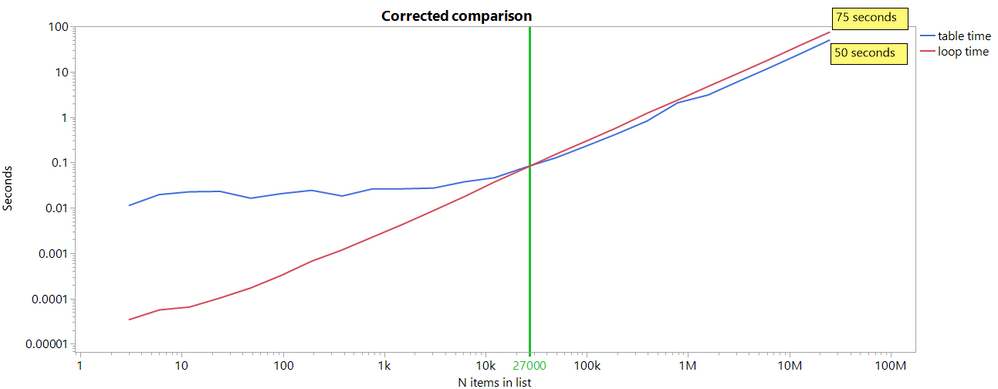
I also renamed the variables in the loop so they would not be using the data table columns as temporaries.
- Mark as New
- Bookmark
- Subscribe
- Mute
- Subscribe to RSS Feed
- Get Direct Link
- Report Inappropriate Content
Re: Concat multiple list items together
Thank you this works great. Even though it uses an iterative function it has good performance.
Recommended Articles
- © 2025 JMP Statistical Discovery LLC. All Rights Reserved.
- Terms of Use
- Privacy Statement
- Contact Us