- Don’t miss your chance to experience Discovery Summit Europe at our best available rate! Early bird registration through 31 Oct.
- Graph Builder Toolbar streamlines interactive graphing. Creates shortcuts on Report and GraphBuilder Helpers toolbars. Download and install the extension.
- Subscribe to RSS Feed
- Mark Topic as New
- Mark Topic as Read
- Float this Topic for Current User
- Bookmark
- Subscribe
- Mute
- Printer Friendly Page
Discussions
Solve problems, and share tips and tricks with other JMP users.- User Community
- :
- Discussions
- :
- Columns Manager > Make Into Data Table Script

- Mark as New
- Bookmark
- Subscribe
- Mute
- Subscribe to RSS Feed
- Get Direct Link
- Report Inappropriate Content
Columns Manager > Make Into Data Table Script
I tried manually clicking the Columns Manager and the Make into Data Table option, and the script was saved like this. When I duplicated and ran the script, the attached error was encountered. How can I generate a data table from the Columns Manager using a JSL script?
Names Default To Here( 1 );
Assign( rpt );
Wait( 0 );
rpt["Columns Manager", Table Box( 1 )] << Make Into Data Table;
rpt << Close Window;Accepted Solutions


- Mark as New
- Bookmark
- Subscribe
- Mute
- Subscribe to RSS Feed
- Get Direct Link
- Report Inappropriate Content
Re: Columns Manager > Make Into Data Table Script
Here is the script that I produced that creates a data table from Columns Manager
Names Default To Here( 1 );
dt=current data table();
main menu("columns manager");
rpt = window(dt << get name || " - Columns Manager");
Wait( 0 );
rpt["Columns Manager", Table Box( 1 )] << Make Combined Data Table;
rpt << Close Window;- Mark as New
- Bookmark
- Subscribe
- Mute
- Subscribe to RSS Feed
- Get Direct Link
- Report Inappropriate Content
Re: Columns Manager > Make Into Data Table Script
Here is the script that I produced that creates a data table from Columns Manager
Names Default To Here( 1 );
dt=current data table();
main menu("columns manager");
rpt = window(dt << get name || " - Columns Manager");
Wait( 0 );
rpt["Columns Manager", Table Box( 1 )] << Make Combined Data Table;
rpt << Close Window;- Mark as New
- Bookmark
- Subscribe
- Mute
- Subscribe to RSS Feed
- Get Direct Link
- Report Inappropriate Content
Re: Columns Manager > Make Into Data Table Script
Thank you very much! That worked.

- Mark as New
- Bookmark
- Subscribe
- Mute
- Subscribe to RSS Feed
- Get Direct Link
- Report Inappropriate Content
Re: Columns Manager > Make Into Data Table Script
Columns manager seems to return a bit weird reference, and you have to do some extra to get the data table out (@jules not sure if this is fixed in JMP19). Here is one more option
Names Default To Here(1);
dt = Open("$SAMPLE_DATA/Big Class.jmp");
cm = dt << Columns Manager(
	Hide Hidden Columns(0),
	Hide Excluded Columns(0),
	Include Extended Statistics(1),
	Force calculations for all numeric columns(1),
	Force calculations for all categorical columns(1)
);
wait(0);
(cm << top parent)[TableBox(1)] << Make into Data Table();
I'm not sure if wait(0) will be always enough for columns manager as I think it can dynamically calculate the statistics. And if you have column groups, you will have to expand those first
Names Default To Here(1);
dt = Open("$SAMPLE_DATA/Probe.jmp");
dt << Expand All Column Groups;
cm = dt << Columns Manager(
	Hide Hidden Columns(0),
	Hide Excluded Columns(0),
	Include Extended Statistics(1),
	Force calculations for all numeric columns(1),
	Force calculations for all categorical columns(1)
);
wait(0);
(cm << top parent)[TableBox(1)] << Make into Data Table();
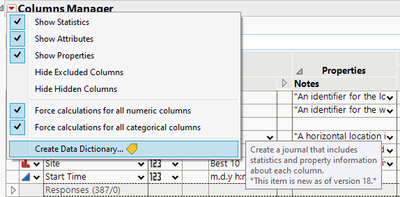
Have you tried if the Data Dictionary would be enough for your use case?

- Mark as New
- Bookmark
- Subscribe
- Mute
- Subscribe to RSS Feed
- Get Direct Link
- Report Inappropriate Content
Re: Columns Manager > Make Into Data Table Script
Thank you! This worked also.
Recommended Articles
- © 2026 JMP Statistical Discovery LLC. All Rights Reserved.
- Terms of Use
- Privacy Statement
- Contact Us