- Don’t miss your chance to experience Discovery Summit Europe at our best available rate! Early bird registration through 31 Oct.
- Image to Table JMP extension imports single or batch images as data tables. Useful to extract curves from pictures or convert image data to curve data to use in analyses like Functional Data Explorer. Download and install the extension.
- Subscribe to RSS Feed
- Mark Topic as New
- Mark Topic as Read
- Float this Topic for Current User
- Bookmark
- Subscribe
- Mute
- Printer Friendly Page
Discussions
Solve problems, and share tips and tricks with other JMP users.- User Community
- :
- Discussions
- :
- Re: Columns Manager > Make Into Data Table Script

- Mark as New
- Bookmark
- Subscribe
- Mute
- Subscribe to RSS Feed
- Get Direct Link
- Report Inappropriate Content
Columns Manager > Make Into Data Table Script
I tried manually clicking the Columns Manager and the Make into Data Table option, and the script was saved like this. When I duplicated and ran the script, the attached error was encountered. How can I generate a data table from the Columns Manager using a JSL script?
Names Default To Here( 1 );
Assign( rpt );
Wait( 0 );
rpt["Columns Manager", Table Box( 1 )] << Make Into Data Table;
rpt << Close Window;Accepted Solutions


- Mark as New
- Bookmark
- Subscribe
- Mute
- Subscribe to RSS Feed
- Get Direct Link
- Report Inappropriate Content
Re: Columns Manager > Make Into Data Table Script
Here is the script that I produced that creates a data table from Columns Manager
Names Default To Here( 1 );
dt=current data table();
main menu("columns manager");
rpt = window(dt << get name || " - Columns Manager");
Wait( 0 );
rpt["Columns Manager", Table Box( 1 )] << Make Combined Data Table;
rpt << Close Window;- Mark as New
- Bookmark
- Subscribe
- Mute
- Subscribe to RSS Feed
- Get Direct Link
- Report Inappropriate Content
Re: Columns Manager > Make Into Data Table Script
Here is the script that I produced that creates a data table from Columns Manager
Names Default To Here( 1 );
dt=current data table();
main menu("columns manager");
rpt = window(dt << get name || " - Columns Manager");
Wait( 0 );
rpt["Columns Manager", Table Box( 1 )] << Make Combined Data Table;
rpt << Close Window;- Mark as New
- Bookmark
- Subscribe
- Mute
- Subscribe to RSS Feed
- Get Direct Link
- Report Inappropriate Content
Re: Columns Manager > Make Into Data Table Script
Thank you very much! That worked.

- Mark as New
- Bookmark
- Subscribe
- Mute
- Subscribe to RSS Feed
- Get Direct Link
- Report Inappropriate Content
Re: Columns Manager > Make Into Data Table Script
Columns manager seems to return a bit weird reference, and you have to do some extra to get the data table out (@jules not sure if this is fixed in JMP19). Here is one more option
Names Default To Here(1);
dt = Open("$SAMPLE_DATA/Big Class.jmp");
cm = dt << Columns Manager(
	Hide Hidden Columns(0),
	Hide Excluded Columns(0),
	Include Extended Statistics(1),
	Force calculations for all numeric columns(1),
	Force calculations for all categorical columns(1)
);
wait(0);
(cm << top parent)[TableBox(1)] << Make into Data Table();
I'm not sure if wait(0) will be always enough for columns manager as I think it can dynamically calculate the statistics. And if you have column groups, you will have to expand those first
Names Default To Here(1);
dt = Open("$SAMPLE_DATA/Probe.jmp");
dt << Expand All Column Groups;
cm = dt << Columns Manager(
	Hide Hidden Columns(0),
	Hide Excluded Columns(0),
	Include Extended Statistics(1),
	Force calculations for all numeric columns(1),
	Force calculations for all categorical columns(1)
);
wait(0);
(cm << top parent)[TableBox(1)] << Make into Data Table();
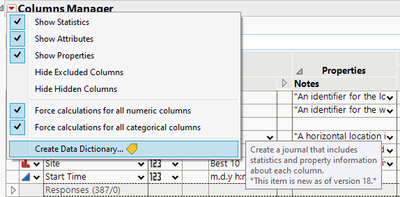
Have you tried if the Data Dictionary would be enough for your use case?

- Mark as New
- Bookmark
- Subscribe
- Mute
- Subscribe to RSS Feed
- Get Direct Link
- Report Inappropriate Content
Re: Columns Manager > Make Into Data Table Script
Thank you! This worked also.
Recommended Articles
- © 2026 JMP Statistical Discovery LLC. All Rights Reserved.
- Terms of Use
- Privacy Statement
- Contact Us