Hello Expert,
I have an issue with "PERCENT" in JMP.
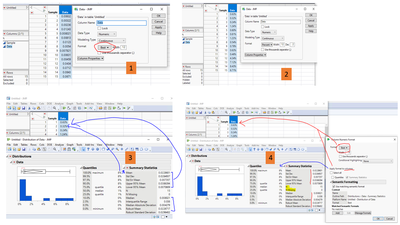
1-2: I have defined the column "Data" from rate to be in "Percent" & Dec "2" in the data table.
3: But, when I plot Distribution --> the quantiles "Data" values do not follows my instruction that the data is already in "Percent" & Dec "2".
4: The summary statistics for basic statistics also does not follow the data format that I've defined earlier.
N & N missing is in count.
So, If I change the summary statistics to be "Percent", the N would become 15 x 100% = 1500% which is incorrect.
But, I'm doing a simple ad-hoc analysis so it's quite annoying to repeat the steps of changing the column format for "Distribution" then "Control charts"......
I can configure it in JSL scripting but am I missing a preference setting for GUI (JMP 17.0)?
Thank you
Regards