- JMP Statement Regarding Critical PHP Remote Code Execution Vulnerabilities (CVE-2026-109618, CVE-2026-109619)
- Don’t miss your chance to experience Discovery Summit Europe at our best available rate! Early bird registration through 31 Oct.
- Graph Builder Toolbar streamlines interactive graphing. Creates shortcuts on Report and GraphBuilder Helpers toolbars. Download and install the extension.
- Subscribe to RSS Feed
- Mark Topic as New
- Mark Topic as Read
- Float this Topic for Current User
- Bookmark
- Subscribe
- Mute
- Printer Friendly Page
Discussions
Solve problems, and share tips and tricks with other JMP users.- User Community
- :
- Discussions
- :
- Re: Color cells based on multiple conditions

- Mark as New
- Bookmark
- Subscribe
- Mute
- Subscribe to RSS Feed
- Get Direct Link
- Report Inappropriate Content
Color cells based on multiple conditions
I have written the following code to color the cells based on condition.I need to add one more condition -
if weight is within -2% of Target then need to color cells yellow.How do I do this?
dt << New Column("color cells",
Formula(If(:Target> :weight, :weight << color cells("Red", Row()); .,
:weight << color cells("Green", Row()); .)),
Hide(1)
);
Thanks
Accepted Solutions


- Mark as New
- Bookmark
- Subscribe
- Mute
- Subscribe to RSS Feed
- Get Direct Link
- Report Inappropriate Content
Re: Color cells based on multiple conditions
If(
:Target > :weight,
:weight << color cells( "Red", Row() );
.;,
:weight < :Target + (.02 * Abs( :Target )) & :weight > :Target - (.02 *
Abs( :Target )),
:weight << color cells( "Yellow", Row() );
.;,
:weight << color cells( "Green", Row() );
.;
);
- Mark as New
- Bookmark
- Subscribe
- Mute
- Subscribe to RSS Feed
- Get Direct Link
- Report Inappropriate Content
Re: Color cells based on multiple conditions
If(
:Target > :weight,
:weight << color cells( "Red", Row() );
.;,
:weight < :Target + (.02 * Abs( :Target )) & :weight > :Target - (.02 *
Abs( :Target )),
:weight << color cells( "Yellow", Row() );
.;,
:weight << color cells( "Green", Row() );
.;
);
- Mark as New
- Bookmark
- Subscribe
- Mute
- Subscribe to RSS Feed
- Get Direct Link
- Report Inappropriate Content
Re: Color cells based on multiple conditions
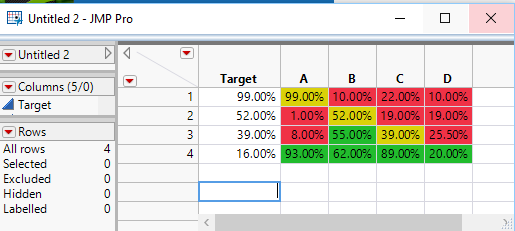
Need to script a variation of this logic. I have data in 4 columns and need to compare the value in each cell with the Target value. Also I wouldnt know the column names before hand. How to do this? In simple words,need to compare values in column A,B,C and D with corresponding value in Target column and color code(Green,Yellow or Red) accordingly.
| Target | A | B | C | D |
| 99% | 1% | 8% | 93% | 10% |
| 52% | 55% | 62% | 22% | 19% |
| 39% | 89% | 18% | 33% | 25.50% |
| 16% | 11% | 92% | 10% | 2% |
- Mark as New
- Bookmark
- Subscribe
- Mute
- Subscribe to RSS Feed
- Get Direct Link
- Report Inappropriate Content
Re: Color cells based on multiple conditions
1. If you are going to be working in JSL, you need to take the time to read the Scripting Guide: Help==>Books==>Scripting Guide
2. Below is a simple script that generates the coloring as you described
Names Default To Here( 1 );
dt = Current Data Table();

colNamesList = dt << get column names( string );

For( theRow = 1, theRow <= N Rows( dt ), theRow++,
	For( theCol = 2, theCol <= N Items( colNamesList ), theCol++,
		If(
			:Target[theRow] > Column( dt, colNamesList[theCol] )[theRow],
				Column( dt, colNamesList[theCol] ) << color cells( "Red", theRow );
				.;,
			Column( dt, colNamesList[theCol] )[theRow] < :Target[theRow] + (.02 *
			Abs( :Target[theRow] )) & Column( dt, colNamesList[theCol] )[theRow] >
			:Target[theRow] - (.02 * Abs( :Target[theRow] )),
				Column( dt, colNamesList[theCol] ) << color cells( "Yellow", theRow );
				.;,
			Column( dt, colNamesList[theCol] ) << color cells( "Green", theRow );
			.;
		)
	)
);Recommended Articles
- © 2026 JMP Statistical Discovery LLC. All Rights Reserved.
- Terms of Use
- Privacy Statement
- Contact Us