- Don’t miss your chance to experience Discovery Summit Europe at our best available rate! Early bird registration through 31 Oct.
- Graph Builder Toolbar streamlines interactive graphing. Creates shortcuts on Report and GraphBuilder Helpers toolbars. Download and install the extension.
- Subscribe to RSS Feed
- Mark Topic as New
- Mark Topic as Read
- Float this Topic for Current User
- Bookmark
- Subscribe
- Mute
- Printer Friendly Page
Discussions
Solve problems, and share tips and tricks with other JMP users.- User Community
- :
- Discussions
- :
- Button to open specific outline in a journal

- Mark as New
- Bookmark
- Subscribe
- Mute
- Subscribe to RSS Feed
- Get Direct Link
- Report Inappropriate Content
Button to open specific outline in a journal
Is there a way to add button in a journal that opens a specific outline within the journal ? (e.g. similar to in-document referencing in word documents)
I've seen journals used <<open next outline, but I believe this won't be able to open outline box if it's not positioned right next to the containing outline box.
Accepted Solutions


- Mark as New
- Bookmark
- Subscribe
- Mute
- Subscribe to RSS Feed
- Get Direct Link
- Report Inappropriate Content
Re: Button to open specific outline in a journal
Maybe you can use something like this:
Current Journal()[OutlineBox("Outline3")] << Close(0)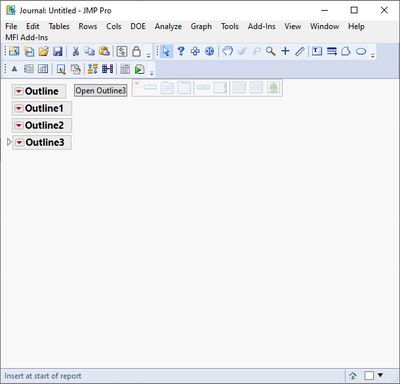
- Mark as New
- Bookmark
- Subscribe
- Mute
- Subscribe to RSS Feed
- Get Direct Link
- Report Inappropriate Content
Re: Button to open specific outline in a journal
Maybe you can use something like this:
Current Journal()[OutlineBox("Outline3")] << Close(0)
- Mark as New
- Bookmark
- Subscribe
- Mute
- Subscribe to RSS Feed
- Get Direct Link
- Report Inappropriate Content
Re: Button to open specific outline in a journal
@jthi Yeah, I was using xml and was able to get it to work :)
Now I wonder if there's a way to bring the opened outline to the top of the page. Any ideas on this ?
- Mark as New
- Bookmark
- Subscribe
- Mute
- Subscribe to RSS Feed
- Get Direct Link
- Report Inappropriate Content
Re: Button to open specific outline in a journal
Not sure if you can move display element, but you could maybe remove and then re-add it
Names Default To Here(1);
New Window("WrapListBox",
	vlb = V List Box(
		ob1 = Outline Box("1"),
		ob2 = Outline Box("2"),
		ob3 = Outline Box("3"),
	);
);

wait(1);
ob_to_move = Remove From(vlb, Contains(vlb << XPath("//OutlineBox"), ob3));
wait(1);
Insert Into(vlb, ob_to_move, 1);
- Mark as New
- Bookmark
- Subscribe
- Mute
- Subscribe to RSS Feed
- Get Direct Link
- Report Inappropriate Content
Re: Button to open specific outline in a journal
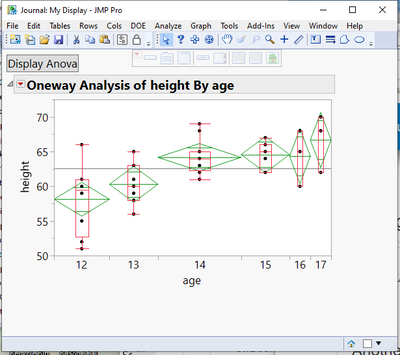
Another way of handling this, is to completely hide the outline box of interest, rather than closing it; The button box can then redisplay the outline box, rather than opening it. This is all done using the Visibility element available to the Outline Box() object.
Names Default To Here( 1 );
dt =
// Open Data Table: Big Class.jmp
// → Data Table( "Big Class" )
Open( "/C:/Program Files/SAS/JMPEA/17/Samples/Data/Big Class.jmp" );

ow = Oneway(
	Y( :height ),
	X( :age ),
	Means( 1 ),
	Box Plots( 1 ),
	Mean Diamonds( 1 )
);
nw = New Window( "My Display",
	<<journal,
	bb = Button Box( "Display Anova",
		nw["Oneway Anova"] << visibility( switch );
		If( switch == "visible",
			switch = "collapse";
			bb << set button name( "Hide Anova" );
		,
			switch = "visible";
			bb << set button name( "Display Anova" );
		)

		;
	)
);
Report( ow ) << journal;
ow << close window;
switch = "visible";
nw["Oneway Anova"] << visibility( "collapse" );Recommended Articles
- © 2026 JMP Statistical Discovery LLC. All Rights Reserved.
- Terms of Use
- Privacy Statement
- Contact Us