- JMP Statement Regarding Critical PHP Remote Code Execution Vulnerabilities (CVE-2026-109618, CVE-2026-109619)
- Don’t miss your chance to experience Discovery Summit Europe at our best available rate! Early bird registration through 31 Oct.
- Graph Builder Toolbar streamlines interactive graphing. Creates shortcuts on Report and GraphBuilder Helpers toolbars. Download and install the extension.
- Subscribe to RSS Feed
- Mark Topic as New
- Mark Topic as Read
- Float this Topic for Current User
- Bookmark
- Subscribe
- Mute
- Printer Friendly Page
Discussions
Solve problems, and share tips and tricks with other JMP users.- User Community
- :
- Discussions
- :
- Auto Click Button
- Mark as New
- Bookmark
- Subscribe
- Mute
- Subscribe to RSS Feed
- Get Direct Link
- Report Inappropriate Content
Auto Click Button
Hi Guys,
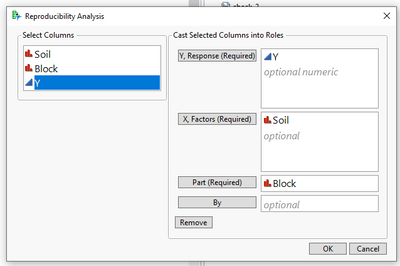
How I can auto click button "OK" after I choose variable , because after this dialog I have to run another chart and data
You can see in below pictures


- Mark as New
- Bookmark
- Subscribe
- Mute
- Subscribe to RSS Feed
- Get Direct Link
- Report Inappropriate Content
Re: Auto Click Button
Can you elaborate on under which conditions you would want to automatically click "OK"? In JSL, you can programatically click a button using something like "OK_button << click;"
If, for example, you want to programatically click OK once all required inputs are populated, you could write a function or expression like this:
check_inputs = Expr(
	If(
		N Items( y_inputs << get items ) > 0 & N Items( x_inputs << get items ) > 0
		 & N Items( parts_inputs << get items ) > 0,
		OK_button << click
	)
);
Then, within the script for each of the input buttons, you could add check_inputs() at the end.
- Mark as New
- Bookmark
- Subscribe
- Mute
- Subscribe to RSS Feed
- Get Direct Link
- Report Inappropriate Content
Re: Auto Click Button
Thank you so much, I will try it on my script

- Mark as New
- Bookmark
- Subscribe
- Mute
- Subscribe to RSS Feed
- Get Direct Link
- Report Inappropriate Content
Re: Auto Click Button
How can you find out what the button is called?
I have a similar issue with the GO button needing to be automatically pressed.
I've guessed (presumably incorrectly) at what it might be called but those combos GO_button, etc. did not work.


- Mark as New
- Bookmark
- Subscribe
- Mute
- Subscribe to RSS Feed
- Get Direct Link
- Report Inappropriate Content
Re: Auto Click Button
The previous example uses a variable GO-button in which a reference to an actual button was previously stored. See the example below for the basic approach to use.
Names Default to Here( 1 );

// example data set
dt = Open( "$SAMPLE_DATA/Big Class.jmp" );

// example dialog
launch = dt << Fit Model(
	Y( :weight ),
	Effects( :age, :sex, :height ),
	Personality( "Standard Least Squares" )
);

// find Run button and unwrap the list
button = (launch << XPath( "//ButtonBox[text()='Run']" ))[1];

// click it!
button << Click;
Recommended Articles
- © 2026 JMP Statistical Discovery LLC. All Rights Reserved.
- Terms of Use
- Privacy Statement
- Contact Us