- Don’t miss your chance to experience Discovery Summit Europe at our best available rate! Early bird registration through 31 Oct.
- Graph Builder Toolbar streamlines interactive graphing. Creates shortcuts on Report and GraphBuilder Helpers toolbars. Download and install the extension.
- Subscribe to RSS Feed
- Mark Topic as New
- Mark Topic as Read
- Float this Topic for Current User
- Bookmark
- Subscribe
- Mute
- Printer Friendly Page
Discussions
Solve problems, and share tips and tricks with other JMP users.- User Community
- :
- Discussions
- :
- Re: Alternate row shading colors

- Mark as New
- Bookmark
- Subscribe
- Mute
- Subscribe to RSS Feed
- Get Direct Link
- Report Inappropriate Content
Alternate row shading colors
I have alternate row shading set to 1 in my script and the rows in my data tables are coloured in shades of greys, I would like to change the colors used, to two shades of blue. What is the best way to code this in jsl.
Accepted Solutions


- Mark as New
- Bookmark
- Subscribe
- Mute
- Subscribe to RSS Feed
- Get Direct Link
- Report Inappropriate Content
Re: Alternate row shading colors
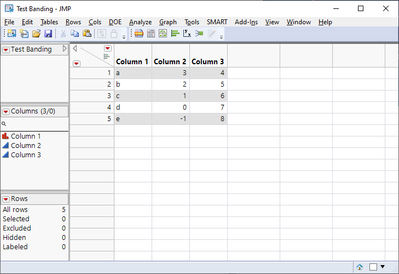
This code should give you an idea how to do it for a data table.
dt = New Table( "Test Banding", Add Rows( 4 ),
	New Column( "Column 1", Character, "Nominal",
		Set Values( {"a", "b", "c", "d", "e"} ) ),
	New Column( "Column 2", Numeric, "Continuous", Format( "Best", 12 ),
		Set Values( [3, 2, 1, 0, -1] ) ),
	New Column( "Column 3", Numeric, "Continuous", Format( "Best", 12 ),
		Set Values( [4, 5, 6, 7, 8] ) )
);

// Create a list of every other row number
gray_rows = {};
for (i = 1, i <= nrows(dt), i+=2,
	insertinto(gray_rows, i);
);

// Set every other row to gray
for (i = 1, i <= ncols(dt), i++,
	column(dt, i) << Color Cells( {-14803425, gray_rows} );
);

- Mark as New
- Bookmark
- Subscribe
- Mute
- Subscribe to RSS Feed
- Get Direct Link
- Report Inappropriate Content
Re: Alternate row shading colors
Your question is a bit sparse. If you're asking about a TableBox() then I do believe that it's not possible to set which colors the rows are shaded, just the default grays. If you're talking about a DataBox() (as you would get when opening a "*.jmp" file), then you can set the cell colors to whatever you'd like -- just look up "color cell" in the Scripting index.
- Mark as New
- Bookmark
- Subscribe
- Mute
- Subscribe to RSS Feed
- Get Direct Link
- Report Inappropriate Content
Re: Alternate row shading colors
- Mark as New
- Bookmark
- Subscribe
- Mute
- Subscribe to RSS Feed
- Get Direct Link
- Report Inappropriate Content
Re: Alternate row shading colors
This code should give you an idea how to do it for a data table.
dt = New Table( "Test Banding", Add Rows( 4 ),
	New Column( "Column 1", Character, "Nominal",
		Set Values( {"a", "b", "c", "d", "e"} ) ),
	New Column( "Column 2", Numeric, "Continuous", Format( "Best", 12 ),
		Set Values( [3, 2, 1, 0, -1] ) ),
	New Column( "Column 3", Numeric, "Continuous", Format( "Best", 12 ),
		Set Values( [4, 5, 6, 7, 8] ) )
);

// Create a list of every other row number
gray_rows = {};
for (i = 1, i <= nrows(dt), i+=2,
	insertinto(gray_rows, i);
);

// Set every other row to gray
for (i = 1, i <= ncols(dt), i++,
	column(dt, i) << Color Cells( {-14803425, gray_rows} );
);
- Mark as New
- Bookmark
- Subscribe
- Mute
- Subscribe to RSS Feed
- Get Direct Link
- Report Inappropriate Content
Re: Alternate row shading colors
Thanks for taking the time to include an example. This is just what I was looking for, still new to JSL coding.
Many thanks for your help.
Craig.
- Mark as New
- Bookmark
- Subscribe
- Mute
- Subscribe to RSS Feed
- Get Direct Link
- Report Inappropriate Content
Re: Alternate row shading colors
Hi,
I used your script to color every third row by changing it to "i+3" instead of i+2 by pure intuition and trial and error - I don't know how to script.
I have a table that has measurements in bunches of 3 repetitions. I'd like to shade 3 rows at a time, alternating: 3 rows grey, 3 white, 3 grey, 3 white, etc. How would such a script look like?
thanks a LOT for your help!
uriel

- Mark as New
- Bookmark
- Subscribe
- Mute
- Subscribe to RSS Feed
- Get Direct Link
- Report Inappropriate Content
Re: Alternate row shading colors
Here's an example.
Names Default To Here( 1 );
dt = New Table( "nothing", New Column( "Shaded", Set Values( 1 :: 99 ) ) );
grays = Filter Each( {v, i}, 1 :: N Row( dt ), Mod( Ceiling( i / 3 ), 2 ) );
dt:Shaded << Color Cells( "light gray", grays );Recommended Articles
- © 2026 JMP Statistical Discovery LLC. All Rights Reserved.
- Terms of Use
- Privacy Statement
- Contact Us