Turn on suggestions
Auto-suggest helps you quickly narrow down your search results by suggesting possible matches as you type.
- JMP Statement Regarding Critical PHP Remote Code Execution Vulnerabilities (CVE-2026-109618, CVE-2026-109619)
- Don’t miss your chance to experience Discovery Summit Europe at our best available rate! Early bird registration through 31 Oct.
- Graph Builder Toolbar streamlines interactive graphing. Creates shortcuts on Report and GraphBuilder Helpers toolbars. Download and install the extension.
Options
- Subscribe to RSS Feed
- Mark Topic as New
- Mark Topic as Read
- Float this Topic for Current User
- Bookmark
- Subscribe
- Mute
- Printer Friendly Page
Discussions
Solve problems, and share tips and tricks with other JMP users.- User Community
- :
- Discussions
- :
- After generating a new script in a data table through JSL, why does the operatio...

Level IX
- Mark as New
- Bookmark
- Subscribe
- Mute
- Subscribe to RSS Feed
- Get Direct Link
- Report Inappropriate Content
After generating a new script in a data table through JSL, why does the operation behind the original JSL stop?
Apr 16, 2024 11:42 PM
(1926 views)
For example the following JSL
Does it finish adding scripts and then stop working?
Thanks!
dt = Open( "$SAMPLE_DATA/Big Class.jmp" );
Eval(
	Parse(
		"dt<<new script(\!"test\!",
dt<<Select Columns(ncol(dt));dt<<Move Selected Columns(after(Column(1)));
"
	)
);

//??
New Column( "AA" );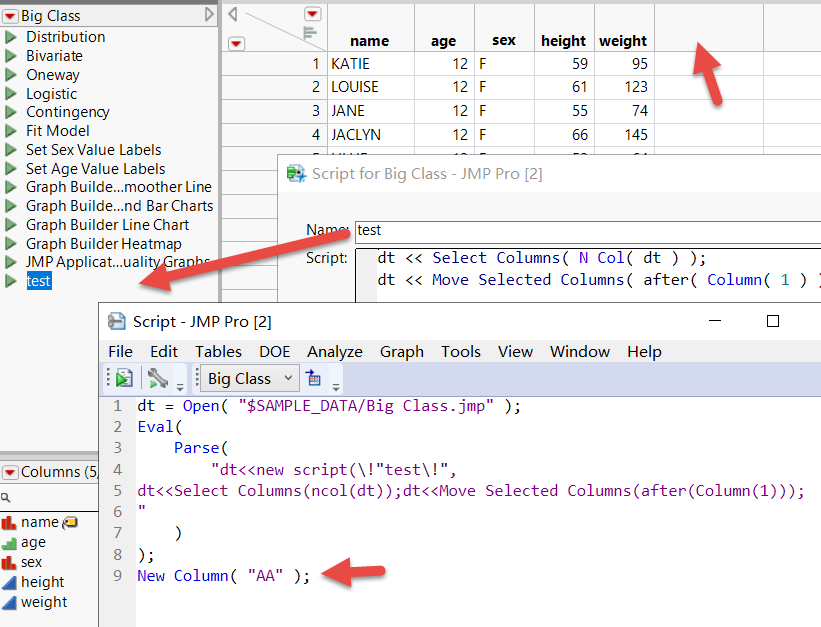
2 REPLIES 2


Super User
- Mark as New
- Bookmark
- Subscribe
- Mute
- Subscribe to RSS Feed
- Get Direct Link
- Report Inappropriate Content
Re: After generating a new script in a data table through JSL, why does the operation behind the original JSL stop?
There is a syntax error in the JSL. The Log shows
Unexpected end of input. Perhaps there is a missing "," or ")".
Trying to parse arguments of function "new script".
Line 2 Column 75: …olumns(after(Column(1)));►
The issue is a missing closing ");) for the New Script() function. If the closing ");" is added the JSL works as expected.
dt = Open( "$SAMPLE_DATA/Big Class.jmp" );
Eval(Parse(
	"dt<<new script(\!"test\!",
dt<<Select Columns(ncol(dt));dt<<Move Selected Columns(after(Column(1))););
"
));

//??
dt << New Column( "AA" );
Jim
Level IX
- Mark as New
- Bookmark
- Subscribe
- Mute
- Subscribe to RSS Feed
- Get Direct Link
- Report Inappropriate Content
Re: After generating a new script in a data table through JSL, why does the operation behind the original JSL stop?
Eval(Parse(
"dt<<new script(\!"test\!",


);"));
Thank Jim!

Recommended Articles
- © 2026 JMP Statistical Discovery LLC. All Rights Reserved.
- Terms of Use
- Privacy Statement
- Contact Us