- Don’t miss your chance to experience Discovery Summit Europe at our best available rate! Early bird registration through 31 Oct.
- Graph Builder Toolbar streamlines interactive graphing. Creates shortcuts on Report and GraphBuilder Helpers toolbars. Download and install the extension.
- Subscribe to RSS Feed
- Mark Topic as New
- Mark Topic as Read
- Float this Topic for Current User
- Bookmark
- Subscribe
- Mute
- Printer Friendly Page
Discussions
Solve problems, and share tips and tricks with other JMP users.- User Community
- :
- Discussions
- :
- Re: Adding color text in a If() JSL

- Mark as New
- Bookmark
- Subscribe
- Mute
- Subscribe to RSS Feed
- Get Direct Link
- Report Inappropriate Content
Adding color text in a If() JSL
Hi,
I am writing a JSL Script and not sure how to add color text in this If() code. I want to add green color indicate for "Ideal" and red color for "Not Ideal".
If(P <= 0.5 & C > 0.8, "Ideal",
P > 0.5 & C < 0.8, "Not Ideal",
);
Thanks!


- Mark as New
- Bookmark
- Subscribe
- Mute
- Subscribe to RSS Feed
- Get Direct Link
- Report Inappropriate Content
Re: Adding color text in a If() JSL
Where is the "Ideal" or ""Not Ideal" going to be displayed? In a data table, a report, a dialog box?
- Mark as New
- Bookmark
- Subscribe
- Mute
- Subscribe to RSS Feed
- Get Direct Link
- Report Inappropriate Content
Re: Adding color text in a If() JSL
Hi Jim,
Thanks for replying back!
Here is a simplified version of my code. The "Ideal" or ""Not Ideal" is going to be displayed in a dialog box.
P = 0.4

M = If(
    P <= 0.5 & C > 0.8, "Ideal",
    P > 0.5 & C < 0.8, "Not Ideal",

);

M_Output << set text( Char( M ) );
),
Outline Box( "Results",
Panel Box( "Message",
Lineup Box( N Col( 2 ),
Text Box( "Output: " ),
M_Output = Text Box(),
)

),
Maria
- Mark as New
- Bookmark
- Subscribe
- Mute
- Subscribe to RSS Feed
- Get Direct Link
- Report Inappropriate Content
Re: Adding color text in a If() JSL
You will need to use Markup notation to change the text color.
See the Scripting Index
Text Box=>Markup
Here is an example from the Scripting Index entry
Names Default To Here( 1 );
win = New Window( "Example", fontobj = text = Text Box( "Example Text" ) );
text << setText(
	"This is <font color='Blue'>blue</font> text. This is a <background color='yellow'>yellow</background> background. This is <font color='#0000ff'><background color='0xffff00'>blue text on a yellow background</background></font>."
);
text << markup;
- Mark as New
- Bookmark
- Subscribe
- Mute
- Subscribe to RSS Feed
- Get Direct Link
- Report Inappropriate Content
Re: Adding color text in a If() JSL
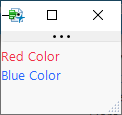
If you want the entire string to be one color you can use << text color("color").
nw = new window("Test Colors",
	r = text box("Red Color", << text color("red")),
	b = text box("Blue Color", << text color("blue"))
);
The scripting index is your friend here.
Recommended Articles
- © 2026 JMP Statistical Discovery LLC. All Rights Reserved.
- Terms of Use
- Privacy Statement
- Contact Us