- Don’t miss your chance to experience Discovery Summit Europe at our best available rate! Early bird registration through 31 Oct.
- Graph Builder Toolbar streamlines interactive graphing. Creates shortcuts on Report and GraphBuilder Helpers toolbars. Download and install the extension.
- Subscribe to RSS Feed
- Mark Topic as New
- Mark Topic as Read
- Float this Topic for Current User
- Bookmark
- Subscribe
- Mute
- Printer Friendly Page
Discussions
Solve problems, and share tips and tricks with other JMP users.- User Community
- :
- Discussions
- :
- Adding FrameBox Content to a Datatable as an image.

- Mark as New
- Bookmark
- Subscribe
- Mute
- Subscribe to RSS Feed
- Get Direct Link
- Report Inappropriate Content
Adding FrameBox Content to a Datatable as an image.
How do I take the output from Graphbuilder, grab the main FRAMEBOX as an image, resize it and add it to a datatable?
I make my output using Graph builder and then run the following.
obj = GB << Get Scriptable Object;
r= obj << Report;
myImage = r[FrameBox(1)];
myImage << setSize(100, 100);
DT:GFA[1] = myImage;  //Row 1 of column 'GFA' (Expression Column) in a Table called 'DT'
I think my issues is the 'image' returned is not an actual image but rather a display box.
Cheers, Troy
Accepted Solutions


- Mark as New
- Bookmark
- Subscribe
- Mute
- Subscribe to RSS Feed
- Get Direct Link
- Report Inappropriate Content
Re: Adding FrameBox Content to a Datatable as an image.
You might, or might not, want to resize it (<<scale below) because it will be scaled to fit later. If you don't resize, the original resolution is available if you want it.
dt=open("$sample_data/big class.jmp");
r = dt<<Graph Builder(
    Size( 518, 448 ),
    Show Control Panel( 0 ),
    Variables( X( :weight ), Y( :height ) ),
    Elements( Points( X, Y, Legend( 12 ) ), Smoother( X, Y, Legend( 13 ) ) )
);
myImage = ((r<<report)[FrameBox(1)])<<getpicture;
myImage<<scale(.25);

dtPics = New Table( "pics",
    Add Rows( 1 ),
    Set Cell Height( 100 ),
    New Column( "graphs", Expression, "None", Set Display Width( 150 ) )
);

dtPics:graphs[1] = myImage;
In the example, 'r' is the scriptable report object, not the displaybox tree, You can ask the object for the tree with either r<<report or report(r). Navigating down the tree to Framebox(1) using subscripting finds the first framebox; there are no axes. If you want axes, pick a box higher in the tree that includes them. ShowTreeStructure can be really helpful.
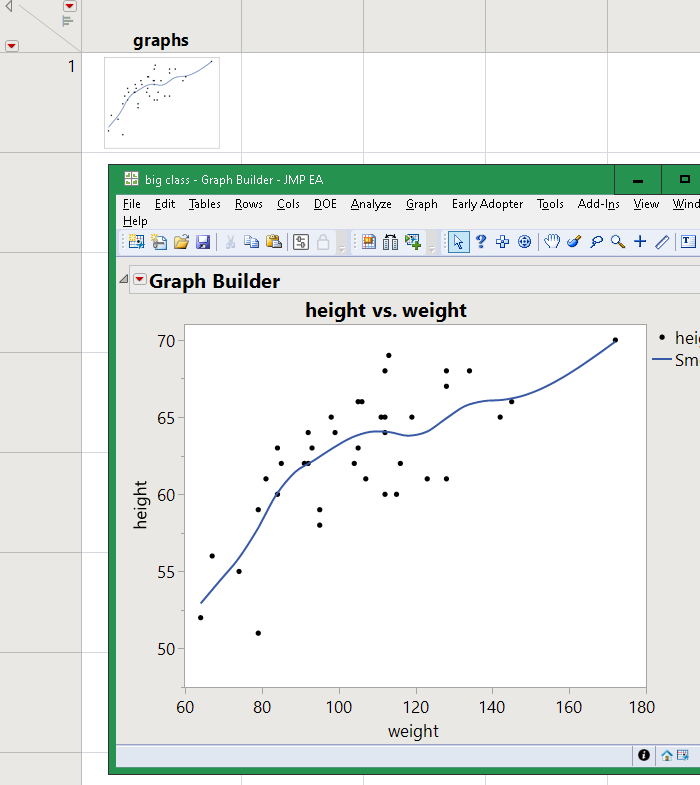
Edit: still asleep. You had the variable names correct; I should have used 'obj' rather than 'r' because 'r' should be for the report surface which is the display box tree.
- Mark as New
- Bookmark
- Subscribe
- Mute
- Subscribe to RSS Feed
- Get Direct Link
- Report Inappropriate Content
Re: Adding FrameBox Content to a Datatable as an image.
You might, or might not, want to resize it (<<scale below) because it will be scaled to fit later. If you don't resize, the original resolution is available if you want it.
dt=open("$sample_data/big class.jmp");
r = dt<<Graph Builder(
    Size( 518, 448 ),
    Show Control Panel( 0 ),
    Variables( X( :weight ), Y( :height ) ),
    Elements( Points( X, Y, Legend( 12 ) ), Smoother( X, Y, Legend( 13 ) ) )
);
myImage = ((r<<report)[FrameBox(1)])<<getpicture;
myImage<<scale(.25);

dtPics = New Table( "pics",
    Add Rows( 1 ),
    Set Cell Height( 100 ),
    New Column( "graphs", Expression, "None", Set Display Width( 150 ) )
);

dtPics:graphs[1] = myImage;
In the example, 'r' is the scriptable report object, not the displaybox tree, You can ask the object for the tree with either r<<report or report(r). Navigating down the tree to Framebox(1) using subscripting finds the first framebox; there are no axes. If you want axes, pick a box higher in the tree that includes them. ShowTreeStructure can be really helpful.
Edit: still asleep. You had the variable names correct; I should have used 'obj' rather than 'r' because 'r' should be for the report surface which is the display box tree.
- Mark as New
- Bookmark
- Subscribe
- Mute
- Subscribe to RSS Feed
- Get Direct Link
- Report Inappropriate Content
Re: Adding FrameBox Content to a Datatable as an image.
Thanks Craig. I've recently started to pull all my images into tables rather than working with external images from a directory. Makes for much easier application development.
Thanks for putting together a full working solution.
Troy
Recommended Articles
- © 2026 JMP Statistical Discovery LLC. All Rights Reserved.
- Terms of Use
- Privacy Statement
- Contact Us