- JMP Statement Regarding Critical PHP Remote Code Execution Vulnerabilities (CVE-2026-109618, CVE-2026-109619)
- Don’t miss your chance to experience Discovery Summit Europe at our best available rate! Early bird registration through 31 Oct.
- Graph Builder Toolbar streamlines interactive graphing. Creates shortcuts on Report and GraphBuilder Helpers toolbars. Download and install the extension.
- Subscribe to RSS Feed
- Mark Topic as New
- Mark Topic as Read
- Float this Topic for Current User
- Bookmark
- Subscribe
- Mute
- Printer Friendly Page
Discussions
Solve problems, and share tips and tricks with other JMP users.- User Community
- :
- Discussions
- :
- Re: Add entries to Graph Builder Legens?

- Mark as New
- Bookmark
- Subscribe
- Mute
- Subscribe to RSS Feed
- Get Direct Link
- Report Inappropriate Content
Add entries to Graph Builder Legends?
If a user defined a marker or color for a specific row, this marker/color will not show up in the Legend of Graph Builder.
To make a manual Update to graph builder legend when using colour or mark by column
is it possible to add additional entries to the Graph Builder legend?
... then change the marker/color manually and add a meaningful label.


- Mark as New
- Bookmark
- Subscribe
- Mute
- Subscribe to RSS Feed
- Get Direct Link
- Report Inappropriate Content
Re: Add entries to Graph Builder Legens?
I don't think you can add extra items to legend which doesn't really have any relation to the columns. Create a column which takes row states (marker and color) into account and use that as color/overlay (or both)?
- Mark as New
- Bookmark
- Subscribe
- Mute
- Subscribe to RSS Feed
- Get Direct Link
- Report Inappropriate Content
Re: Add entries to Graph Builder Legens?
Relation to column is OK, if necessary, one can edit the label and the marker manually.
e.g.
To add some dummy entries for "name":
1) add a Points Overlay and deselect all Variables but "Color = Name".
The idea: don't show any data point - just create new entries in the legend for every "name".
[for all the other plots, deselect "Color = Name" to keep them as they are]
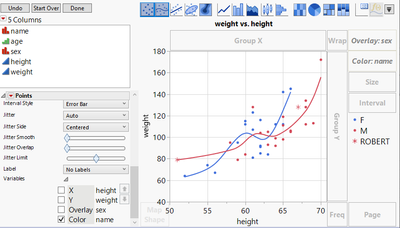
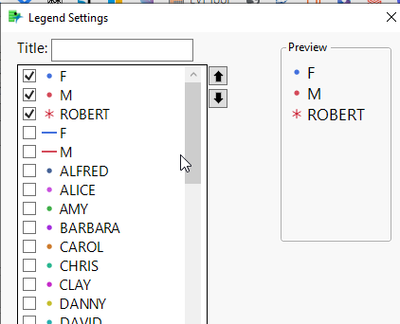
2) In the legend, adjust the marker/color to the settings from row states
... and deselect unwanted entries
Recommended Articles
- © 2026 JMP Statistical Discovery LLC. All Rights Reserved.
- Terms of Use
- Privacy Statement
- Contact Us