- Image to Table JMP extension imports single or batch images as data tables. Useful to extract curves from pictures or convert image data to curve data to use in analyses like Functional Data Explorer. Download and install the extension.
- Subscribe to RSS Feed
- Mark Topic as New
- Mark Topic as Read
- Float this Topic for Current User
- Bookmark
- Subscribe
- Mute
- Printer Friendly Page
Discussions
Solve problems, and share tips and tricks with other JMP users.- User Community
- :
- Discussions
- :
- Add entries to Graph Builder Legends?

- Mark as New
- Bookmark
- Subscribe
- Mute
- Subscribe to RSS Feed
- Get Direct Link
- Report Inappropriate Content
Add entries to Graph Builder Legends?
If a user defined a marker or color for a specific row, this marker/color will not show up in the Legend of Graph Builder.
To make a manual Update to graph builder legend when using colour or mark by column
is it possible to add additional entries to the Graph Builder legend?
... then change the marker/color manually and add a meaningful label.


- Mark as New
- Bookmark
- Subscribe
- Mute
- Subscribe to RSS Feed
- Get Direct Link
- Report Inappropriate Content
Re: Add entries to Graph Builder Legens?
I don't think you can add extra items to legend which doesn't really have any relation to the columns. Create a column which takes row states (marker and color) into account and use that as color/overlay (or both)?
- Mark as New
- Bookmark
- Subscribe
- Mute
- Subscribe to RSS Feed
- Get Direct Link
- Report Inappropriate Content
Re: Add entries to Graph Builder Legens?
Relation to column is OK, if necessary, one can edit the label and the marker manually.
e.g.
To add some dummy entries for "name":
1) add a Points Overlay and deselect all Variables but "Color = Name".
The idea: don't show any data point - just create new entries in the legend for every "name".
[for all the other plots, deselect "Color = Name" to keep them as they are]
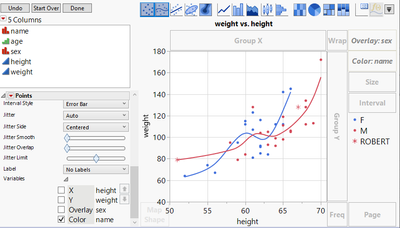
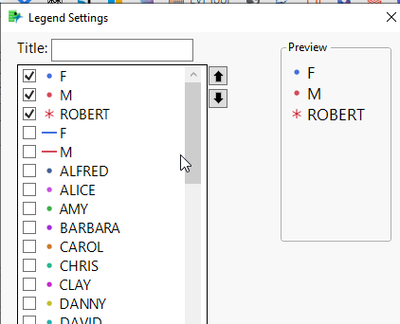
2) In the legend, adjust the marker/color to the settings from row states
... and deselect unwanted entries
Recommended Articles
- © 2026 JMP Statistical Discovery LLC. All Rights Reserved.
- Terms of Use
- Privacy Statement
- Contact Us