- Don’t miss your chance to experience Discovery Summit Europe at our best available rate! Early bird registration through 31 Oct.
- Graph Builder Toolbar streamlines interactive graphing. Creates shortcuts on Report and GraphBuilder Helpers toolbars. Download and install the extension.
- Subscribe to RSS Feed
- Mark Topic as New
- Mark Topic as Read
- Float this Topic for Current User
- Bookmark
- Subscribe
- Mute
- Printer Friendly Page
Discussions
Solve problems, and share tips and tricks with other JMP users.- User Community
- :
- Discussions
- :
- Activate a button box in JSL - Simulate button press

- Mark as New
- Bookmark
- Subscribe
- Mute
- Subscribe to RSS Feed
- Get Direct Link
- Report Inappropriate Content
Activate a button box in JSL - Simulate button press
Is it possible to activate a button box that was created by a previously running script? Essentially, I'm looking to simulate a button press.
Example:
[Script A creates object buttonbox(1)]
[Script B contains a line similar to one below, to simulate pressing the buttonbox]
buttonbox(1) << run script;
Then, script B would be run any time after script A and would call the script from buttonbox(1).
Accepted Solutions


- Mark as New
- Bookmark
- Subscribe
- Mute
- Subscribe to RSS Feed
- Get Direct Link
- Report Inappropriate Content
Re: Activate a button box in JSL - Simulate button press
The Click function allows you to do that.
names default to here(1);
new window("xxx",rr=button box("test",show("pressed")));
rr<<click;
- Mark as New
- Bookmark
- Subscribe
- Mute
- Subscribe to RSS Feed
- Get Direct Link
- Report Inappropriate Content
Re: Activate a button box in JSL - Simulate button press
The Click function allows you to do that.
names default to here(1);
new window("xxx",rr=button box("test",show("pressed")));
rr<<click;

- Mark as New
- Bookmark
- Subscribe
- Mute
- Subscribe to RSS Feed
- Get Direct Link
- Report Inappropriate Content
Re: Activate a button box in JSL - Simulate button press
Hi Jim,
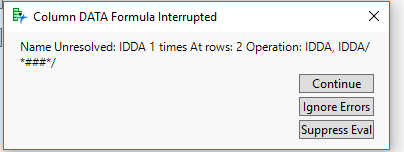
Is this aproach can also work for the error windows generated e.g while formula errors. in the attached picture i want to click on the "Ignore Errors"button using JSL?
Thanks
Ram
- Mark as New
- Bookmark
- Subscribe
- Mute
- Subscribe to RSS Feed
- Get Direct Link
- Report Inappropriate Content
Re: Activate a button box in JSL - Simulate button press
This error window is a modal window, which means that all processing will stop except for the window action, until the window is closed. Therefore, you will not be able to issue a "Click" function
- Mark as New
- Bookmark
- Subscribe
- Mute
- Subscribe to RSS Feed
- Get Direct Link
- Report Inappropriate Content
Re: Activate a button box in JSL - Simulate button press
Thank you Jim for explaining.
Recommended Articles
- © 2026 JMP Statistical Discovery LLC. All Rights Reserved.
- Terms of Use
- Privacy Statement
- Contact Us