- Subscribe to RSS Feed
- Mark Topic as New
- Mark Topic as Read
- Float this Topic for Current User
- Bookmark
- Subscribe
- Mute
- Printer Friendly Page
Community Discussions
Got a question about using the JMP User Community? A complaint or a compliment? Post it here.- JMP User Community
- :
- About the JMP User Community
- :
- Community Discussions
- :
- Convert character date and time (Jun 2, 2020 8:41:43 AM) to numeric DD MM YYYY H...

- Mark as New
- Bookmark
- Subscribe
- Mute
- Subscribe to RSS Feed
- Get Direct Link
- Report Inappropriate Content
Convert character date and time (Jun 2, 2020 8:41:43 AM) to numeric DD MM YYYY HH:MM:SS
Normally manipulate this date format in excel 'Jun 2, 2020 8:41:43 AM' to be more JMP friendly but is there a method of completing this activity within the software?
Accepted Solutions


- Mark as New
- Bookmark
- Subscribe
- Mute
- Subscribe to RSS Feed
- Get Direct Link
- Report Inappropriate Content
Re: Convert character date and time (Jun 2, 2020 8:41:43 AM) to numeric DD MM YYYY HH:MM:SS
One option would be to create formula like in the attached file in Column 2.
And if JMP14 has Custom functions, you could use them: JMP15.0 Help - Create Custom Functions, Transforms, and Formats
- Mark as New
- Bookmark
- Subscribe
- Mute
- Subscribe to RSS Feed
- Get Direct Link
- Report Inappropriate Content
Re: Convert character date and time (Jun 2, 2020 8:41:43 AM) to numeric DD MM YYYY HH:MM:SS
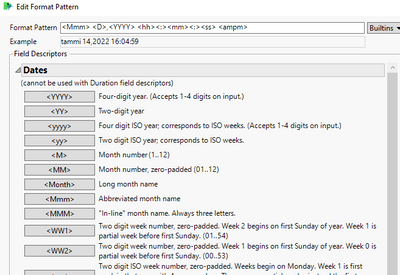
If you are using JMP16 you might have luck with Format Pattern depending on your Locale Settings:
- Mark as New
- Bookmark
- Subscribe
- Mute
- Subscribe to RSS Feed
- Get Direct Link
- Report Inappropriate Content
Re: Convert character date and time (Jun 2, 2020 8:41:43 AM) to numeric DD MM YYYY HH:MM:SS
Thanks for quick response Jarmo! Unfortunately i'm still using JMP 14 so i don't think i have this function.
- Mark as New
- Bookmark
- Subscribe
- Mute
- Subscribe to RSS Feed
- Get Direct Link
- Report Inappropriate Content
Re: Convert character date and time (Jun 2, 2020 8:41:43 AM) to numeric DD MM YYYY HH:MM:SS
As I don't have access to JMP14 at the moment and my locale is different (I'm not used to 12 hour clock and I have had my fair share of issues how JMP manages dates and times, especially before JMP16.1), testing for me might be a bit finicky. Depending where you need this functionality, you could create a function / custom function or use just as is. The idea is to get your string into date-time value, which JMP can then convert to what ever format you want.
You will have to be careful with different corner cases which can make a mess of the date time and this might not handle all of them or have mistakes in it:
Names Default To Here(1);

//Converts "Jun 2, 2020 12:41:43 PM" formatted string to JMP date-time
convert_str_to_date_time = function({str}, {Default Local},

	//create month list to get month number based on index
	months = {"Jan", "Feb","Mar","Apr","May","Jun","Jul","Aug","Sep","Oct","Nov","Dec"};
	{month_str, day_str, year_str, time_str, ampm_str} = Words(str, ", ");
	{hour_str, minute_str, second_str} = Words(time_str, ":");

	//Date
	year_num = Num(year_str);
	month_num = Contains(months, month_str);
	day_num = Num(day_str);

	//Time
	hour_num = Num(hour_str) + If(ampm_str == "PM", 12, 0); //will need to handle 24 -> 0...
	If(hour_num >= 24,
		hour_num = 0;
	);
	minute_num = Num(minute_str);
	second_num = Num(second_str);

	//date-time value
	date_time_val = Date DMY(day_num, month_num, year_num) + In Hours(hour_num) + In Minutes(minute_num) + second_num;

	return(date_time_val)
);
str1 = "Jun 2, 2020 8:41:43 AM";
str2 = "Jun 2, 2020 12:41:43 PM";

date_time = convert_str_to_date_time(str1); // As Date(date_time) = 02Jun2020:08:41:43;
Show(As Date(date_time));
date_time = convert_str_to_date_time(str2); // As Date(date_time) = 02Jun2020:00:41:43;
Show(As Date(date_time));
- Mark as New
- Bookmark
- Subscribe
- Mute
- Subscribe to RSS Feed
- Get Direct Link
- Report Inappropriate Content
Re: Convert character date and time (Jun 2, 2020 8:41:43 AM) to numeric DD MM YYYY HH:MM:SS
Thanks Jarmo - would it be possible to show me how to deploy such a function in the software?
- Mark as New
- Bookmark
- Subscribe
- Mute
- Subscribe to RSS Feed
- Get Direct Link
- Report Inappropriate Content
Re: Convert character date and time (Jun 2, 2020 8:41:43 AM) to numeric DD MM YYYY HH:MM:SS
One option would be to create formula like in the attached file in Column 2.
And if JMP14 has Custom functions, you could use them: JMP15.0 Help - Create Custom Functions, Transforms, and Formats
- © 2026 JMP Statistical Discovery LLC. All Rights Reserved.
- Terms of Use
- Privacy Statement
- Contact Us