Re: Does JSL provide a "busy" indicator similar to a spinning wheel or bar?
here's an example of a progress indicator made in JSL; it uses a namespace to encapsulate the code. The last few lines are a test, try setting workload bigger or smaller. For smooth performance the progress:set function must be called fairly often. The progress:init function needs to know the total amount of work that will be done to get the percentage right.
Edit: attached a copy of the JSL, apparently the inline JSL may not display correctly.
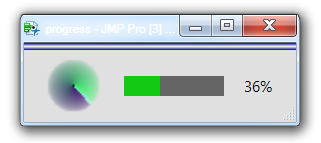
progress = New Namespace(
	"progress"
);
progress:init = Function( {workload},
	progress:TotalWork = workload;
	progress:Current = -1;
	progress:tick = Tick Seconds();
	progress:Window = New Window( "progress",
		H List Box(
			Spacer Box( size( 20, 20 ) ),
			progress:busy = Busy Light( <<size( 60, 60 ) ),
			Border Box( Left( 20 ), Right( 20 ), top( 20 ), bottom( 20 ),
				H List Box(
					progress:left = Spacer Box( color( RGB Color( 20, 200, 20 ) ) ),
					progress:right = Spacer Box( color( RGB Color( 100, 100, 100 ) ) ),
					Spacer Box( size( 20, 10 ) ),
					progress:text = Text Box( "0" )
				)
			)
		)
	);
	progress:set( 0 );
);
progress:set = Function( {workdone},
	{now = Tick Seconds(), pct = Round( 100 * workdone / progress:TotalWork )},
	If( now - progress:tick > 1 / 30,
		progress:tick = now;
		If( pct != progress:Current,
			progress:Current = pct;
			progress:left << size( progress:Current, 20 );
			progress:right << size( 100 - progress:Current, 20 );
			progress:text << settext( Char( pct ) || "%" );
		);
		progress:busy << advance;
		Wait( 0 );
	)
);
progress:term = Function( {},
	progress:Window << closeWindow
);
/////////////////////////
// test
/////////////////////////
workload = 1e6; // 1e6 is about 5 seconds
progress:init( workload );
For( i = 1, i <= workload, i++,
	progress:set( i )
);
progress:term();