Beginning with JMP 16, JMP offers the ability to interactively compare data tables by comparing columns with different names showing the results in a table.
Highlights
-
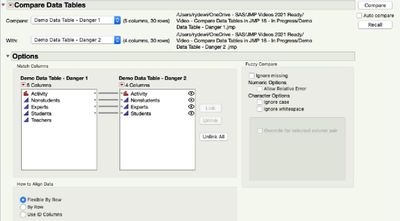
Compare Data Tables utility has a more flexible interface with increased functionality to align rows with a key rather than automatically matching rows and compare columns with different names.
-
Comparison results are shown as a table.
-
Added the ability to align rows with a key rather than automatically matching rows.
-
Added the ability to compare columns with different names.
-
Results are shown as a table.
To compare tables:
-
Open two or more data tables.
-
From the Tables menu in either table, select Compare Data Tables
-
Leave (or change) defaults. In this case, under how to Align Data, leave Flexible by Row.
-
Click Compare.
-
Examine Summary table view of the Compare results in each cell. For example, in row 3 of both tables, the Nonstudents cell data differed, with the difference being 6 to 3.
-
Select a cell to examine the table cell differences.
Resources
 Compare Data Tables
Compare Data Tables
Compare Data Tables
