cancel
Showing results for 
Show  only  | Search instead for 
Did you mean: 
  • Learn how to build custom Python data connectors and further customize JMP’s Data Connector Framework with the Python Data Connector Demo, available now in the JMP Marketplace!
  • See how to move from signal modeling to system modeling at the first JMP Aerospace Analytics webinar. Register. June 18, 1 p.m. US Eastern Time.

Learning Library

Choose Language Hide Translation Bar
Fill a Column with Values

There are two ways to repeat a set of values down a data table column.

Using a Fill Command

  1. Highlight the values that you want to repeat and right-click.
  2. Select Fill > Repeat sequence to end of table.
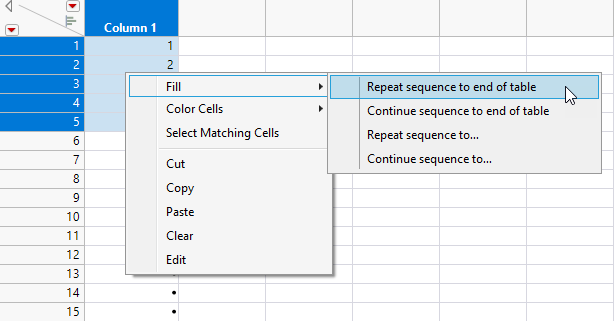
Fill MenuFill Menu

Filled Values

Using Copy and Paste

  1. Highlight the values and select Edit > Copy.
  2. Highlight the destination cells and select Edit > Paste.

The paste operation cycles through the cells in your selection repeatedly until your destination cells are filled.

Recommended Articles