Use to model the relationship a factor has on the time-to-event. It is often used to model a factor that accelerates the event as a means to predict the time-to-event for normal operating conditions where failures do not frequently occur. This platform is able to analyze data that is censored (incomplete).
Accelerated Testing (Fit Life by X)
- From an open JMP® data table, select Analyze > Reliability and Survival > Fit Life by X.
- Select a continuous time variable from Select Columns, then Click Y, Time to Event (continuous variables have blue triangles).
- Select the factor and click X.
- If the data contains censored values, select the censoring variable and click Censor. Change the Censor Code if needed (the default is 1).
- Select the Relationship to use, the probability Distribution to use, and the Confidence Interval Method, and click OK.
JMP will display:
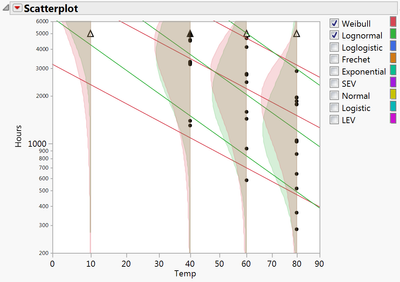
- A scatterplot of the data, with the time to event (Y) variable plotted against the factor (X). Triangles indicate censored values. Under the red triangle next to Scatterplot select Show Density Curves and Add Quantile Lines to compare density curves and quantiles for different values of the factor.
Other distributions can be it to the data by selecting under the top red triangle.
- The Comparisons panel, which allows you to compare various profilers and statistics for each of the selected distributions (below, middle).
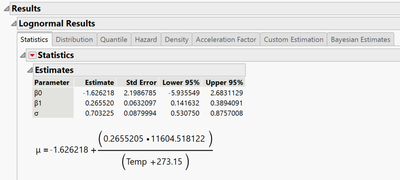
- The Results panel for each selected distribution, containing diagnostic plots, statistical output, profilers, and Custom Estimation calculators to compute quantiles and probabilities (below, right).
Notes: Other options, such as fit individual distribution, fit all distributions, and view tabbed or individual reports are available under the top red triangle. Click on red triangles throughout the report to access additional features.
 Devalt.jmp (Help > Sample Data Folder > Reliability)

Visit Reliability and Survival Methods > Fit Live by X in JMP Help to learn more.