Turn on suggestions
Auto-suggest helps you quickly narrow down your search results by suggesting possible matches as you type.
JMP Security Notice: CVE-2026-109618 and CVE-2026-109619
JMP promptly initiated a review of its products, services, and relevant infrastructure for exposure to CVE-2026-109618 and CVE-2026-109619.
Our assessment of JMP products has not identified exposure to these vulnerabilities. Where remediation was required within supporting environments, appropriate security updates and controls have been applied and validated.
We have identified no evidence of successful exploitation or unauthorized access to JMP systems or customer information associated with these vulnerabilities.
JMP continues to monitor the issue and relevant vendor guidance. No action is required by JMP customers at this time.
- Don’t miss your chance to experience Discovery Summit Europe at our best available rate! Early bird registration through 31 Oct.
- Graph Builder Toolbar streamlines interactive graphing. Creates shortcuts on Report and GraphBuilder Helpers toolbars. Download and install the extension.
Options
- Subscribe
- Mark as read
- Mark as new
Learn JMP Events
Events designed to further your knowledge and exploration of JMP.- User Community
- :
- Learn JMP Events
- :
- New in JMP 17 and JMP Pro 17 - Some Highlights ORIGINAL ENGLISH VERSION
New in JMP 17 and JMP Pro 17 - Some Highlights ORIGINAL ENGLISH VERSION
Presented in English


New Features Everyone Can Use
- Workflow Builder - JMP Macro Recorder (see video below)
- Collect and save analysis steps
- Replay all steps at once
- Replay single steps
- Add steps to Workflow
- Share workflow
- Create Workflow package
- Tables Menu Operations Preview - Preview Before You Click OK (see video below)
- Concatenate Tables
- Join Tables
- Sort Table
- Split Tables
- Stack Tables
- Subset Tables
- Table Summary
- Transpose Tables
- Update Table
Tables Preview for StackTables Preview for Stack
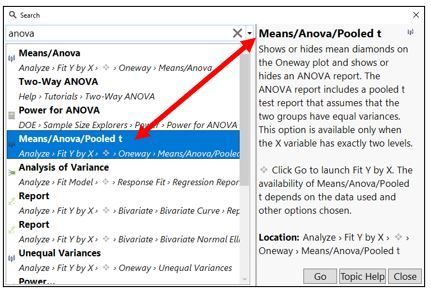
- Interactive JMP Search - Search In Context During Analysis (see video below)
- JMP Menu Items
- Red Triangle Menu Items
- Sample Data Table Names
- Sample Data Script Names
- Teaching Scripts
- Help Tutorials
- JMP Scripting Index
- JMP Document Library
- JMP User Community
- Custom Ordering - Create Custom Variable Order and Save as Preference (see video below)
- Create and Save Preferences Directly from Analyses
- Feature Version Display - ID When Features Were Introduced & Set Feature Version Filters (see video below)
- Plotting Multiple Responses in Graph Builder (see video below)
- Display Tabular Data in Graph Builder - Reference Lines and Statistics (see video below)
DOE Features for Experimenters
- Easy DOE - Guided & Flexible Modes for Different Levels of Experience (see video below)
- Design Explorer - Explore Many Design Options (see video below)
Quality and Process Improvement
- Design Space Profiler - Optimize Process for Your Design Space (see video below)
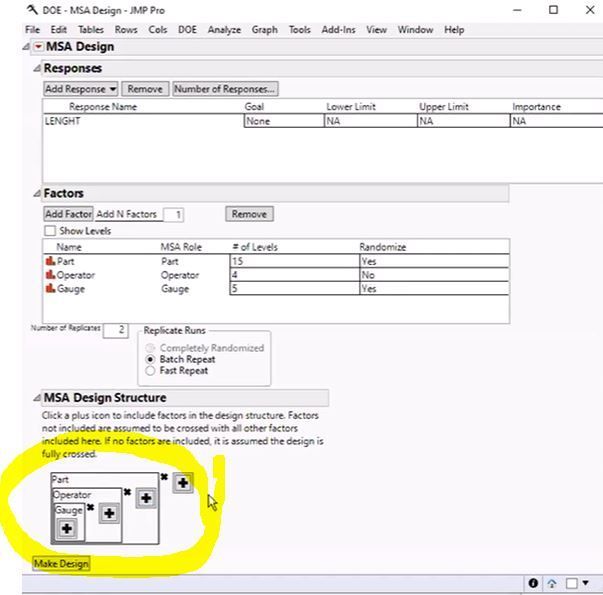
- MSA Design - MSA Design Assistance (see video below)
- MSA Improvements - Integrating EMP graphs w/ Gauge R&R tabular summaries (see video below)
- Process Screening Improvements (see video below)
JMP PRO FOR ADVANCED USERS
- Model Random Effects and Non-Normal Distributions (see video below)
- Generalized Linear Model - working with non-normal distributions such as Count (Poisson) and Proportions (Binomial)
- Mixed Model - working with random effects such as Blocking
- GLMM - Generalized Linear Model + Mixed Models
- Spectral Data Analysis (Functional Data Explorer Wavelets) (see video below)
- Model Screening Improvements (see video below)
Questions aswered by Mike Anderson @MikeD_Anderson during the live webinar:
Q: In Workflow Builder, if you add more data to the data table, and rerun the workflow, will the new summary statistics/analyses get updated with new charts/values?
A: Yes.
Q: Can we use the recorded workflow on a new set of data?
A: Yes. If the data table it’s expecting isn’t open it will prompt you for a new one. It will also prompt for any missing columns in the analysis.
Q: Can we import the JMP16 preferences to JMP17?
A: Yes, they’re brought in automatically when you install your new license to 17.
Q: Does JMP use and icon to mark platforms that have moved menu position in the current release?
A: No, it uses and icon to mark new capabilities/analysis platforms, not platforms that have moved menu location.
Q: Can I export Profilers so that non-JMP users can interact with the scenario building?
A: You can save to an HTML 5 report, JMP Public, JMP Live (if you license it).
Q: Re; MSA, will you define "gauge"? Is that the equipment or device you are using to measure the part?
A: It’s the tool used to make a measurement. The term comes from classical manufacturing where you have calipers and gauges.
Q: Can MSA show Anderson-Darling or something to indicate normal conformance of data?
A: That’s available as a test in the Distribution platform. You can learn more about it. The info on that test is found in JMP 17 documentation, but the test has been in there for a while.
Q: With the new capability of Graph Builder to handle data with multiple Response structure, was the Rows/Row Selection/Name Selection in Column function updated to "collect" multiple labels in the label column? Then the label column could be used like the multiple-response column that Hyde used in his example.
A: Yes. Multiple response data maps back to the data table and selects the rows that contain the selected response. So those features will work as normal.
Resources
- New features are available from JMP Help as a PDF file. Also attached to this post are ther release notes from JMP 17.2.
- Summary of What's New in JMP 17 and JMP Pro. 17.
Start:
Wed, Oct 19, 2022 05:47 PM EDT
End:
Wed, Oct 19, 2022 06:47 PM EDT
Upcoming Events
-
Getting More Value from Excel (and Other) Data
Nov 20Getting More Value from Excel (and Other) Data: Quickly clean, explore, and analyze data to boost efficiency and reduce prep time. Import complex... -
Assessing the Precision and Variability of Your Measurement System
Nov 13Understanding your measurement system is critical to determine if it is good enough to use for your quality analyses and how to improve it or work aro... -
Modeling Sensor and Spectral Data
Nov 6See how to analyze sequential measurement data when the measurements you want to analyze are not single points, but a range of points presented as cur...
0 Comments

- © 2026 JMP Statistical Discovery LLC. All Rights Reserved.
- Terms of Use
- Privacy Statement
- Contact Us