A useful tool for manipulating Boolean outputs, the ! (NOT) operator in JMP can also have other valuable applications, such as use with Contains() in the <<Select Where() message sent to JMP data tables. This blog post will explore the use of ! and how it might be useful in your JSL code.
First, let’s clarify here that we are discussing the use of ! as an operator and not as the syntactical tool used in escape sequences in quoted strings; in these instances, it does not take on the NOT meaning.
You can think of ! like any other operator in JMP. You are likely familiar with the most common ones: Add (+), Subtract (-), Multiply (*), Divide (/), etc. In a general sense, an operator is a one- or two-character symbol used to perform common arithmetic actions, compare values, construct lists, subscript into a data element, send messages, concatenate lists, scope names, glue expressions, and end expressions.
The ! character (often referred to as the “bang” character) in JMP is used in JSL code as an operator to indicate a logical NOT, which means, in the context of Boolean values (true or false), that it maps nonzero (or true) values to 0 (which means false) and maps 0 (0 or false) values to 1 (which means true).
Here are some simple examples of its use:
Ex 1:
x = 1;
!x;
//LOG RESULT: 0
Ex 2:
x = 0;
!x;
//LOG RESULT: 1
Ex 3:
!(1 < 2);
//LOG RESULT: 0
When grouping it with other operators, you can think of it as belonging with other “logical” operators such as OR (|) and AND (&), which are typically used in If() statements.
Ex 1:
x = 4;
//Check if x is NOT equal to 2 or 3
If( x != 2 & !(x == 3),
   Show("Not Equal to 2 or 3"),
   Show("Equal to 2 or 3")
);
//LOG RESULT: "Not Equal to 2 or 3"
Note: Notice here that you can assert NOT Equal with != or adding ! before the entire equality expression, such as !(x==3).
Ex 2:
str = "hello world";
//Check if str does NOT contain the letter "o"
If (!Contains(str,"o"),
	Show("Does not contain o"),
	Show("Contains o")
);
//LOG RESULT: "Contains o"
There are many situations where it might be helpful to use ! where it is not limited to your If() statements like above. We saw an example of using ! with Contains(), but let’s take it a bit further. A classic use of Contains() is in the context of a << Select Where() message, as demonstrated in this example:
dt = Open("$SAMPLE_DATA/Big Class.jmp");
//Select Rows in the table that do not contain the letter "A" for :name column
dt << Select Where (!Contains(:name, "A"));
This is the same as
dt = Open("$SAMPLE_DATA/Big Class.jmp");
//Select Rows in the table that do not contain the letter "A" for :name column
dt << Select Where (Contains(:name, "A")==0);
The first 'Select Where' statement above matches the output you would see if you went through the Rows window in the UI, navigated to Row Selection --> Select Where… and then selected the option from the dropdown in the dialog “does not contain”.
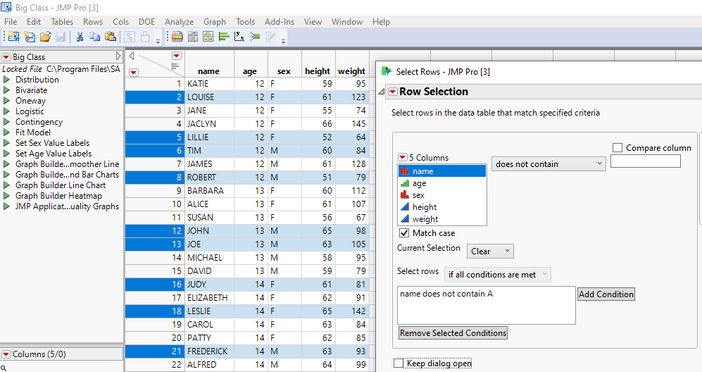
As you can see from the example above, the use of ! can make code more concise and readable; it also works better when you want to combine statements in your <<Select Where messages, like the one below:
dt = Open("$SAMPLE_DATA/Big Class.jmp");
//Select Rows in the table that do not contain the letter "A" and "E", and contain letter "I"
dt << Select Where (!Contains(:name, "A") & !Contains(:name,"E") & Contains(:name, "I"));
The NOT operator has many useful applications in JSL, so give it a try in your code. Of course, feel free to reach out to JMP Technical Support if you run into any issues or have questions!


You must be a registered user to add a comment. If you've already registered, sign in. Otherwise, register and sign in.