Rational subgrouping is the process of organizing the data into groups that were produced under the same/similar operating conditions. Several new subgrouping features were added to the Process Screening platform in JMP 16.1 to make this analysis more flexible and user friendly.
- You can now specify multiple subgroup columns.
- Individual and Moving Range charts with a subgroup role now create a detail table that includes sample label column(s).
- An option was added that gives you the flexibility to sort by subgroup columns or not.
To see examples of these new features, open Semiconductor Capability.jmp found in the sample data folder.
dt=open("$SAMPLE_DATA/Semiconductor Capability.jmp");
Multiple subgroup columns and sample label column
Select Analyze->Screening->Process Screening. Specify NPN1 as Process Variables. For Subgroup, specify lot_id and wafer.

In previous versions, only one subgroup column was allowed for Process Screening. Beginning with JMP 16.1, multiple subgroup columns can be defined for the Process Screening analysis. Click OK.
From the red triangle, select Save Details Table. In addition to a Subgroup column, the table contains columns for all subgroup variables: lot_id and wafer. In previous versions, only a Subgroup column was created. There was no identifying information for lot_id and wafer in the details table.

Sort by Subgroup
Select Analyze->Screening->Process Screening. Specify NPN1 as Process Variables. Specify wafer as Subgroup. Set the Control Chart Type to XBar and R.
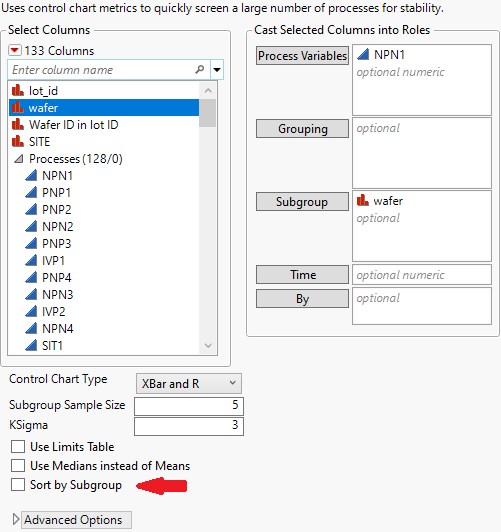
Notice the new checkbox in the lower left “Sort by Subgroup”. By default, this box is not checked meaning the data will not be sorted.
Click OK. From the red triangle at the top of the report, select Save Details Table.

We see that the first subgroup corresponds to wafer=1. The 25th subgroup also corresponds to wafer=1. This is because Process Screening did no sorting of the data. If you look back at the original data table, you will see a similar arrangement where wafer=1 for rows 1-5 and wafer=1 for rows 121-125.
Let’s compare this to checking the Sort by Subgroup box in the dialog. Select the original Semiconductor Capability data table. Select Analyze->Screening->Process Screening. Click Recall. You should have the same dialog as previously pictured. In this dialog box, check the box in the lower left for Sort by Subgroup before clicking OK.
Now when you select Save Details Table, you find that there is only 1 subgroup for wafer 1 for the NPN1 column.

Comparing the Process Screening results, you will find that the given statistics are different depending on the sorting options used. Rational subgroups define how the analysis is implemented.

Conclusion
JMP 16.1 provides more flexibility with regards to subgroup variables.
- Multiple subgroup variables can be defined.
- Detail tables from IMR charts with a subgroup variable contain a subgroup label column for each subgroup variable.
- The new Sort by Subgroup command determines if the platform sorts the data prior to the analysis or not.


You must be a registered user to add a comment. If you've already registered, sign in. Otherwise, register and sign in.