cancel
Showing results for 
Show  only  | Search instead for 
Did you mean: 
  • DownloadSemiconductor Toolkit: Tools to create wafer maps, add wafer geometry to graphics, explore die defects & compare wafers.
  • Discovery Summit 2026: Early User Edition - September 23-24.Register. It's free.
  • Use JMP Clinical with CDISC-compliant data. Review studies, ID safety and efficacy signals & communicate findings with interactive graphics. Register to see how. Aug. 27, 2 pm US ET.

JMP Wish List

We want to hear your ideas for improving JMP. Share them here.
Choose Language Hide Translation Bar

Label Alignment in Graph Builder

It would be great if labels in Graph Builder could be more easily aligned, e.g. by a right-click -> Align Labels, or Align Selected Labels (alongside an invisible vertical or horizontal axis). If something like this already exists, please give me a hint...


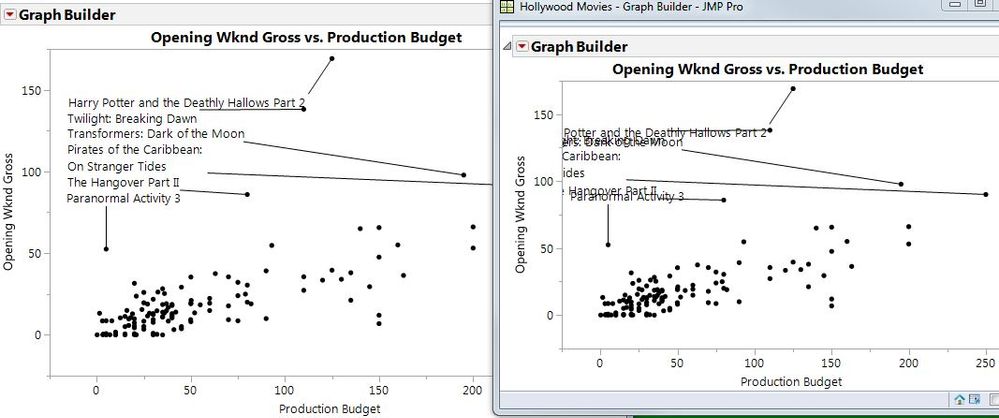
I often label e.g. two-dimensional outliers by their serial number, align labels to make them readable, resize the graph at some point, and then have to start over again (see the Hollywood Movies example below).


Maybe it could be possible to group selected labels (e.g. after alignment) and then move them around as one group of labels.

Or maybe after alignment, labels could be allocated their X and Y coordinates at that moment, and when resizing the graph, only font sizes for labels are adjusted for readability, but labels remain at their coordinates.
 

Labels.JPG

1 Comment
Ryan_Gilmore
Community Manager
Status changed to: Archived
We are archiving this request. If this is still important please comment with additional details and we will reopen. Thank you!