Use to perform automated variable selection in multiple linear or logistic regression models. The method is particular useful when there is a large number of candidate explanatory variables.
Stepwise Regression
- From an open table, select Analyze > Fit Model.
- Select a response variable from Select Columns and click Y.
- Select predictor variables and click Add.
- If desired, select a validation column (JMP® Pro only).
- Select Stepwise from the Personality drop-down menu.
- In the resulting Stepwise Fit window (below):
- Select a Stopping Rule.
- Select the step Direction (forward, backward or mixed).
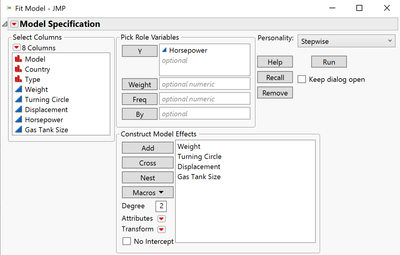 Car Physical Data.jmp (Help > Sample Data Library)
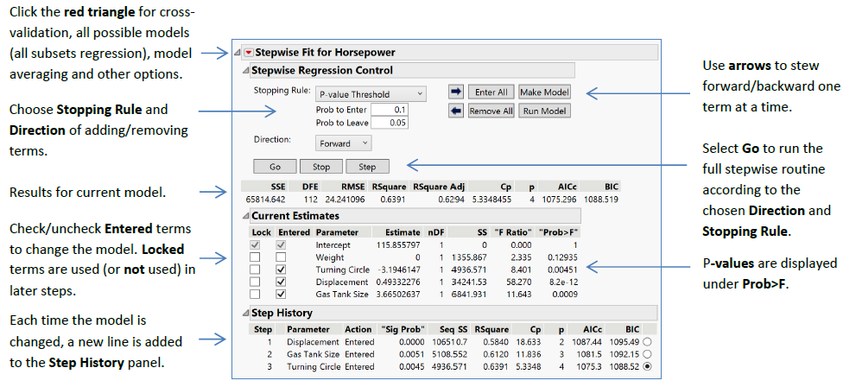
- For Forward regression, remove all terms, then click Step or Go.
- For Backward regression, enter all terms, then click Step or Go.
- The Mixed direction is only available with the p-value stopping rule.
- To run the model shown in the Current Estimates table, click Run Model.
JMP generates the Fit Model report.
- See the Multiple Linear Regression or Multiple Logistic Regression one-page guides for more details.
Visit Fitting Linear Models > Stepwise Regression Models in JMP Help to learn more.