This guide demonstrates three methods for calculating standardized values (z-scores) for a continuous variable.
Method 1 (Save Standardized)
- From an open JMP data table, select Analyze > Distribution.
- Select one or more continuous variables from Select Columns and click Y, Columns.
- Click OK to generate a histogram and descriptive statistics.
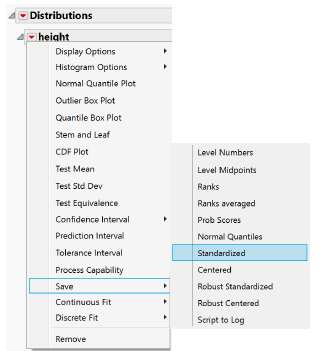
- Click on the red triangle for the variable, and select Save > Standardized. A new column of the standardized values will be
saved to the data table. The column Std height contains z-scores for height.
 Big Class.jmp (Help > Sample Data Folder)

Method 2 (Instant Formula)
- From an open JMP data table, right click on the column that you want to standardize and select New Formula Column > Distributional > Standardize. A new column of the standardized values will be created
in the data table.
To view the formula, right-click on the column header for this new column and select Formula.
Method 3 (Create Formula with Formula Editor)
- From an open JMP data table, select Cols > New Column.
- Under Column Name, assign a name for the column.
- Click Column Properties, and select Formula. This takes you to the JMP Formula Editor. A standardized value (z-score) is of the form:

- Create the formula. This will populate the column in the data table with standardized values for the variable. Below are two ways to create the standardized values in the Formula Editor. All functions in this example can be found under the “Statistical” functions.


Visit Using JMP > Create Formulas in JMP in JMP Help to learn more.