- Don’t miss your chance to experience Discovery Summit Europe at our best available rate! Early bird registration through 31 Oct.
- Graph Builder Toolbar streamlines interactive graphing. Creates shortcuts on Report and GraphBuilder Helpers toolbars. Download and install the extension.
- JMP will suspend normal business operations for our Rest and Recharge Day on Friday, October 2, 2026.
Regular business hours will resume on Monday, October 5, 2026.
- Subscribe to RSS Feed
- Mark Topic as New
- Mark Topic as Read
- Float this Topic for Current User
- Bookmark
- Subscribe
- Mute
- Printer Friendly Page
Discussions
Solve problems, and share tips and tricks with other JMP users.- User Community
- :
- Discussions
- :
- Re: how do i invert Unhide and unexclude rows based on values in few columns

- Mark as New
- Bookmark
- Subscribe
- Mute
- Subscribe to RSS Feed
- Get Direct Link
- Report Inappropriate Content
how do i invert Unhide and unexclude rows based on values in few columns
Hello,
I need some guidance here....
I have two columns (per_Change) and Step (it's a formula based values) and Per_Change column is sorted from -ve to +ve values.
In my script i need to know max rows so i created rank column from 1-14 (ascending order as attached image) and need to have atleast 8 rows (starting with highest rank).
Steps:
1. Exclude -ve values in Per_Change column
2. then in Col Step is based on some formula, and it will create some "-ve" and "+ve" and some "null" values. Hide and exclude all -ve values in col Step. the null values were already hidden and excluded based on Col Per_Change since formula will generate -ve values.
3. My requirement is to have atleast 8 values (descending order). In my example there are 6 clear row states (rank 9-14) (2 additional rows should be from descending i.e. unhide/unexclude rank 8 and 7 but should not include "null" values in a scenario if there are more null values and fewer -ve or +ve values in col Step).
Step 1 and 2, i am able to perform in JSL script but am having issues in enabling 2 additional rows.
I tried using lag function and also creating dummy columns to go enabling in reverse order but am having hard time for unselecting additional rows.
.
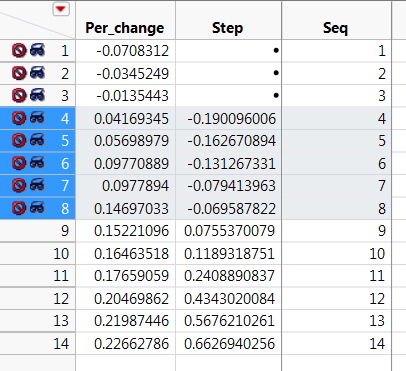
Thank you!
Accepted Solutions


- Mark as New
- Bookmark
- Subscribe
- Mute
- Subscribe to RSS Feed
- Get Direct Link
- Report Inappropriate Content
Re: how do i invert Unhide and unexclude rows based on values in few columns
CG, I attached a data table, named PerChangeExample to emulate your example.
Try this script
Names Default to Here(1);

dt = Data Table("PerChangeExample");
dt << select where(:Per_change < 0 | IsMissing(:Per_change) );
dt << exclude(1) << hide(1);
dt << select where(:Step < 0 | IsMissing(:Step) );
dt << exclude(1) << hide(1);
dt << clear select;

nexcl = nrow( dt << get excluded rows() );
if ( nrow(dt) - nexcl < 8,
   for(i = nexcl, i > nrow(dt) -8 , i--,
      if ( !IsMissing(:Step[i]),
            dt << Select Rows(i);
            dt << Exclude(0) << Hide(0);
            dt << clear select;
         )
    ); //end for i
); // end if

nexcl = nrow( dt << get excluded rows() );
if ( nrow(dt) - nexcl < 8, throw() ); //stop program execution if still not enough data.- Mark as New
- Bookmark
- Subscribe
- Mute
- Subscribe to RSS Feed
- Get Direct Link
- Report Inappropriate Content
Re: how do i invert Unhide and unexclude rows based on values in few columns
CG, I attached a data table, named PerChangeExample to emulate your example.
Try this script
Names Default to Here(1);

dt = Data Table("PerChangeExample");
dt << select where(:Per_change < 0 | IsMissing(:Per_change) );
dt << exclude(1) << hide(1);
dt << select where(:Step < 0 | IsMissing(:Step) );
dt << exclude(1) << hide(1);
dt << clear select;

nexcl = nrow( dt << get excluded rows() );
if ( nrow(dt) - nexcl < 8,
   for(i = nexcl, i > nrow(dt) -8 , i--,
      if ( !IsMissing(:Step[i]),
            dt << Select Rows(i);
            dt << Exclude(0) << Hide(0);
            dt << clear select;
         )
    ); //end for i
); // end if

nexcl = nrow( dt << get excluded rows() );
if ( nrow(dt) - nexcl < 8, throw() ); //stop program execution if still not enough data.- Mark as New
- Bookmark
- Subscribe
- Mute
- Subscribe to RSS Feed
- Get Direct Link
- Report Inappropriate Content
Re: how do i invert Unhide and unexclude rows based on values in few columns
Thank you for prompt reply...it works!
Recommended Articles
- © 2026 JMP Statistical Discovery LLC. All Rights Reserved.
- Terms of Use
- Privacy Statement
- Contact Us