Turn on suggestions
Auto-suggest helps you quickly narrow down your search results by suggesting possible matches as you type.
- Image to Table JMP extension imports single or batch images as data tables. Useful to extract curves from pictures or convert image data to curve data to use in analyses like Functional Data Explorer. Download and install the extension.
Options
- Subscribe to RSS Feed
- Mark Topic as New
- Mark Topic as Read
- Float this Topic for Current User
- Bookmark
- Subscribe
- Mute
- Printer Friendly Page
Discussions
- User Community
- :
- Software Administrators
- :
- Discussions
- :
- Where do I find the sample data files?

Level I
- Mark as New
- Bookmark
- Subscribe
- Mute
- Subscribe to RSS Feed
- Get Direct Link
- Report Inappropriate Content
Where do I find the sample data files?
Nov 21, 2014 09:47 AM
(21693 views)
Where do I find the sample data files?
1 ACCEPTED SOLUTION
Accepted Solutions


 Community Manager
Solution
- Mark as New
- Bookmark
- Subscribe
- Mute
- Subscribe to RSS Feed
- Get Direct Link
- Report Inappropriate Content
Re: Where do I find the sample data files?
Created:
Nov 21, 2014 10:49 AM
| Last Modified: Oct 18, 2016 3:05 PM
(27177 views)
| Posted in reply to message from olav_a_kvitaste 11-21-2014
Within JMP you can access the Sample Data from the Help menu.
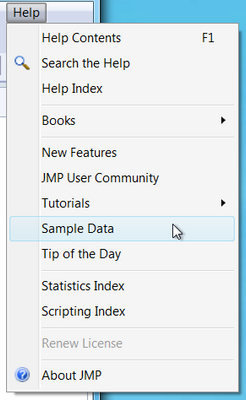
That will open the Sample Data Journal from which you can open and data table.
If you're wondering where the sample data tables are installed:
- On Windows - C:\Program Files\SAS\JMP[PRO]\[Version Number]\Samples\Data
- On the Macintosh - Macintosh HD ▸ Library ▸ Application Support ▸ JMP ▸ 11 ▸ Samples ▸ Data
I hope that helps.
-Jeff
-Jeff
1 REPLY 1
Community Manager
Solution
- Mark as New
- Bookmark
- Subscribe
- Mute
- Subscribe to RSS Feed
- Get Direct Link
- Report Inappropriate Content
Re: Where do I find the sample data files?
Created:
Nov 21, 2014 10:49 AM
| Last Modified: Oct 18, 2016 3:05 PM
(27177 views)
| Posted in reply to message from olav_a_kvitaste 11-21-2014
Within JMP you can access the Sample Data from the Help menu.
That will open the Sample Data Journal from which you can open and data table.
If you're wondering where the sample data tables are installed:
- On Windows - C:\Program Files\SAS\JMP[PRO]\[Version Number]\Samples\Data
- On the Macintosh - Macintosh HD ▸ Library ▸ Application Support ▸ JMP ▸ 11 ▸ Samples ▸ Data
I hope that helps.
-Jeff
-Jeff
- © 2026 JMP Statistical Discovery LLC. All Rights Reserved.
- Terms of Use
- Privacy Statement
- Contact Us