- JMP Statement Regarding Critical PHP Remote Code Execution Vulnerabilities (CVE-2026-109618, CVE-2026-109619)
- Don’t miss your chance to experience Discovery Summit Europe at our best available rate! Early bird registration through 31 Oct.
- Graph Builder Toolbar streamlines interactive graphing. Creates shortcuts on Report and GraphBuilder Helpers toolbars. Download and install the extension.
- Subscribe to RSS Feed
- Mark Topic as New
- Mark Topic as Read
- Float this Topic for Current User
- Bookmark
- Subscribe
- Mute
- Printer Friendly Page
Discussions
Solve problems, and share tips and tricks with other JMP users.- User Community
- :
- Discussions
- :
- Re: Row Problem

- Mark as New
- Bookmark
- Subscribe
- Mute
- Subscribe to RSS Feed
- Get Direct Link
- Report Inappropriate Content
Row Problem
I have a two part question. I am trying to change the value of previous rows in a column based on data in another column and I'm having a couple of problems. In the example below, when the status changes from Status1 to anything else (note green cells), I want to change the value of the cell 6 rows up (red cell).
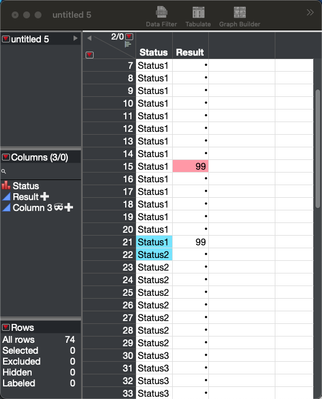
The column formula I am using is below.

As you can see from the table, the script does insert a 99 in Row()-6 but there is also a 99 in Row(). I can't figure out where that last one is coming from.
The larger problem I'm trying to solve here is that I want to fill in all cells at and above the status change with 99 (So Row(), Row()-1, Row()-2, ... , Row()-6 all are 99). I tried to use a FOR loop to do this (see second script below) but it does nothing.

As I'm sure you can tell, I'm pretty ignorant regarding JSL so any assistance on this would be greatly appreciated. Thanks much.
Accepted Solutions


- Mark as New
- Bookmark
- Subscribe
- Mute
- Subscribe to RSS Feed
- Get Direct Link
- Report Inappropriate Content
Re: Row Problem
As I don't have your data table this is just a guess
Names Default To Here(1);

dt = New Table("Untitled 2",
	Add Rows(23),
	Compress File When Saved(1),
	New Column("S",
		Character,
		"Nominal",
		Set Values(
			{"A", "A", "A", "A", "A", "A", "A", "A", "A", "A", "A", "A", "A", "A", "A", "A", "A",
			"A", "B", "B", "B", "C", "C"}
		)
	)
);

dt << New Column("R", Numeric, Continuous, Formula(
	If(:S == "A" & Lag(:S, -6) != "A",
		99
	, :S == "A",
		Lag(:R)
	);
));
You can use Lag to look for values behind and also forward.
- Mark as New
- Bookmark
- Subscribe
- Mute
- Subscribe to RSS Feed
- Get Direct Link
- Report Inappropriate Content
Re: Row Problem
As I don't have your data table this is just a guess
Names Default To Here(1);

dt = New Table("Untitled 2",
	Add Rows(23),
	Compress File When Saved(1),
	New Column("S",
		Character,
		"Nominal",
		Set Values(
			{"A", "A", "A", "A", "A", "A", "A", "A", "A", "A", "A", "A", "A", "A", "A", "A", "A",
			"A", "B", "B", "B", "C", "C"}
		)
	)
);

dt << New Column("R", Numeric, Continuous, Formula(
	If(:S == "A" & Lag(:S, -6) != "A",
		99
	, :S == "A",
		Lag(:R)
	);
));
You can use Lag to look for values behind and also forward.

- Mark as New
- Bookmark
- Subscribe
- Mute
- Subscribe to RSS Feed
- Get Direct Link
- Report Inappropriate Content
Re: Row Problem
Thanks, I also want to know it.
- Mark as New
- Bookmark
- Subscribe
- Mute
- Subscribe to RSS Feed
- Get Direct Link
- Report Inappropriate Content
Re: Row Problem
Thanks much for the help! I didn't know you could have negative lags. That's very handy.
Recommended Articles
- © 2026 JMP Statistical Discovery LLC. All Rights Reserved.
- Terms of Use
- Privacy Statement
- Contact Us