- Don’t miss your chance to experience Discovery Summit Europe at our best available rate! Early bird registration through 31 Oct.
- Graph Builder Toolbar streamlines interactive graphing. Creates shortcuts on Report and GraphBuilder Helpers toolbars. Download and install the extension.
- Subscribe to RSS Feed
- Mark Topic as New
- Mark Topic as Read
- Float this Topic for Current User
- Bookmark
- Subscribe
- Mute
- Printer Friendly Page
Discussions
Solve problems, and share tips and tricks with other JMP users.- User Community
- :
- Discussions
- :
- Odd Image File Types in Unzipped JmpAddin

- Mark as New
- Bookmark
- Subscribe
- Mute
- Subscribe to RSS Feed
- Get Direct Link
- Report Inappropriate Content
Odd Image File Types in Unzipped JmpAddin
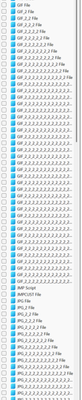
I am managing a JMPADDIN file for my team, and I noticed there are many odd files types like JPG_2_2_2_2_2_2_2_2_2. My concern is these are unnecessary and cause a bloated file size for the JMPADDIN. Why do these files exist? If unnecessary, what is the best way to remove them? What is the best way to prevent this in the future?
I am using JMP18.1.1, but I have seen this issue in other JMP versions.

Accepted Solutions

- Mark as New
- Bookmark
- Subscribe
- Mute
- Subscribe to RSS Feed
- Get Direct Link
- Report Inappropriate Content
Re: Odd Image File Types in Unzipped JmpAddin
I think the same thing happened to me when I saved a new version of one of my add-ins that used an image as its icon. If I forgot to remove the image from the add-in folder when saving, it seemed to re-add the image and keep the old one.
- Mark as New
- Bookmark
- Subscribe
- Mute
- Subscribe to RSS Feed
- Get Direct Link
- Report Inappropriate Content
Re: Odd Image File Types in Unzipped JmpAddin
I think the same thing happened to me when I saved a new version of one of my add-ins that used an image as its icon. If I forgot to remove the image from the add-in folder when saving, it seemed to re-add the image and keep the old one.
- Mark as New
- Bookmark
- Subscribe
- Mute
- Subscribe to RSS Feed
- Get Direct Link
- Report Inappropriate Content
Re: Odd Image File Types in Unzipped JmpAddin
Thanks @mmarchandFSLR. I will try this and mark your answer as the solution if this solve the issue.
Recommended Articles
- © 2026 JMP Statistical Discovery LLC. All Rights Reserved.
- Terms of Use
- Privacy Statement
- Contact Us