Turn on suggestions
Auto-suggest helps you quickly narrow down your search results by suggesting possible matches as you type.
- Don’t miss your chance to experience Discovery Summit Europe at our best available rate! Early bird registration through 31 Oct.
- Graph Builder Toolbar streamlines interactive graphing. Creates shortcuts on Report and GraphBuilder Helpers toolbars. Download and install the extension.
Options
- Subscribe to RSS Feed
- Mark Topic as New
- Mark Topic as Read
- Float this Topic for Current User
- Bookmark
- Subscribe
- Mute
- Printer Friendly Page
Discussions
Solve problems, and share tips and tricks with other JMP users.- User Community
- :
- Discussions
- :
- Re: Manually Ordering Categories in a Stacked Bar Chart

Level III
- Mark as New
- Bookmark
- Subscribe
- Mute
- Subscribe to RSS Feed
- Get Direct Link
- Report Inappropriate Content
Manually Ordering Categories in a Stacked Bar Chart
Created:
May 21, 2018 06:08 PM
| Last Modified: May 22, 2018 6:10 AM
(12060 views)
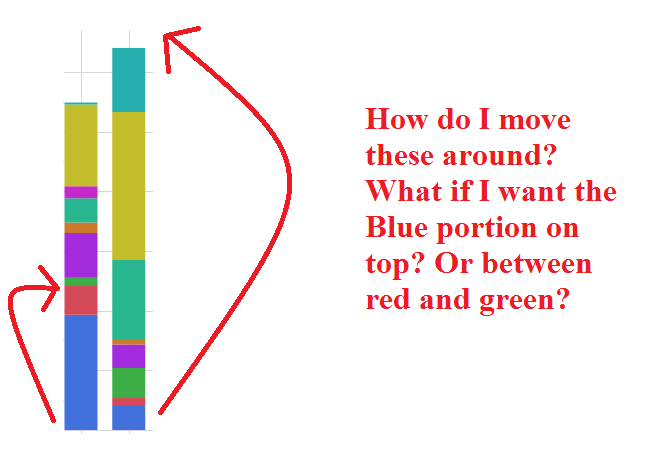
See question in attached photo. I currently have a stacked bar chart, but I would like to be able to order the categories differently in all the bars. Is there a way to do this in the GUI graph builder or in JSL? Thanks for your help!
1 ACCEPTED SOLUTION
Accepted Solutions


Super User
Solution
- Mark as New
- Bookmark
- Subscribe
- Mute
- Subscribe to RSS Feed
- Get Direct Link
- Report Inappropriate Content
Re: Manually Ordering Categories in a Stacked Bar Chart
You can use the column properties of Value Ordering and Value Colors to change the order and colors. Right click on the header for the column in question and select Column Ordering. A dialog box will open and you will be able to set the order to use. Do the same with Value Colors to change the colors.
Also, you should be able to change the colors just by clicking on the values in the legend
Also, you should be able to change the colors just by clicking on the values in the legend
Jim
4 REPLIES 4
Super User
Solution
- Mark as New
- Bookmark
- Subscribe
- Mute
- Subscribe to RSS Feed
- Get Direct Link
- Report Inappropriate Content
Re: Manually Ordering Categories in a Stacked Bar Chart
You can use the column properties of Value Ordering and Value Colors to change the order and colors. Right click on the header for the column in question and select Column Ordering. A dialog box will open and you will be able to set the order to use. Do the same with Value Colors to change the colors.
Also, you should be able to change the colors just by clicking on the values in the legend
Also, you should be able to change the colors just by clicking on the values in the legend
Jim
Level III
- Mark as New
- Bookmark
- Subscribe
- Mute
- Subscribe to RSS Feed
- Get Direct Link
- Report Inappropriate Content
Re: Manually Ordering Categories in a Stacked Bar Chart
Is there a way to change the order of the categories within the bars in the graph builder itself without using column ordering? I was able to change the order of the categories in the legend by using graph builder.
Super User
- Mark as New
- Bookmark
- Subscribe
- Mute
- Subscribe to RSS Feed
- Get Direct Link
- Report Inappropriate Content
Re: Manually Ordering Categories in a Stacked Bar Chart
Not that I am aware of it.
Jim
Level III
- Mark as New
- Bookmark
- Subscribe
- Mute
- Subscribe to RSS Feed
- Get Direct Link
- Report Inappropriate Content
Re: Manually Ordering Categories in a Stacked Bar Chart
I ended up using the JSL command
DataColumn << Set Property("Value Ordering", {"X", "Y", "Z"})to order the values the way I wanted before producing the graph, as you suggested. Thanks for your help!
Recommended Articles
- © 2026 JMP Statistical Discovery LLC. All Rights Reserved.
- Terms of Use
- Privacy Statement
- Contact Us