- Don’t miss your chance to experience Discovery Summit Europe at our best available rate! Early bird registration through 31 Oct.
- Graph Builder Toolbar streamlines interactive graphing. Creates shortcuts on Report and GraphBuilder Helpers toolbars. Download and install the extension.
- Subscribe to RSS Feed
- Mark Topic as New
- Mark Topic as Read
- Float this Topic for Current User
- Bookmark
- Subscribe
- Mute
- Printer Friendly Page
Discussions
Solve problems, and share tips and tricks with other JMP users.- User Community
- :
- Discussions
- :
- How to write a script to use a specific row for plot bar chart?

- Mark as New
- Bookmark
- Subscribe
- Mute
- Subscribe to RSS Feed
- Get Direct Link
- Report Inappropriate Content
How to write a script to use a specific row for plot bar chart?
Hi all!
I want to plot a bar chart using a specific row in the data table. The format of the table is as following:

I am not sure what is the best way to do it.
My thought is to select the row, save it to a new data table, transpose the new table and then use the two columns in the new data table to plot the bar. The script for this method is a little bit long so I would like to know whether there is a more simple way for it.
Any help will be greatly appreciated!
Accepted Solutions


- Mark as New
- Bookmark
- Subscribe
- Mute
- Subscribe to RSS Feed
- Get Direct Link
- Report Inappropriate Content
Re: How to write a script to use a specific row for plot bar chart?
The "values( dt[0, 5] )" refers to the values to be placed into the data table. The "dt[0,5]" referred to the 5th row in the data table. It actually was an error in my code, it should have been, "values( dt[5, 0] )". The "0" refers to all columns in the data table. I have changed my code below to meet the new requirement.
Names Default To Here( 1 );
dt = Open( "$SAMPLE_DATA/blood pressure.jmp" );
dt << delete columns( 1, 2 );

rowNum = 5;

colNames = dt << get column names(string);


dt2 = New Table( "example",
	New Column( "Label", character, values( colNames ) ),
New Column( "Row " || char( rowNum ), values( dt[rowNum, 0 ] ) ) );- Mark as New
- Bookmark
- Subscribe
- Mute
- Subscribe to RSS Feed
- Get Direct Link
- Report Inappropriate Content
Re: How to write a script to use a specific row for plot bar chart?
Here is a simple example of one way to do what you want
Names Default To Here( 1 );
dt = Open( "$SAMPLE_DATA/blood pressure.jmp" );
dt << delete columns( 1, 2 );


dt2 = New Table( "example", New Column( "transpose", values( dt[0, 5] ) ) );- Mark as New
- Bookmark
- Subscribe
- Mute
- Subscribe to RSS Feed
- Get Direct Link
- Report Inappropriate Content
Re: How to write a script to use a specific row for plot bar chart?
Thank you for your reply, Jim!
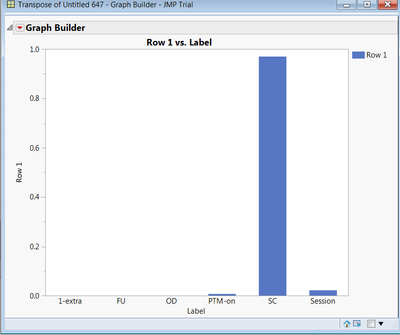
I don't get what "values( dt[0, 5] )" means here though. How can I just select the row that I want for the plot? For example, in my case, I only want to select row 132 as numeric values in y-axis for the plot and the names of the columns as the categorical names in the x-axis. Expected plot is as the following:
- Mark as New
- Bookmark
- Subscribe
- Mute
- Subscribe to RSS Feed
- Get Direct Link
- Report Inappropriate Content
Re: How to write a script to use a specific row for plot bar chart?
The "values( dt[0, 5] )" refers to the values to be placed into the data table. The "dt[0,5]" referred to the 5th row in the data table. It actually was an error in my code, it should have been, "values( dt[5, 0] )". The "0" refers to all columns in the data table. I have changed my code below to meet the new requirement.
Names Default To Here( 1 );
dt = Open( "$SAMPLE_DATA/blood pressure.jmp" );
dt << delete columns( 1, 2 );

rowNum = 5;

colNames = dt << get column names(string);


dt2 = New Table( "example",
	New Column( "Label", character, values( colNames ) ),
New Column( "Row " || char( rowNum ), values( dt[rowNum, 0 ] ) ) );Recommended Articles
- © 2026 JMP Statistical Discovery LLC. All Rights Reserved.
- Terms of Use
- Privacy Statement
- Contact Us