Turn on suggestions
Auto-suggest helps you quickly narrow down your search results by suggesting possible matches as you type.
- Don’t miss your chance to experience Discovery Summit Europe at our best available rate! Early bird registration through 31 Oct.
- Graph Builder Toolbar streamlines interactive graphing. Creates shortcuts on Report and GraphBuilder Helpers toolbars. Download and install the extension.
Options
- Subscribe to RSS Feed
- Mark Topic as New
- Mark Topic as Read
- Float this Topic for Current User
- Bookmark
- Subscribe
- Mute
- Printer Friendly Page
Discussions
Solve problems, and share tips and tricks with other JMP users.- User Community
- :
- Discussions
- :
- How to sent the point to the Backward in the Graph Builder

Level II
- Mark as New
- Bookmark
- Subscribe
- Mute
- Subscribe to RSS Feed
- Get Direct Link
- Report Inappropriate Content
How to sent the point to the Backward in the Graph Builder
Nov 24, 2018 09:58 AM
(6737 views)
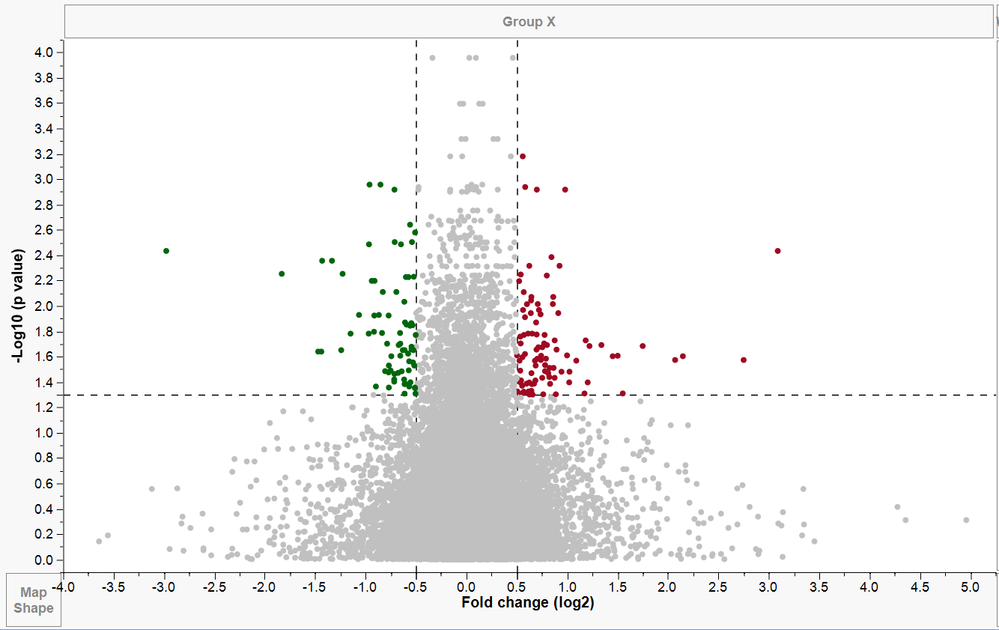
Due to the requirement, I add two reference lines(-0.5 and 0.5) in the X-axis, but I could not wholly see these two reference lines. How can I sent the point to the backward and bring these two reference lines to the front of points?
1 ACCEPTED SOLUTION
Accepted Solutions


Super User
Solution
- Mark as New
- Bookmark
- Subscribe
- Mute
- Subscribe to RSS Feed
- Get Direct Link
- Report Inappropriate Content
Re: How to sent the point to the Backward in the Graph Builder
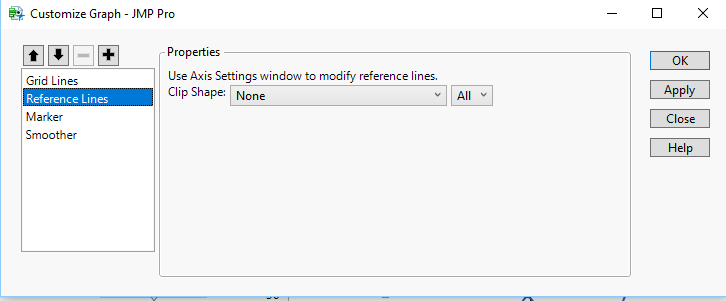
If you right click on the graph, you can select "Customize". In the Customize menu, you can move the displayed elements up and down in the menu which will move their display position.
Jim
1 REPLY 1
Super User
Solution
- Mark as New
- Bookmark
- Subscribe
- Mute
- Subscribe to RSS Feed
- Get Direct Link
- Report Inappropriate Content
Re: How to sent the point to the Backward in the Graph Builder
If you right click on the graph, you can select "Customize". In the Customize menu, you can move the displayed elements up and down in the menu which will move their display position.
Jim
Recommended Articles
- © 2026 JMP Statistical Discovery LLC. All Rights Reserved.
- Terms of Use
- Privacy Statement
- Contact Us