- Don’t miss your chance to experience Discovery Summit Europe at our best available rate! Early bird registration through 31 Oct.
- Graph Builder Toolbar streamlines interactive graphing. Creates shortcuts on Report and GraphBuilder Helpers toolbars. Download and install the extension.
- Subscribe to RSS Feed
- Mark Topic as New
- Mark Topic as Read
- Float this Topic for Current User
- Bookmark
- Subscribe
- Mute
- Printer Friendly Page
Discussions
Solve problems, and share tips and tricks with other JMP users.- User Community
- :
- Discussions
- :
- How to hide charts with no data when scripting to create Control Charts?

- Mark as New
- Bookmark
- Subscribe
- Mute
- Subscribe to RSS Feed
- Get Direct Link
- Report Inappropriate Content
How to hide charts with no data when scripting to create Control Charts?
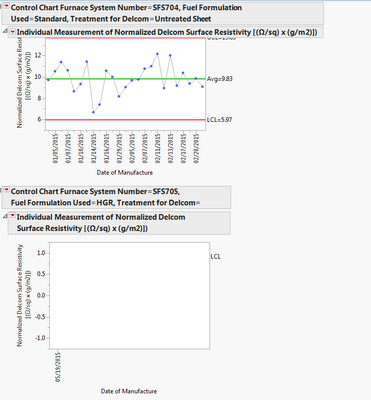
I was wondering if it is possible to script a control chart such that if there is no data, the graph will not show. I often run into the problem where there is no data present for one of the charts I am making so I want it to not be shown. A picture of this is shown below. The charts are scripted so they show up BY "Treatment for Delcom", a character column. In some cases, there are missing data points so the treatment shows up blank. I cannot hide the missing data points because it will affect my other graphs I am making.
Accepted Solutions


- Mark as New
- Bookmark
- Subscribe
- Mute
- Subscribe to RSS Feed
- Get Direct Link
- Report Inappropriate Content
Re: How to hide charts with no data when scripting to create Control Charts?
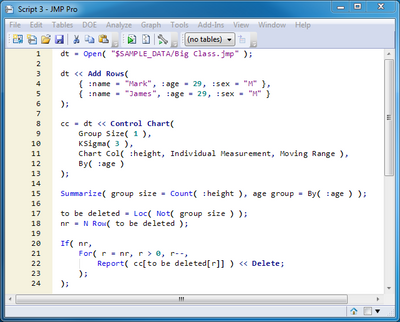
That came out really bad looking but I didn't notice before I clicked Add Reply!
Try this picture instead:

- Mark as New
- Bookmark
- Subscribe
- Mute
- Subscribe to RSS Feed
- Get Direct Link
- Report Inappropriate Content
Re: How to hide charts with no data when scripting to create Control Charts?
jsuls,
Thanks for the question.
Have you considered creating an indicator formula in a separate column that could tell JMP if there is a measure in the data column? Then it would be easy to include a script that only triggers off of the indicator column to ensure that only the control charts for groupings with actual data get generated!
Here is a quick example...see the attached "No Missing Control Chart.jmp" with scripting attached ("My Script"). First we created a simple datatable to control chart with 10 rows of data for machines A, B & C. However machine C did not record any data and per your instruction: 1) we don't want to plot a control chart for C when using Machine as a "By", but 2) we cannot just filter the data column to exclude missing values.
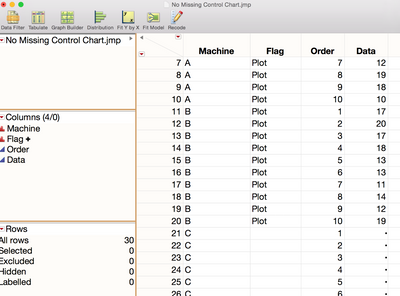
So instead of using a filter on the data column (which you indicated was not an option), we created a simple formula to make an indicator column to let JMP know if there is any data present, using conditional and comparison formula function elements. So here if there is any data in the row it will return a "Plot" label.
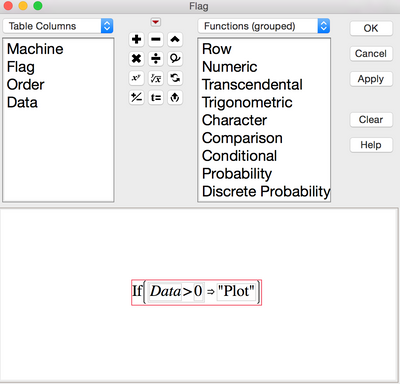
Now that we have this indicator "flagged" column, we can then use this as a trigger in our script to only get carts plotted for the A & B machines that have data and not plot the C machine that has no data recorded. So really only had to add a Where statement in my normal control chart script to trigger off of only the rows that had data (as indicated by the "Plot" label in our created flag column. The results gave me only the machine control chart plots that truly had data in it.
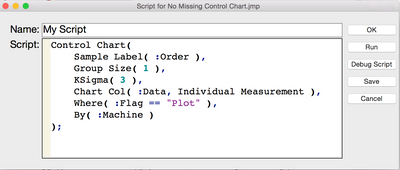
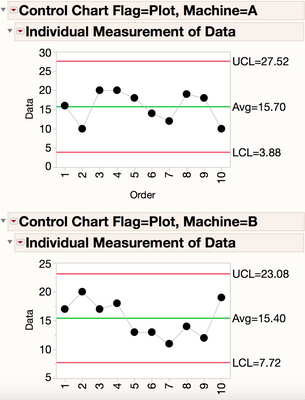
While there are probably many ways to go at it with JMP scripting, see if this simple approach might be an easy way to help straighten out your control charting universe.
Scott
- Mark as New
- Bookmark
- Subscribe
- Mute
- Subscribe to RSS Feed
- Get Direct Link
- Report Inappropriate Content
Re: How to hide charts with no data when scripting to create Control Charts?
A scripted solution would detect and delete the By groups with zero observations. This example illustrates this approach. It opens up the Big Class data tables and adds two rows in a new age group with missing height data. It launches XmR control charts on height by age, so the last pair of charts is empty. It uses the Summarize() function to determine the number of height observations in each group, locates groups with a zero count, and then systematically removes the associated pair of charts from the bottom.
= Open( "$SAMPLE_DATA/Big Class.jmp" );
<< Add Rows(
:name = "Mark", :age = 29, :sex = "M" },
:name = "James", :age = 29, :sex = "M" }
;
= dt << Control Chart(
1 ),
3 ),
:height, Individual Measurement, Moving Range ),
:age )
;
( group size = Count( :height ), age group = By( :age ) );
= Loc( Not( group size ) );
= N Row( to be deleted );
( nr,
For( r = nr, r > 0, r--,
Report( cc[to be deleted[r]] ) << Delete;
;
;
- Mark as New
- Bookmark
- Subscribe
- Mute
- Subscribe to RSS Feed
- Get Direct Link
- Report Inappropriate Content
Re: How to hide charts with no data when scripting to create Control Charts?
That came out really bad looking but I didn't notice before I clicked Add Reply!
Try this picture instead:
Recommended Articles
- © 2026 JMP Statistical Discovery LLC. All Rights Reserved.
- Terms of Use
- Privacy Statement
- Contact Us