- JMP Statement Regarding Critical PHP Remote Code Execution Vulnerabilities (CVE-2026-109618, CVE-2026-109619)
- Don’t miss your chance to experience Discovery Summit Europe at our best available rate! Early bird registration through 31 Oct.
- Graph Builder Toolbar streamlines interactive graphing. Creates shortcuts on Report and GraphBuilder Helpers toolbars. Download and install the extension.
- Subscribe to RSS Feed
- Mark Topic as New
- Mark Topic as Read
- Float this Topic for Current User
- Bookmark
- Subscribe
- Mute
- Printer Friendly Page
Discussions
Solve problems, and share tips and tricks with other JMP users.- User Community
- :
- Discussions
- :
- How to Extract few columns and save as .csv file ?

- Mark as New
- Bookmark
- Subscribe
- Mute
- Subscribe to RSS Feed
- Get Direct Link
- Report Inappropriate Content
How to Extract few columns and save as .csv file ?
i want to extract few columns and then save this as .csv file , i need a jmp script with does this
i will usually do tables >> tabulate (grouping columns ) >> make into data table and copy the columns to a csv file
Accepted Solutions


- Mark as New
- Bookmark
- Subscribe
- Mute
- Subscribe to RSS Feed
- Get Direct Link
- Report Inappropriate Content
Re: How to Extract few columns and save as .csv file ?
JMP will create for you most of the script that you need to do what you are wanting to do; In the example below, I am using the Semiconductor Capability data table from the Sample data tables provided under the Help pull down menu
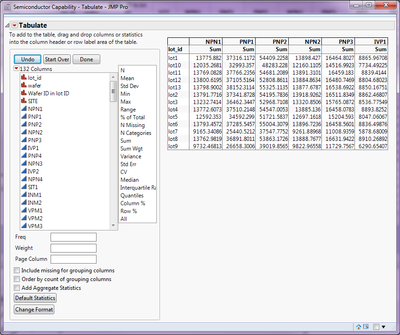
First you just need to run the Tabulate platform, setting it up the way you want it:
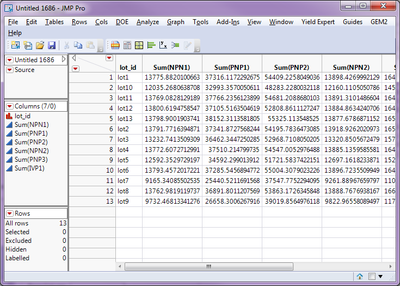
Then under the red triangle, select Make into Data Table
Most of the script that you will need, is contained in the Source code for that created the table. To get to it, click on the red triangle next to the "Source" entry in the Tables Panel at the left of the table:
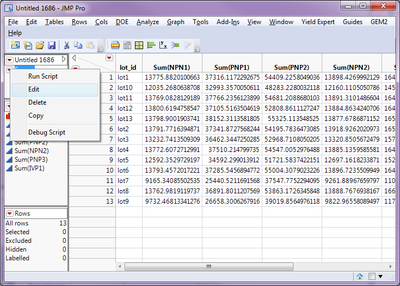
Select Edit and the script that produced the table is displayed
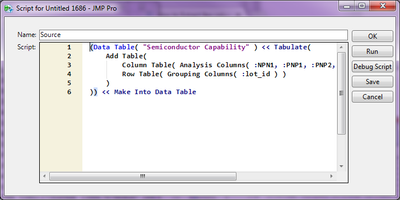
Cut and paste this into a JMP Script window (File==>New==>Script), and add the statement to save the new table
(Data Table( "Semiconductor Capability" ) << Tabulate(
Add Table(
Column Table( Analysis Columns( :NPN1, :PNP1, :PNP2, :NPN2, :PNP3, :IVP1 ) ),
Row Table( Grouping Columns( :lot_id ) )
)
)) << Make Into Data Table;
// Note the ";" added to the end of the above line
// Add the statement to save the data table as a .csv file
current data table() << Save As("C:\The Example.csv");
- Mark as New
- Bookmark
- Subscribe
- Mute
- Subscribe to RSS Feed
- Get Direct Link
- Report Inappropriate Content
Re: How to Extract few columns and save as .csv file ?
JMP will create for you most of the script that you need to do what you are wanting to do; In the example below, I am using the Semiconductor Capability data table from the Sample data tables provided under the Help pull down menu
First you just need to run the Tabulate platform, setting it up the way you want it:
Then under the red triangle, select Make into Data Table
Most of the script that you will need, is contained in the Source code for that created the table. To get to it, click on the red triangle next to the "Source" entry in the Tables Panel at the left of the table:
Select Edit and the script that produced the table is displayed
Cut and paste this into a JMP Script window (File==>New==>Script), and add the statement to save the new table
(Data Table( "Semiconductor Capability" ) << Tabulate(
Add Table(
Column Table( Analysis Columns( :NPN1, :PNP1, :PNP2, :NPN2, :PNP3, :IVP1 ) ),
Row Table( Grouping Columns( :lot_id ) )
)
)) << Make Into Data Table;
// Note the ";" added to the end of the above line
// Add the statement to save the data table as a .csv file
current data table() << Save As("C:\The Example.csv");
Recommended Articles
- © 2026 JMP Statistical Discovery LLC. All Rights Reserved.
- Terms of Use
- Privacy Statement
- Contact Us