- Don’t miss your chance to experience Discovery Summit Europe at our best available rate! Early bird registration through 31 Oct.
- Graph Builder Toolbar streamlines interactive graphing. Creates shortcuts on Report and GraphBuilder Helpers toolbars. Download and install the extension.
- Subscribe to RSS Feed
- Mark Topic as New
- Mark Topic as Read
- Float this Topic for Current User
- Bookmark
- Subscribe
- Mute
- Printer Friendly Page
Discussions
Solve problems, and share tips and tricks with other JMP users.- User Community
- :
- Discussions
- :
- How do I split text in a cell into rows without a delimiter?

- Mark as New
- Bookmark
- Subscribe
- Mute
- Subscribe to RSS Feed
- Get Direct Link
- Report Inappropriate Content
How do I split text in a cell into rows without a delimiter?
I would like to split data in my rows from looking like this:
| Start Letter No. | End Letter No. | Letter Sequence | Delta D |
| 30 | 33 | ABCD | 0.065 |
to looking like this:
| Start Letter No. | End Letter No. | Letter Sequence | Delta D |
| 30 | 30 | A | 0 |
| 31 | 31 | B | 0.065 |
| 32 | 32 | C | 0.065 |
| 33 | 33 | D | 0.065 |
Where the sequence of letters in the text are split into a single letter in each row and this is associated with it's corresponding number in the sequence. The 'Delta D' should be 0 for the first letter in every sequence but the same number as the original row for all the other letters. I would really like a way to do this without coding so that I can do it/understand it manually.
Thanks!
Accepted Solutions


- Mark as New
- Bookmark
- Subscribe
- Mute
- Subscribe to RSS Feed
- Get Direct Link
- Report Inappropriate Content
Re: How do I split text in a cell into rows without a delimiter?
If you don't want to manually fix a lot of things, I think you will at minimum need some formulas. Below is one possible option:
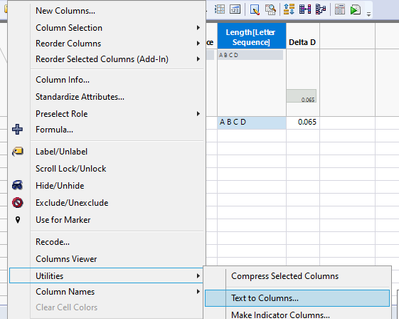
Create delimiters with new formula column
Concat Items(Words(:Letter Sequence, ""), " ")Then use text to columns with the new delimiter character
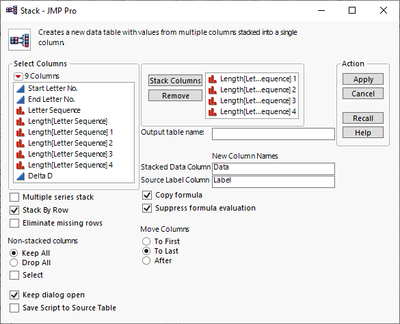
Stack the data table with the new columns
Create new formula column to get the correct Start Letter numbers
Col Min(:Start Letter No., :Letter Sequence) + Col Cumulative Sum(1, :Letter Sequence)Copy that just created column to other column to get End Letter No (or use formula)
Then you need one more formula, to change first letter's Delta D to 0
If(Row() == Col Min(Row(), :Letter Sequence),
	0,
	:Delta D
)
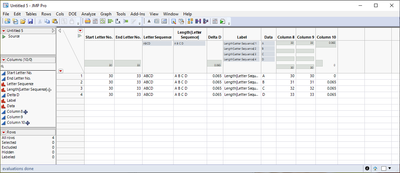
Finally cleanup column names to match what you want
- Mark as New
- Bookmark
- Subscribe
- Mute
- Subscribe to RSS Feed
- Get Direct Link
- Report Inappropriate Content
Re: How do I split text in a cell into rows without a delimiter?
If you don't want to manually fix a lot of things, I think you will at minimum need some formulas. Below is one possible option:
Create delimiters with new formula column
Concat Items(Words(:Letter Sequence, ""), " ")Then use text to columns with the new delimiter character
Stack the data table with the new columns
Create new formula column to get the correct Start Letter numbers
Col Min(:Start Letter No., :Letter Sequence) + Col Cumulative Sum(1, :Letter Sequence)Copy that just created column to other column to get End Letter No (or use formula)
Then you need one more formula, to change first letter's Delta D to 0
If(Row() == Col Min(Row(), :Letter Sequence),
	0,
	:Delta D
)
Finally cleanup column names to match what you want
Recommended Articles
- © 2026 JMP Statistical Discovery LLC. All Rights Reserved.
- Terms of Use
- Privacy Statement
- Contact Us