Turn on suggestions
Auto-suggest helps you quickly narrow down your search results by suggesting possible matches as you type.
- Don’t miss your chance to experience Discovery Summit Europe at our best available rate! Early bird registration through 31 Oct.
- Graph Builder Toolbar streamlines interactive graphing. Creates shortcuts on Report and GraphBuilder Helpers toolbars. Download and install the extension.
Options
- Subscribe to RSS Feed
- Mark Topic as New
- Mark Topic as Read
- Float this Topic for Current User
- Bookmark
- Subscribe
- Mute
- Printer Friendly Page
Discussions
Solve problems, and share tips and tricks with other JMP users.- User Community
- :
- Discussions
- :
- How do I download images in bulk with JSL and save them with the name of the spe...
Level VIII
- Mark as New
- Bookmark
- Subscribe
- Mute
- Subscribe to RSS Feed
- Get Direct Link
- Report Inappropriate Content
How do I download images in bulk with JSL and save them with the name of the specified column?
Created:
Feb 24, 2020 09:24 AM
| Last Modified: Feb 24, 2020 6:29 AM
(4013 views)
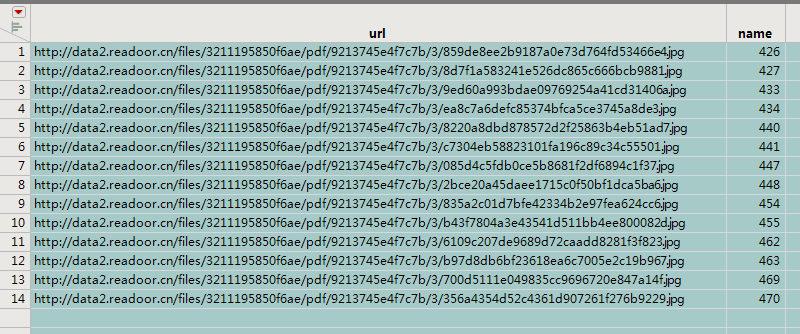
For example, download the attached links and save these pictures to the C: directory.
Thanks!
1 ACCEPTED SOLUTION
Accepted Solutions


Super User
Solution
- Mark as New
- Bookmark
- Subscribe
- Mute
- Subscribe to RSS Feed
- Get Direct Link
- Report Inappropriate Content
Re: How do I download images in bulk with JSL and save them with the name of the specified column?
Created:
Feb 24, 2020 10:02 AM
| Last Modified: Feb 24, 2020 7:09 AM
(4002 views)
| Posted in reply to message from lwx228 02-24-2020
Here is a very simple script that I believe will do what you want
Names Default To Here( 1 );

// Create a list of all of the images
imgList = {"http://data2.readoor.cn/files/3211195850f6ae/pdf/9213745e4f7c7b/3/859de8ee2b9187a0e73d764fd53466e4.jpg",
"http://data2.readoor.cn/files/3211195850f6ae/pdf/9213745e4f7c7b/3/.........",
"http://data2.readoor.cn/files/3211195850f6ae/pdf/9213745e4f7c7b/3/........."};

// Read in and write each of the images
For( i = 1, i <= N Items( imgList ), i++,
	img = Open( imgList[i], jpg );
	img << Save Image( "C:\image" || Char( i ) || ".jpg", jpg );
);
The Open() and Save Image() functions are Documented with examples in the Scripting Index.
Jim
3 REPLIES 3
Super User
Solution
- Mark as New
- Bookmark
- Subscribe
- Mute
- Subscribe to RSS Feed
- Get Direct Link
- Report Inappropriate Content
Re: How do I download images in bulk with JSL and save them with the name of the specified column?
Created:
Feb 24, 2020 10:02 AM
| Last Modified: Feb 24, 2020 7:09 AM
(4003 views)
| Posted in reply to message from lwx228 02-24-2020
Here is a very simple script that I believe will do what you want
Names Default To Here( 1 );

// Create a list of all of the images
imgList = {"http://data2.readoor.cn/files/3211195850f6ae/pdf/9213745e4f7c7b/3/859de8ee2b9187a0e73d764fd53466e4.jpg",
"http://data2.readoor.cn/files/3211195850f6ae/pdf/9213745e4f7c7b/3/.........",
"http://data2.readoor.cn/files/3211195850f6ae/pdf/9213745e4f7c7b/3/........."};

// Read in and write each of the images
For( i = 1, i <= N Items( imgList ), i++,
	img = Open( imgList[i], jpg );
	img << Save Image( "C:\image" || Char( i ) || ".jpg", jpg );
);
The Open() and Save Image() functions are Documented with examples in the Scripting Index.
Jim
Level VIII
- Mark as New
- Bookmark
- Subscribe
- Mute
- Subscribe to RSS Feed
- Get Direct Link
- Report Inappropriate Content
Re: How do I download images in bulk with JSL and save them with the name of the specified column?
- Thank Jim!
I used to write it this way, but it didn't work.
request = New HTTP Request(	Url("http://data2.readoor.cn/files/3211195850f6ae/pdf/2977675e4e6cb5/3/f0df50279eeaa6465bfaf4e93525e81a.jpg",jpg),
	Method( "GET" ),
);
img  = request << Send;
img << SaveImage( "C:/1.jpg", jpg );
Level VIII
- Mark as New
- Bookmark
- Subscribe
- Mute
- Subscribe to RSS Feed
- Get Direct Link
- Report Inappropriate Content
Re: How do I download images in bulk with JSL and save them with the name of the specified column?
dt=Current Data Table();
imgList = Column( "url" ) << get values;
For( i = 1, i <= N Row(dt), i++,
	img = Open( imgList[i], jpg );
	img << Save Image( "C:\image" || Char( i ) || ".jpg", jpg );
);Recommended Articles
- © 2026 JMP Statistical Discovery LLC. All Rights Reserved.
- Terms of Use
- Privacy Statement
- Contact Us