- Don’t miss your chance to experience Discovery Summit Europe at our best available rate! Early bird registration through 31 Oct.
- Image to Table JMP extension imports single or batch images as data tables. Useful to extract curves from pictures or convert image data to curve data to use in analyses like Functional Data Explorer. Download and install the extension.
- Subscribe to RSS Feed
- Mark Topic as New
- Mark Topic as Read
- Float this Topic for Current User
- Bookmark
- Subscribe
- Mute
- Printer Friendly Page
Discussions
Solve problems, and share tips and tricks with other JMP users.- User Community
- :
- Discussions
- :
- Re: How do I create a new table avoiding duplicates.

- Mark as New
- Bookmark
- Subscribe
- Mute
- Subscribe to RSS Feed
- Get Direct Link
- Report Inappropriate Content
How do I create a new table avoiding duplicates.
In JMP Pro 16.0 I have a table with three columns and multiple rows. The columns are named: ID, Amount and Results. The ID values are Characters whereas the Amounts and Results values are numbers. In some cases the ID is one unique id-code for example 3333. In some cases the same ID for example 3334 is duplicated in several rows and each row has their unique values of Amount and Results.
I would like to create a new table where I would like to include the unique id-codes including the values for Amount and Results. However, if there are duplicate ID-codes I would like to include only ID, Amount and Results with the ID with the lowest value of Amount as well as the Results value.
Would appreciate very much for how I should do that. I am at advanced amateur level and know how to write JSL scripts.
Sincerely yours
Lars Enochsson
Professor of Surgery
Karolinska Institutet
Stockholm,
Sweden
Accepted Solutions


- Mark as New
- Bookmark
- Subscribe
- Mute
- Subscribe to RSS Feed
- Get Direct Link
- Report Inappropriate Content
Re: How do I create a new table avoiding duplicates.
Hello Lars,
In response to your question- while this could be done with scripting, it is not necessary.
A column formula can create an indicator. From this select matching, where the Flag=1. Then Tables menu> Subset, selected rows....
I will use sample data file Big Class, with "Age" as an ID that has duplicates. This is a ordinal value, but the same formula will work with characters.
We will flag the Minimum "Height" within the group of similar "age" in a similar way that you are looking for the minimum "amount" per "ID"
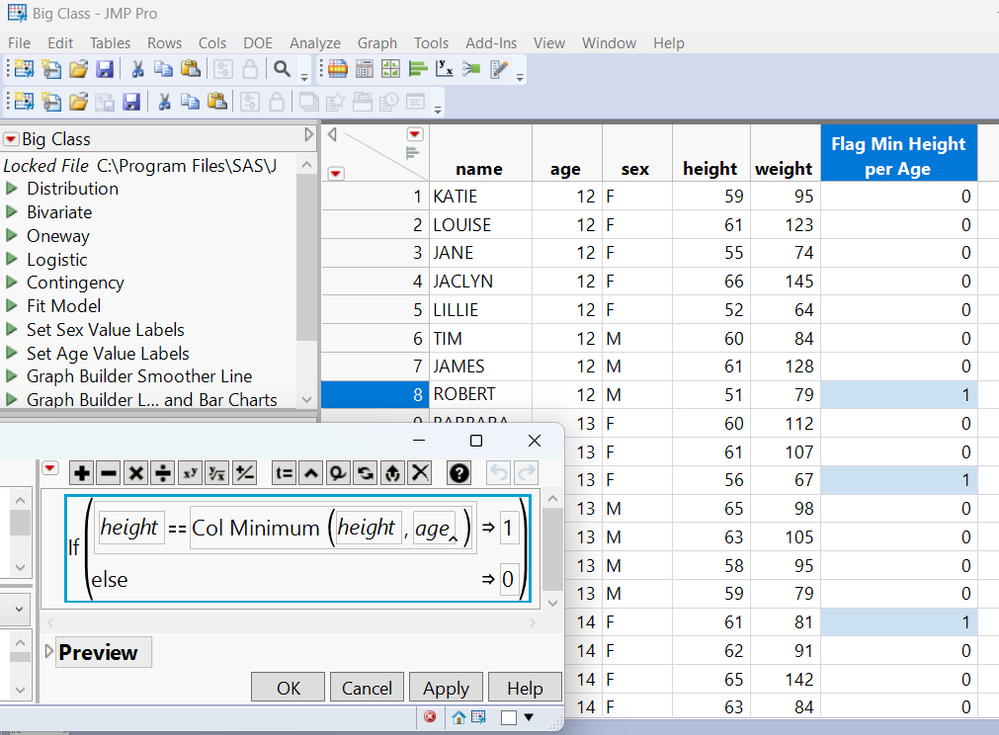
These steps could be recorded with workflow builder in order to make a script.

- Mark as New
- Bookmark
- Subscribe
- Mute
- Subscribe to RSS Feed
- Get Direct Link
- Report Inappropriate Content
Re: How do I create a new table avoiding duplicates.
Please see the documentation for the Tables > Summary command. You can simply ask for the Minimum value by ID.
- Mark as New
- Bookmark
- Subscribe
- Mute
- Subscribe to RSS Feed
- Get Direct Link
- Report Inappropriate Content
Re: How do I create a new table avoiding duplicates.
Thank you for the swift answer. However, it did not completely solve the problem. The thing is that if I have a table like this
ID Amount Results
John 10 20
George 5 43
George 10 24
George 15 32
Matt 40 60
Matt 70 35
I would like to create a new table with the unique ID as well as with the lowest amount and the corresponding Results number. The new table should look like this
ID Amount Results
John 10 20
George 5 43
Matt 40 60
Sincerely yours
Lars


- Mark as New
- Bookmark
- Subscribe
- Mute
- Subscribe to RSS Feed
- Get Direct Link
- Report Inappropriate Content
Re: How do I create a new table avoiding duplicates.
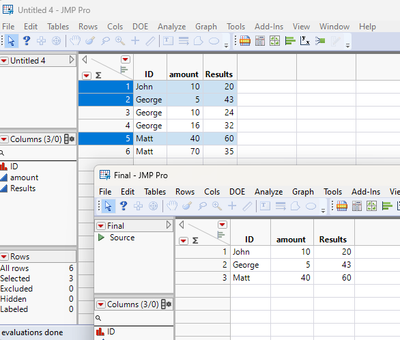
Here is a little script that seems to do what you want
Names Default To Here( 1 );
dt = Current Data Table();

dt << select where( :amount == Col Min( :amount, :id ) );

dtFinal = dt << subset(
	selected rows( 1 ),
	selected columns( 0 ),
	output table( "Final" )
);
- Mark as New
- Bookmark
- Subscribe
- Mute
- Subscribe to RSS Feed
- Get Direct Link
- Report Inappropriate Content
Re: How do I create a new table avoiding duplicates.
Hello Lars,
In response to your question- while this could be done with scripting, it is not necessary.
A column formula can create an indicator. From this select matching, where the Flag=1. Then Tables menu> Subset, selected rows....
I will use sample data file Big Class, with "Age" as an ID that has duplicates. This is a ordinal value, but the same formula will work with characters.
We will flag the Minimum "Height" within the group of similar "age" in a similar way that you are looking for the minimum "amount" per "ID"
These steps could be recorded with workflow builder in order to make a script.

- Mark as New
- Bookmark
- Subscribe
- Mute
- Subscribe to RSS Feed
- Get Direct Link
- Report Inappropriate Content
Re: How do I create a new table avoiding duplicates.
An alternative (not necessarily easier but might be and does not require scripting) is to use Tabulate with ID as the row and using minimum Amount in the body of the table. Then Make into Data Table and then join that back to the original table, dropping multiples in the with table but bringing in the column for Results. In the Join Tables, match on both the ID and the Amount columns.
Recommended Articles
- © 2026 JMP Statistical Discovery LLC. All Rights Reserved.
- Terms of Use
- Privacy Statement
- Contact Us