- Don’t miss your chance to experience Discovery Summit Europe at our best available rate! Early bird registration through 31 Oct.
- Graph Builder Toolbar streamlines interactive graphing. Creates shortcuts on Report and GraphBuilder Helpers toolbars. Download and install the extension.
- Subscribe to RSS Feed
- Mark Topic as New
- Mark Topic as Read
- Float this Topic for Current User
- Bookmark
- Subscribe
- Mute
- Printer Friendly Page
Discussions
Solve problems, and share tips and tricks with other JMP users.- User Community
- :
- Discussions
- :
- Graph Labels as Base-Exponent

- Mark as New
- Bookmark
- Subscribe
- Mute
- Subscribe to RSS Feed
- Get Direct Link
- Report Inappropriate Content
Graph Labels as Base-Exponent
Hi,
Couldn't find a format that can show a graph axis labels as powers of 10. The Scientific format or Engineering format show the labels like 1e-2 or 10e-3.
I am looking to write them as base-exponent type.
Is this possible?
Regards,
Saeid
- Tags:
- Mass Customization


- Mark as New
- Bookmark
- Subscribe
- Mute
- Subscribe to RSS Feed
- Get Direct Link
- Report Inappropriate Content
Re: Graph Labels as Base-Exponent
Have you explored the Axis Settings for the setting of the type of axis?

- Mark as New
- Bookmark
- Subscribe
- Mute
- Subscribe to RSS Feed
- Get Direct Link
- Report Inappropriate Content
Re: Graph Labels as Base-Exponent
Of course. This format is for log scales, to make something like this.

- Mark as New
- Bookmark
- Subscribe
- Mute
- Subscribe to RSS Feed
- Get Direct Link
- Report Inappropriate Content
Re: Graph Labels as Base-Exponent
I approximated your desired Axis scaling by taking the log of the data, and then applying the Value Labels column property to the data. I used the Allow Ranges

Then I just plotted the data
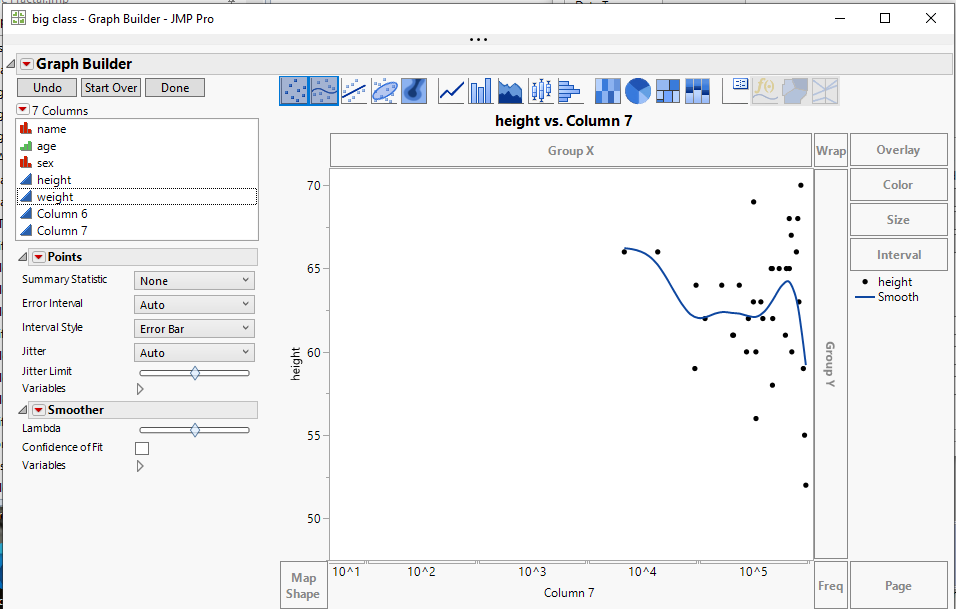
It isn't exactly what you want, but it might be useful. Others in the community may have a better solution

- Mark as New
- Bookmark
- Subscribe
- Mute
- Subscribe to RSS Feed
- Get Direct Link
- Report Inappropriate Content
Re: Graph Labels as Base-Exponent
This is not a good solution. Can any tech person from jmp solve the issue?


- Mark as New
- Bookmark
- Subscribe
- Mute
- Subscribe to RSS Feed
- Get Direct Link
- Report Inappropriate Content
Re: Graph Labels as Base-Exponent
I am not sure if this result is what you want. Here is weight versus height from Big Class example.

I created a new variable, height 2, by applying the Log10() function to height. The name is arbitrary but cannot be height. Now the axis is exponent. This example has a small range, but you can use the axis settings to round the value displayed to suit your need.

Recommended Articles
- © 2026 JMP Statistical Discovery LLC. All Rights Reserved.
- Terms of Use
- Privacy Statement
- Contact Us