cancel
Showing results for 
Show  only  | Search instead for 
Did you mean: 
  • Learn how to build custom Python data connectors and further customize JMP’s Data Connector Framework with the Python Data Connector Demo, available now in the JMP Marketplace!
  • See how to create experiments to support product design and ID useful product features. Register for June 12 webinar, 2pm US Eastern Time.

Discussions

Solve problems, and share tips and tricks with other JMP users.
Choose Language Hide Translation Bar
jac865
Level I

Graph Builder: How do I only display categories with values for each group x

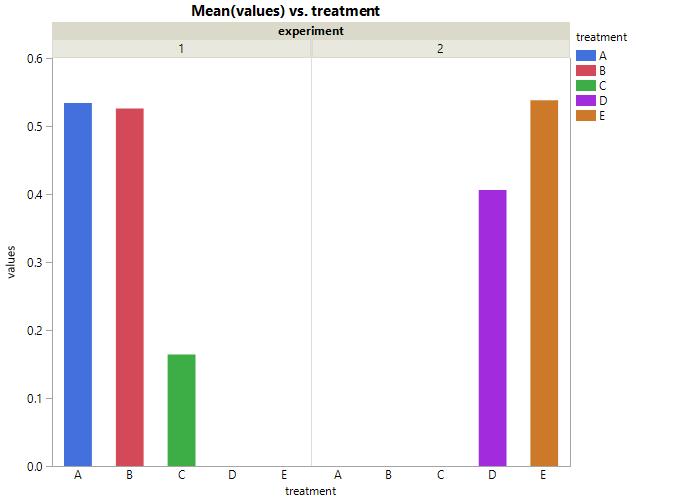
here's what i've got:

jac865_0-1585876750021.png

clearly i don't want to display all treatments for each experiment. D and E were not in experiment 1 and A-C were not in experiment 2. how do i display only treatments with values?

-->

treatmentexperimentvalue
A10.97
A10.39
A10.49
A10.44
A10.38
B10.73
B10.72
B11.02
B10.07
B10.09
C10.23
C10.2
C10.1
C10.22
C10.07
D20.29
D20.18
D20.13
D20.57
D20.86
E20.68
E20.34
E20.46
E20.71
E20.5


help?

1 REPLY 1
txnelson
Super User

Re: Graph Builder: How do I only display categories with values for each group x

You can get the results by having a 2 level x axis and Overlaying by treatment
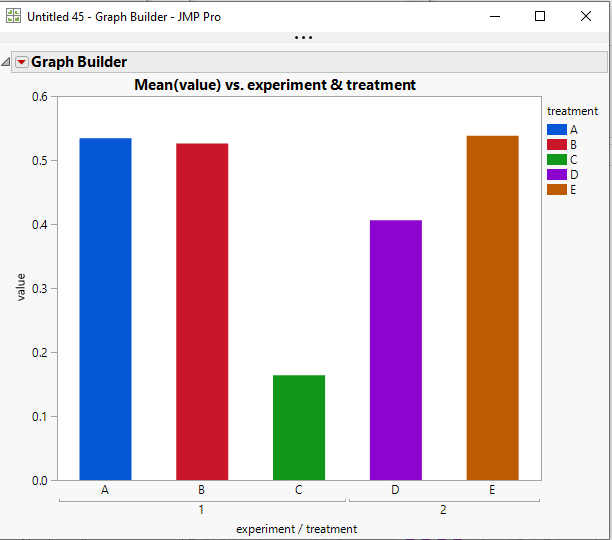
double.PNG


Graph Builder(
	Size( 531, 464 ),
	Show Control Panel( 0 ),
	Variables(
		X( :experiment ),
		X( :treatment, Position( 1 ) ),
		Y( :value ),
		Overlay( :treatment )
	),
	Elements( Bar( X( 1 ), X( 2 ), Y, Legend( 13 ) ) )
);
Jim

Recommended Articles