Turn on suggestions
Auto-suggest helps you quickly narrow down your search results by suggesting possible matches as you type.
- Don’t miss your chance to experience Discovery Summit Europe at our best available rate! Early bird registration through 31 Oct.
- Graph Builder Toolbar streamlines interactive graphing. Creates shortcuts on Report and GraphBuilder Helpers toolbars. Download and install the extension.
Options
- Subscribe to RSS Feed
- Mark Topic as New
- Mark Topic as Read
- Float this Topic for Current User
- Bookmark
- Subscribe
- Mute
- Printer Friendly Page
Discussions
Solve problems, and share tips and tricks with other JMP users.- User Community
- :
- Discussions
- :
- Re: Filter value to grah name

Level I
- Mark as New
- Bookmark
- Subscribe
- Mute
- Subscribe to RSS Feed
- Get Direct Link
- Report Inappropriate Content
Filter value to grah name
Created:
Apr 30, 2022 11:50 PM
| Last Modified: Jun 9, 2023 9:58 AM
(2977 views)
Hi. Can anyone please help me with a script to name my graph with the value of my filter. Thanks!
4 REPLIES 4


Super User
- Mark as New
- Bookmark
- Subscribe
- Mute
- Subscribe to RSS Feed
- Get Direct Link
- Report Inappropriate Content
Re: Filter value to grah name
Could you provide more information? Which graph you want to name and how you want to name it?
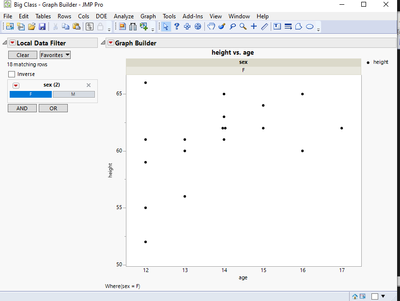
In general I use Group X for "naming" my graphs when I have Local Data Filter. This helps users to see how it has been filtered, especially helpful if there is lots of options.
-Jarmo
Level I
- Mark as New
- Bookmark
- Subscribe
- Mute
- Subscribe to RSS Feed
- Get Direct Link
- Report Inappropriate Content
Re: Filter value to grah name
Thanks for the reply. In your example, I would like to take the graph title "height vs. age" and replace it with the selected filter "F".
Thanks again!
Super User
- Mark as New
- Bookmark
- Subscribe
- Mute
- Subscribe to RSS Feed
- Get Direct Link
- Report Inappropriate Content
Re: Filter value to grah name
This will require scripting to my knowledge and it wasn't as simple as I thought it would be... hopefully there are easier methods to do this than the example I have here:
Names Default To Here(1);
dt = Open("$SAMPLE_DATA/Big Class.jmp");

gb = dt << Graph Builder(
	Size(529, 451),
	Show Control Panel(0),
	Variables(X(:age), Y(:height)),
	Elements(Points(X, Y, Legend(11))),
);

filter = gb << Local Data Filter(Add Filter(columns(:sex), Where(:sex == "F")));
//filter = gb << Local Data Filter(Add Filter(columns(:age), Where(:age == 12)));
f = Function({a},
	cur_filter_script = filter << Get Script;
	filtered_values = Parse(Word(2, Char(Arg(Arg(Arg(cur_filter_script, 1), 2), 1)), "=="));
	If(Type(filtered_values) == "List",
		num_to_str = Transform Each({val}, filtered_values, char(val));
		title = Concat Items(num_to_str, ", ");
	,
		title = char(filtered_values);
	);
	// set title changes wrong text (outline box)
	// but << Show Title() controls correct one
	// so we edit report layer
	Report(gb)[TextEditBox(1)] << Set Text(title);
);

rs = filter << Make Filter Change Handler(f);
-Jarmo
Level I
- Mark as New
- Bookmark
- Subscribe
- Mute
- Subscribe to RSS Feed
- Get Direct Link
- Report Inappropriate Content
Re: Filter value to grah name
Awesome! Thank you. I'll give this a shot.
Recommended Articles
- © 2026 JMP Statistical Discovery LLC. All Rights Reserved.
- Terms of Use
- Privacy Statement
- Contact Us