- Discovery Summit 2026: Early User Edition - September 23-24.Register. It's free.
- Graph Builder Toolbar streamlines interactive graphing. Creates shortcuts on Report and GraphBuilder Helpers toolbars. Download and install the extension.
- Subscribe to RSS Feed
- Mark Topic as New
- Mark Topic as Read
- Float this Topic for Current User
- Bookmark
- Subscribe
- Mute
- Printer Friendly Page
Discussions
Solve problems, and share tips and tricks with other JMP users.- User Community
- :
- Discussions
- :
- Re: Extract Report Data and Export it to Excel

- Mark as New
- Bookmark
- Subscribe
- Mute
- Subscribe to RSS Feed
- Get Direct Link
- Report Inappropriate Content
Extract Report Data and Export it to Excel
I am totally new to the JMP community and have a limited coding background. I am working with Life Distributions (Weibulls mostly), and I would like to create an Add-in that can do the following tasks once I have selected the best distribution fit:
1. Save specific report data from distribution (see the data tables in red)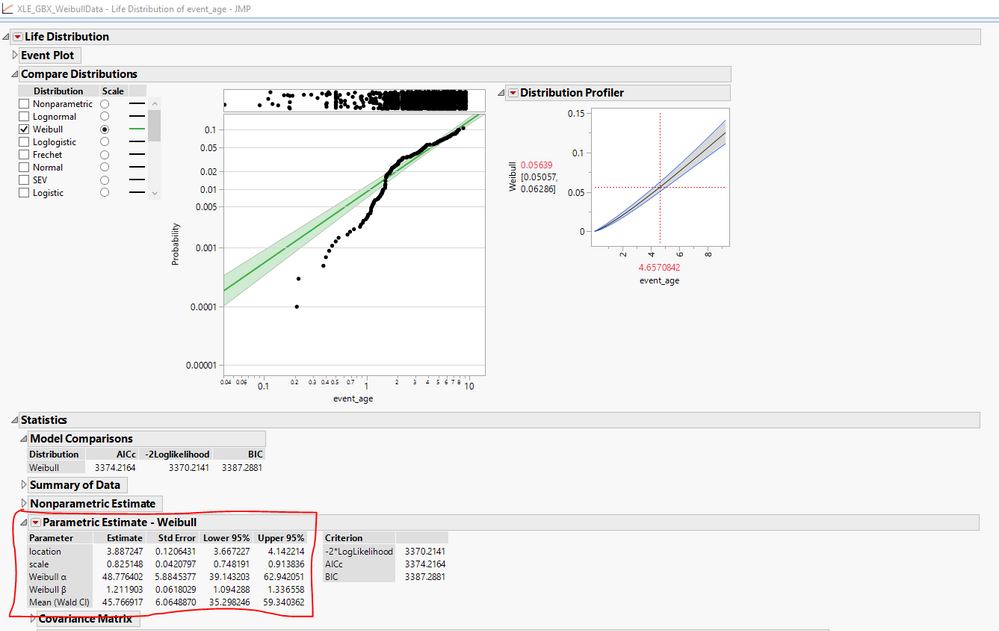
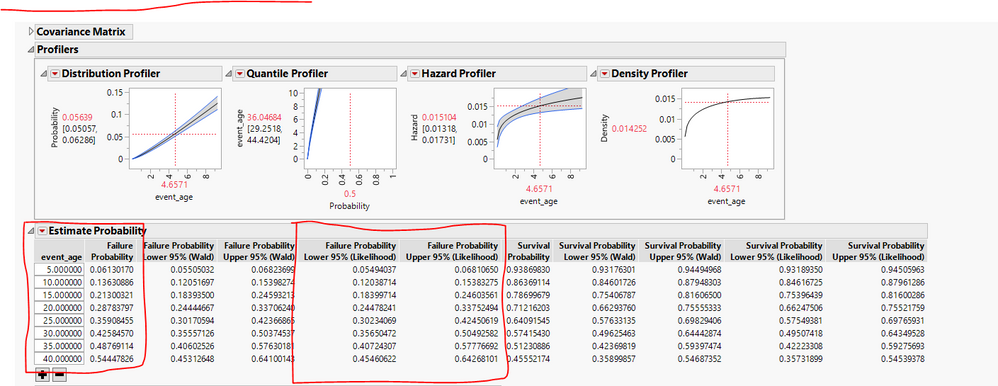
2. Export the data into an excel sheet
3. Have the add-in button available whithin report window?
HUGE THANKS!
This is the report script behind the distribution and parameters I need within the code:
Life Distribution(
	Y( :event_age ),
	Censor( :event_type ),
	Censor Code( "S" ),
	<<Fit Weibull,
	Confidence Interval Method( Likelihood ),
	<<Set Scale( Weibull ),
	<<Suppress Plot( Nonparametric ),
	Interval Type( Simultaneous ),
	Show Event Plot Frequency Label( 0 ),
	<<Set Scriptables(
		{Probability Paper(
			Profiler(
				1,
				Confidence Intervals( 1 ),
				Term Value( event_age( 4.657084189, Lock( 0 ), Show( 1 ) ) )
			)
		), Weibull Distribution(
			Profiler( 1, Confidence Intervals( 1 ), Term Value( event_age( 4.6571, Lock( 0 ), Show( 1 ) ) ) )
		), Weibull Quantile(
			Profiler( 1, Confidence Intervals( 1 ), Term Value( Probability( 0.5, Lock( 0 ), Show( 1 ) ) ) )
		), Weibull Hazard(
			Profiler( 1, Confidence Intervals( 1 ), Term Value( event_age( 4.6571, Lock( 0 ), Show( 1 ) ) ) )
		), Weibull Density(
			Profiler( 1, Confidence Intervals( 0 ), Term Value( event_age( 4.6571, Lock( 0 ), Show( 1 ) ) ) )
		), Custom Estimation( Weibull, 1, Estimate Probability( 5, 10, 15, 20, 25, 30, 35, 40 ) )}
	),
	SendToReport(
		Dispatch(
			{"Compare Distributions"},
			"Life Distribution",
			FrameBox( 2 ),
			{Grid Line Order( 2 ), Reference Line Order( 3 )}
		),
		Dispatch(
			{"Compare Distributions"},
			"Distribution Profiler",
			OutlineBox,
			{Set Summary Behavior( "Collapse" )}
		),
		Dispatch( {"Statistics"}, "", ListBox, {Set Summary Behavior( "Collapse" )} )
	)
);

- Mark as New
- Bookmark
- Subscribe
- Mute
- Subscribe to RSS Feed
- Get Direct Link
- Report Inappropriate Content
Re: Extract Report Data and Export it to Excel
Hi, I am trying to do something similar so my reply here is just to link me to this question in case you get a great answer!


- Mark as New
- Bookmark
- Subscribe
- Mute
- Subscribe to RSS Feed
- Get Direct Link
- Report Inappropriate Content
Re: Extract Report Data and Export it to Excel
cr=current report();
weibulltable=cr<< XPath( "//OutlineBox[text() = '"||"Parametric Estimate - Weibull"|| "']" );

//grab the first instance of the table and 'make combined' if other results are needed
weibulltable=cr<<XPath("//OutlineBox[text()='Statistics']//OutlineBox[text()='Parametric Estimate - Weibull']//NumberColBox[NumberColBoxHeader[text()='Estimate']]");
weibulldt=weibulltable[1]<<make combined data table;

estimate_prob_table=cr<< XPath("//OutlineBox[text()='Statistics']//OutlineBox[text()='Parametric Estimate - Weibull']//OutlineBox[text()='Estimate Probability']//NumberColEditBox[NumberColEditBoxHeader[text()='event_age']]");
estimatedt=estimate_prob_table[1]<<make combined data table;

//column selections are different between v18 and 19, the script below would work on yours, 19 is different
estimatedt<<clear column selection;
estimatedt<<select columns("event_age", "Failure Probability", "Failure Probability Upper 95% (Likelihood)", "Failure Probability Upper 95% (Likelihood)")//select columns you need to delete
estimatedt<<invert column selection;
estimatedt<<delete columns();
This will get you to having both of those as individual JMP tables that you can then export, you can put this script into a custom toolbar and have it available when the report is open.
Recommended Articles
- © 2026 JMP Statistical Discovery LLC. All Rights Reserved.
- Terms of Use
- Privacy Statement
- Contact Us