Turn on suggestions
Auto-suggest helps you quickly narrow down your search results by suggesting possible matches as you type.
- Don’t miss your chance to experience Discovery Summit Europe at our best available rate! Early bird registration through 31 Oct.
- Graph Builder Toolbar streamlines interactive graphing. Creates shortcuts on Report and GraphBuilder Helpers toolbars. Download and install the extension.
Options
- Subscribe to RSS Feed
- Mark Topic as New
- Mark Topic as Read
- Float this Topic for Current User
- Bookmark
- Subscribe
- Mute
- Printer Friendly Page
Discussions
Solve problems, and share tips and tricks with other JMP users.- User Community
- :
- Discussions
- :
- Custom Function - add comment

Level XIII
- Mark as New
- Bookmark
- Subscribe
- Mute
- Subscribe to RSS Feed
- Get Direct Link
- Report Inappropriate Content
Custom Function - add comment
Jan 18, 2025 02:30 AM
(1307 views)
Some of the examples in the Scripting Index have lots of details and useful comments:

When a user submits a function via Add custom Function(), such comments are automatically removed:
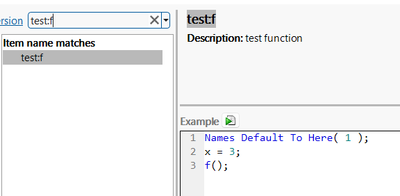
What do I have to do to see the comments?
Add Custom Functions(
	New Custom Function(
		"test",
		"f",
		Function( {}, Print( "hello world" )
		),
		<<Description( "test function" ),
		<<Example(
			Expr(
			x=3;
		// here I want to add a comment which will be displayed in the scripting index
				f()
			)
		)
	)
);
1 ACCEPTED SOLUTION
Accepted Solutions


Super User
Solution
- Mark as New
- Bookmark
- Subscribe
- Mute
- Subscribe to RSS Feed
- Get Direct Link
- Report Inappropriate Content
Re: Custom Function - add comment
Usually JSL Quote() can help with these type of situations. Additional benefit is that you don't have to use strings when building your functions
Names Default To Here(1);
myAdd = New Custom Function(
	"custom",
	"Add",
	Function({x, y = 1},
		x + y - 1
	)
);
myAdd << Example(JSL Quote(// add first to second
	a = Add(1, 2);
	Show(a); // a = 3;
));

Add Custom Functions(myAdd);

-Jarmo
1 REPLY 1
Super User
Solution
- Mark as New
- Bookmark
- Subscribe
- Mute
- Subscribe to RSS Feed
- Get Direct Link
- Report Inappropriate Content
Re: Custom Function - add comment
Usually JSL Quote() can help with these type of situations. Additional benefit is that you don't have to use strings when building your functions
Names Default To Here(1);
myAdd = New Custom Function(
	"custom",
	"Add",
	Function({x, y = 1},
		x + y - 1
	)
);
myAdd << Example(JSL Quote(// add first to second
	a = Add(1, 2);
	Show(a); // a = 3;
));

Add Custom Functions(myAdd);
-Jarmo
Recommended Articles
- © 2026 JMP Statistical Discovery LLC. All Rights Reserved.
- Terms of Use
- Privacy Statement
- Contact Us