cancel
Showing results for 
Show  only  | Search instead for 
Did you mean: 
  • Learn how to build custom Python data connectors and further customize JMP’s Data Connector Framework with the Python Data Connector Demo, available now in the JMP Marketplace!
  • See how to create experiments to support product design and ID useful product features. Register for June 12 webinar, 2pm US Eastern Time.

Discussions

Solve problems, and share tips and tricks with other JMP users.
Choose Language Hide Translation Bar
karem
Level I

Change Column Name after performing Summary Function

Hello.

Good day.

Team,

I will be needing your support on how to achieve my target table output.

I have a sample data table. I made a Mean Summary for Group 1 and Group 2 Columns, separately.

But i want to combine the two Mean Summary table into 1 table.

However, since Group 1 and Group 2 has different Column Name

During Concatenate this 2 Columns will have separate Columns.

In order to have them in same Column Header i need to Rename it Column into one same Column.

However, i cannot change it manually or in script.
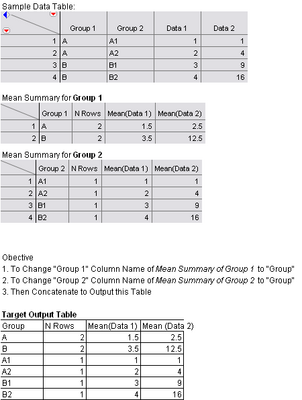
3970_Target Output Table.bmp

Please help. By the way im using JMP 8.

Thank you in advance.

1 REPLY 1
MTOF
Level III

Re: Change Column Name after performing Summary Function

Hi

Try removing the lock on the column first:

dt=current data table();

dt1=dt<<summary(Group(:Group 1), mean(:data 1, :data 2));

dt2=dt<<summary(Group(:Group 2), mean(:data 1, :data 2));

dt1:Group 1<<set lock(0);

dt1:Group 1<<set name ("Group");

dt2:Group 2<<set lock(0);

dt2:Group 2<<set name ("Group");

dt3=dt1<<concatenate(dt2);

close(dt1, no save);

close(dt2, no save);

BR, Marianne

Recommended Articles
