cancel
Showing results for 
Show  only  | Search instead for 
Did you mean: 
  • Instantly extract effect sizes, F-ratios, and FDR-adjusted p-values from your models with the Calculate Effects Sizes extension, available now in the JMP Marketplace!
  • New to JMP? Join us Sept. 23-24 for the Early User Edition of Discovery Summit, tailor-made for new users. Register now for free!
  • Your voice matters! Tell us how you prefer to receive JMP updates, so we can tailor our communication to your needs. Take short survey.

Discussions

Solve problems, and share tips and tricks with other JMP users.
Choose Language Hide Translation Bar
Yu1
Yu1
Level I

ファイルサイズの大きいテキストデータの読み込み方法について

約120GBのテキストデータを読み込む場合、メモリが不足して読み込むことができません。
分割して読み込むなど、何か対処方法があれば、教えていただけないでしょうか。

1 REPLY 1
Craige_Hales
Super User

Re: ファイルサイズの大きいテキストデータの読み込み方法について

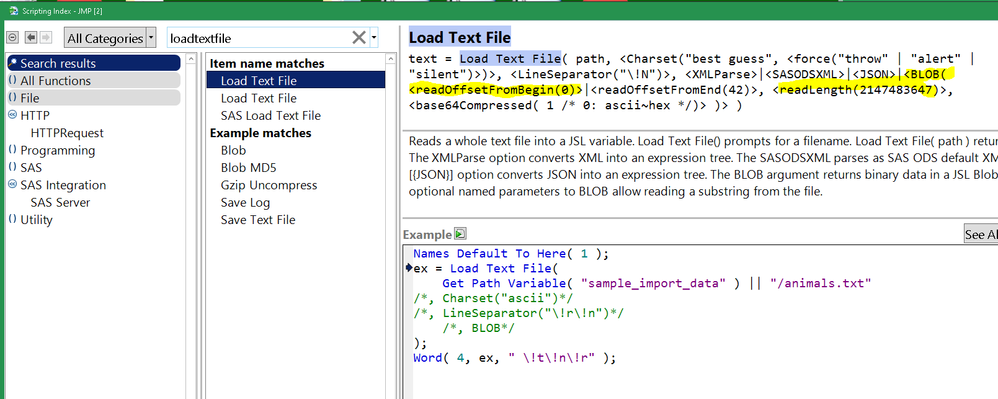
LoadTextFile can do it. ( @Audrey_Shull there are two versions in the scripting index, one is more complete than the other.)
Capture.PNG


Untested code:

blob = loadtextfile("reallyBig.txt", blob( readLength( 1e9 ), readOffsetFromBegin( n * 1e9 ) ) );

It gives the data back as a BLOB, not as text. Blobs can be > 4GB, but JSL strings are limited to < 2GB. 1e9 is almost 1GB. "n" could be 0, 1, 2, ... to step through the file.

The reason it returns a BLOB: multi-byte characters may be split across the 1e9 boundary. If there are only single-byte characters, great! You can probably convert the blob to a string using (again, untested code)

jslString = blobToChar( blob, "utf-8" );

Let us know how this works for you, thanks!

Craige

Recommended Articles
