- Don’t miss your chance to experience Discovery Summit Europe at our best available rate! Early bird registration through 31 Oct.
- Graph Builder Toolbar streamlines interactive graphing. Creates shortcuts on Report and GraphBuilder Helpers toolbars. Download and install the extension.
- Subscribe to RSS Feed
- Mark Topic as New
- Mark Topic as Read
- Float this Topic for Current User
- Bookmark
- Subscribe
- Mute
- Printer Friendly Page
Discussions
Solve problems, and share tips and tricks with other JMP users.- User Community
- :
- Discussions
- :
- Convert Timestamp

- Mark as New
- Bookmark
- Subscribe
- Mute
- Subscribe to RSS Feed
- Get Direct Link
- Report Inappropriate Content
Convert Timestamp
How to convert these kind of timestamp 2019-06-10T20:51:46+0000 into ''yyyy-mm-dd''.
I have tried many of format patterns but its not working.
Currently the data type of timestamp column is Character and modelling type is Nominal
Accepted Solutions


 Community Manager
- Mark as New
- Bookmark
- Subscribe
- Mute
- Subscribe to RSS Feed
- Get Direct Link
- Report Inappropriate Content
Re: Convert Timestamp
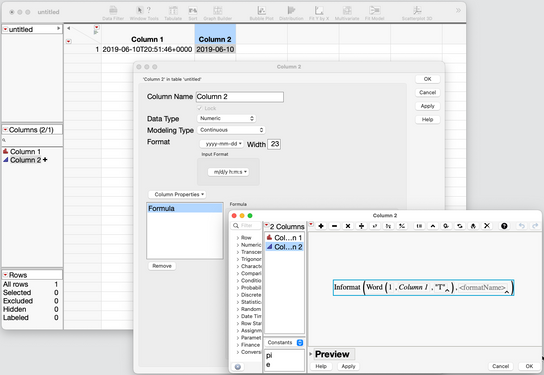
The easiest way to do this is with a new column with a formula.
The Informat() function will convert everything before the "T" and the Word() function makes it easy to extract just that portion.
More about dates and the Word() function:
Using dates, times, datetimes and durations in JMP
If you learn only one Formula Editor function, Word() is the one
Community Manager
- Mark as New
- Bookmark
- Subscribe
- Mute
- Subscribe to RSS Feed
- Get Direct Link
- Report Inappropriate Content
Re: Convert Timestamp
The easiest way to do this is with a new column with a formula.
The Informat() function will convert everything before the "T" and the Word() function makes it easy to extract just that portion.
More about dates and the Word() function:
Using dates, times, datetimes and durations in JMP
If you learn only one Formula Editor function, Word() is the one
Recommended Articles
- © 2026 JMP Statistical Discovery LLC. All Rights Reserved.
- Terms of Use
- Privacy Statement
- Contact Us