cancel
Showing results for 
Show  only  | Search instead for 
Did you mean: 
  • JMP will suspend normal business operations for our Winter Holiday beginning on Wednesday, Dec. 24, 2025, at 5:00 p.m. ET (2:00 p.m. ET for JMP Accounts Receivable).
    Regular business hours will resume at 9:00 a.m. EST on Friday, Jan. 2, 2026.
  • We’re retiring the File Exchange at the end of this year. The JMP Marketplace is now your destination for add-ins and extensions.

JMP Wish List

We want to hear your ideas for improving JMP. Share them here.
Choose Language Hide Translation Bar

Graph Builder: Line - possibility to add breaks

☑ cool new feature
☑ could help many users!

☑ removes a „bug“

☐ nice to have

☐ nobody needs it


#myTop10_2024

What inspired this wish list request? 

For Line Graphs in Graph Builder, there is a cool feature row order.
If it's selected, the line doesn't connect data points from left to right in the graph - but along the order in which they appear in the data table.
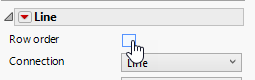
hogi_0-1689353265557.png


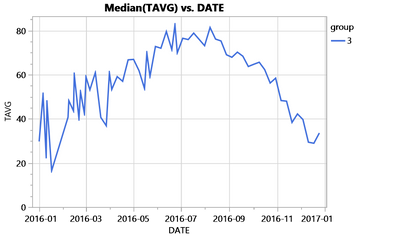
Instead of this graph:

hogi_1-1689353577247.png

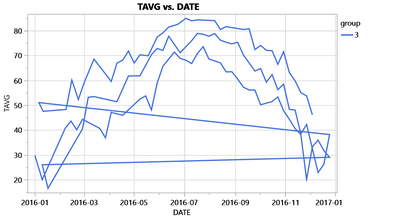
the user gets this graph:

hogi_2-1689353594784.png

Much better ...


But unfortunately, there are those nasty jumps "back" to the next curve.

Of course, for simple graphs, you can use a column (here "Station") as an overlay to produce 3 separate curves, without the zigzag.
But already with slightly more complicated graphs like this one here: Graph Builder. Combine Smoother and Line - how? the user reaches the limits of current Graph Builder (v17, v18).


What is the improvement you would like to see? 


  1.  With sorted data in the data table, a step from right to left indicates a new curve.
    So, with row order enabled, there could be an additional option to draw lines  "only left -> right".
    If this option is enabled, line for steps from higher to lower values will disappear -> the jump back-lines are gone : )
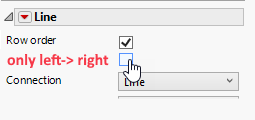
    hogi_4-1689354483794.png

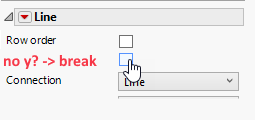
  2. Fallback:  Rows with missing y value could be used to add a break in line graphs (even somewhere in the center of the graph - cool, right?)
    ... if there was an option: *)
    hogi_5-1689355375351.png


Why is this idea important? 

a tiny change of the program - a  tremendous improvement for the users:

hogi_0-1725193366704.png


dt =Open( "$SAMPLE_DATA/Functional Data/Weekly Weather Data.jmp" );
dt << New Column( "group",Character,"Nominal",Formula( Substr( :STATION, 8, 1 ) ));
Graph Builder(
	Size( 523, 407 ),
	Summary Statistic( "Median" ),
	Graph Spacing( 4 ),
	Variables( X( :DATE ), Y( :TAVG ), Overlay( :group ), Color( :group ) ),
	Elements( Line( X, Y, Legend( 31 ), Row order( 1 ) ) ),
	Local Data Filter(
		Add Filter(
			columns( :STATION ),
			Where( :STATION == {"USW00003195", "USW00003868", "USW00003949"} ),
			Display( :STATION, N Items( 15 ) )
		)
	)
)


more wishes by  hogi_2-1702196401638.png

16 Comments
hogi
Level XIII

wow, very elegant workaround :)
Transfer the solution from Overlay to Color. Here we don't have the restriction of "one column only".
-> I will definitely use it in the future!


Unfortunately, won't work for many of my cases -- when the formatting options of Color Dropzone is needed to differentiate between entries along additional dimensions.


@XanGregg : Any chance that Graph Builder will be able to skip the backwards line segments ( via an option in the GUI)?

hogi
Level XIII

Maybe even a setting in the preferences ?
see  "Overlay limit" / from Graph Builder Problem with Lines 

XanGregg
Staff

Regarding skipping backwards line segment connections, there is a new JMP 19 Ordering option in the Line element called "Row Ascending" which addresses the issue for cases like this.

hogi
Level XIII

@XanGregg wow, amazing! Thanks!
like a Christmas present.

Where can I find it  - can you share an example ?

hogi_0-1766420710808.png

XanGregg
Staff

Oops! I lost track of the timing. It's really something you can try in the next EA. So not quite Christmas, early 2026. I'll see if I can edit my reply.

hogi
Level XIII

Ah, wonderful - definitely feels like a Christmas Present:
... some extra days of joyful anticipation ; )

Thanks a lot!