cancel
Showing results for 
Show  only  | Search instead for 
Did you mean: 
  • JMP will suspend normal business operations for our Winter Holiday beginning on Wednesday, Dec. 24, 2025, at 5:00 p.m. ET (2:00 p.m. ET for JMP Accounts Receivable).
    Regular business hours will resume at 9:00 a.m. EST on Friday, Jan. 2, 2026.
  • We’re retiring the File Exchange at the end of this year. The JMP Marketplace is now your destination for add-ins and extensions.

Discussions

Solve problems, and share tips and tricks with other JMP users.
Choose Language Hide Translation Bar
cyoung5
Level I

t-test values in graph?

Can I add my student t-test values into my bar graph in graph builder?, If so, how?

1 REPLY 1
txnelson
Super User

Re: t-test values in graph?

You can annotate the output from your Graph Builder by selecting from the tool bar the Text Box input:
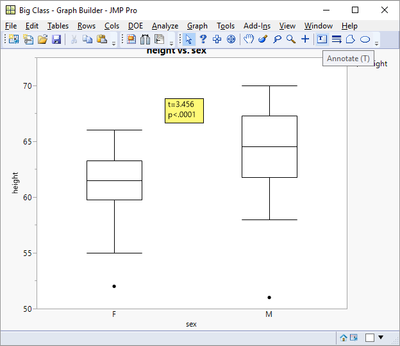
10686_pastedImage_0.png

If you are asking if this can be automated, the answer is also yes, through a script.

Names Default To Here( 1 );

dt = Open( "$SAMPLE_DATA\big class.jmp" );

ow = Oneway( Y( :height ), X( :sex ), t Test( 1 ) );

tratio = (Report( ow )["t Test"][Number Col Box( 3 )] << get)[1];

pvalue = (Report( ow )["t Test"][Number Col Box( 4 )] << get)[1];

Graph Builder(

Size( 528, 447 ),

Show Control Panel( 0 ),

Variables( X( :sex ), Y( :height ) ),

Elements( Box Plot( X, Y, Legend( 4 ) ) ),

SendToReport(

  Dispatch(

   {},

   "Graph Builder",

   FrameBox,

   Add Text Annotation(

    Text( "t="||format(eval(tratio),"Fixed Dec",8,4)||"\!np<"||format(eval(pvalue),"pvalue",4)),

    Text Box( {200, 64, 261, 103} )

   )

  )

)

);

Jim

Recommended Articles